Author: Richard Seroter

  • BizTalk Server and SOA Software Together, Part I

    [Series Links: Part I / Part II / Part III / Part IV]

    Recently, the company I work for purchased a web services management platform solution from SOA Software. This post starts a short series where I will highlight the key features of the platform, and, how to integrate BizTalk with this solution.

    SOA Software provides us with that “last mile” web services capability set that should help my organization realize our vision of a truly enterprise SOA. Specifically, SOA Software provides us with four key functions:

    • Centralized management, including automatic service discovery
    • Fully UDDI 2.0 compliant service registry (UPDATE: UDDI 3.0 compliance as well)
    • Application of service “policy” via configuration
    • Full-featured monitoring and customized alerting

    In this first post, I’ll do a very high level overview of each of those functions.

    Centralized management, including automatic service discovery
    Each of our web servers will have a SOA Software “discovery” agent installed which detects when new web services are deployed to the box. The supported application servers include Websphere, Weblogic, Tomcat and IIS. So this plays very well in a Microsoft, or non-Microsoft shop. Once a web service has been discovered, it can be centrally managed. “Managing” a service can mean applying security policies, establishing service level agreements, apply access/deny rules, and more.

    Fully UDDI 2.0 compliant service registry (UPDATE: UDDI 3.0 compliance as well)
    It’s nice that SOA Software provides us a service registry out of the box. No need to purchase and integrate another company’s registry solution. The registry has a fairly rich “search” capability where I can search for service by name, usage, category and more.


    What are categories? Once a service is managed, you can group the service using user-defined categories. Much nicer than having a registry that just shows a dump of every service with no way to organize them.

    Application of service “policy” via configuration
    While you could potentially do without the previous two features (even though it makes life significantly easier), the SOA Software Policy Manager service is where you really get your money’s worth. Without TOUCHING the code or configuration files of a deployed service, you can apply a “policy” to that service. Because each service is hosted on a web server with a SOA Software management agent, all service requests can be intercepted. SOA Software acts as an intermediary between the service client and service provider. A service policy may include:

    • message logging
    • authentication
    • compression/decompression
    • encryption/decryption
    • validation
    • much more …


    Those are examples of “management” policies. I’ll also show you “SLA” policies, and more in the later post. Each method of a given service can have a different policy attached. I can’t stress how cool this stuff is. When someone builds a service, they don’t have to do anything special for this service management capability. All of it occurs at the management point, not development point.

    Full-featured monitoring and customized alerting
    A robust monitoring module is so important if you want to evaluate service usage trends in your organization. I can capture the payload of the SOAP messages coming in and out of the services. This includes the ability to see the services before/after policies have been applied. The view below shows my message after a SAML token has been applied.

    I can also see various reports about service response time, usage and more. So far, that is just passive reporting. I have to go query for data to discover a problem. What if I have a SLA set up, and NEED to be very proactive about service interruptions or problems? You can subscribe to alerts already configured, or, create your own. I can build an SLA Policy to ensure that if response time goes above a certain amount, or the number of SOAP faults exceeds an acceptable amount, then send me an email message.

    In the next few posts, I’ll show more details about these key subsystems. Finally, I’ll show how BizTalk can call one of these SOA Software-managed services. The service *caller* requires a bit of code (in order to inject the headers necessary to conform to the policies), but SOA Software has made it fairly straightforward.

    Technorati Tags: ,

  • Testing Ordered Delivery Scenarios With BizTalk

    One of the technology backbones of my company moving forward is the use of BizTalk to “fan out” messages from our ERP system (SAP). Instead of having hundreds of direct interfaces to SAP by downstream systems who need real-time data, we can use BizTalk to receive a single message from SAP (XI), and distribute it to all interested parties. One issue brought up recently was “ordered delivery” and ensuring that if a downstream system needs messages delivered in the order sent by SAP, that BizTalk honor it. So, I set out to test a variety of scenarios using BizTalk’s built-in ordered delivery capabilities.

    Setup: I exposed a BizTalk schema as a web service to simulate our publishing receiver from SAP. A simple Windows Form is sending messages to this web service, and stamping each one with a sequence number. I then built a couple of web services to act as “subscribers” of these SAP data events. These web services publish the data to a database table, thus letting me see the exact order of messages delivered. Each SOAP send port has a subscription based on message type.

    Scenario #1: Send port, no ordered delivery
    When a series of messages are published to the receiving web service and routed to the subscriber without ordered delivery, the result may look like this:


    As you can see, even on my single development machine, the order gets mixed up. This is due to batch processing and the multi-threaded nature of BizTalk message distribution.

    Scenario #2: Send port, ordered delivery turned on
    To turn ordered delivery on, all we need to do is check a box on the send port (this assumes that your inbound transport can deliver messages in order. Examples include MSMQ, SOAP and HTTP).


    The result in the database looks like this:


    So you can see that all the messages are in sequential order.

    Scenario #3: One send port no ordered delivery, one send port WITH ordered delivery
    I wanted to prove that ordered delivery only impacted the corresponding port. When sending the message into BizTalk with two send ports subscribing, the data looked like this:


    “Subscriber #1” kept everything in order, but “Subscriber #2” delivered messages a bit more haphazardly.

    Scenario #4: Non-ordered delivery send port, no retries, and error in service
    So what if the service raises an error? When there are no retries, and the send port doesn’t have an ordered delivery requirement, the result looks like this:


    The bad message (#12) is simply skipped (because it is now suspended).

    Scenario #5: Ordered delivery send port, retries enabled, and error in service
    How about for an ordered delivery send port? What if there’s an error in the service call, and retries are turned on for the port? Also, the “cancel if error” is turned off. Check this out:


    The messages queue up waiting for the first one to retry, and hopefully succeed. We’ll see more of this in a moment.

    Scenario #6: Ordered delivery send port, NO retries, and error in service
    This time, there’s an error in the service, and no retries. Also, the “cancel if error” flag is still turned off. The result is:


    So the messages still get delivered AFTER the bad message has been encountered. That’s expected, since we told BizTalk to keep going, even for the ordered delivery port.

    Scenario #7: Ordered delivery send port, NO retries, “cancel if error” turned on, and error in service
    What if we reproduce the previous scenario, BUT, turn “cancel if error” on? This flag can be set on the send port here:


    What you’re telling BizTalk is that if any message fails for this ordered delivery port, stop processing until this error can be corrected. This is useful if you’re concerned that an “insert new contact” message failed, but you expect a “modify existing customer” to be following. Clearly the “modify” message will fail unless the “insert” gets figured out. The result of this?


    Processing stopped after message #11 because message #12 failed. The send port is still “started”, but you’ll find a suspended message. If you open it up, you’ll see that all following messages are queued up until the offender gets resolved.

    Scenario #8: Send port stopped, and restarted for a non-ordered delivery send port
    What if we KNOW that a downstream system is unavailable (e.g. maintenance) and want to prevent the inevitable failure of delivery? Maybe we want to shut off the send port, queue up the messages, and once the unavailable system is back online, open the distribution pipeline again. For a non-ordered delivery port, after restarting a stopped send port, the output looked like this:


    The messages are in a crazy order, as you can see.

    Scenario #9: Send port stopped, and restarted for an ordered delivery send port
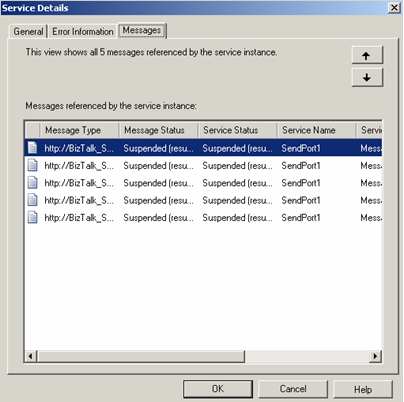
    Final scenario. What if we stop an ordered delivery port, and then start it back up later? Do we retain the correct ordering? When I sent five messages in, I got a suspended instance with five messages:


    If I send in three MORE messages, they actually get added to this suspended instance:


    Once I finally turn the subscriber service back on, all messages were sent in the same order received.

    So there you go. Ordered delivery is a fairly powerful concept, and not particularly hard to do with BizTalk. It greatly impacts performance because the send port won’t send subsequent messages until a delivery confirmation is received, but, in many cases that performance impact is outweighed by business requirements.

    Technorati Tags:

  • More BAM Resources

    Quick follow up to today’s post on production-ready BAM tactics.

    If you have folks accessing the BAM Portal, make sure they’ve installed the necessary components. Specifically, if they want to view aggregation (pivot tables), they must install:

    • Microsoft Core XML Services (MSXML) 6.0
    • Microsoft SQL Server 2005 Analysis Services 9.0 OLE DB Provider

    You can get both of those download from here. Thanks to Paul Wu’s blog for the tip.

    Finally, it’s a BAM sort of day, so check out Darren’s great post on BAM best practices.

    Technorati Tags:

  • Production-Ready BAM Security and Deployment

    I recently went through the process of deploying a BAM model to our new BizTalk infrastructure, and learned a few things about BAM security and deployment along the way.

    Given that most BizTalk architects/developers probably play with BAM on a single fully installed machine (BizTalk, SQL, IIS, etc) while running with highest-level permissions, sometimes certain steps can be taken for granted.

    To start with, my production environment contains clustered SQL Server 2005 servers and a specific SQL instance created for the BizTalk databases. Both SQL Server Analysis Services and SQL Server Integration Services are installed in the cluster as well. If you have this sort of environment, you’ll need to modify SSIS before continuing. Specifically, you must change the MsDtsSrvr.ini.xml file so that the SSIS points to a named instance of SQL Server (see the Microsoft documentation for details). If you do NOT do this, then running the bm.exe BAM tool will result in everything LOOKING fine, but in fact, no SSIS/DTS packages get created anywhere.

    Now, to run the bm.exe, which builds up all the BAM infrastructure (tables, procedures, triggers, packages, cubes, etc), you have to have SSIS on the same machine as the tool itself. Got that? So you can’t run this from a standalone BizTalk box and expect it to work. Another option (instead of installing SQL tools on the BizTalk box) is to install the BAM tools alone on the SQL box. I’ve reviewed a few things, and am fairly sure this is the case, but if anyone wants to challenge that assertion, feel free.

    Let’s talk about security. Specifically, adding users to views. Again, most times when you’re developing BAM solutions, you take for granted that you can go to the BAM Portal and views magically appear. But when you’re not running as an Administrator, those views aren’t visible by default. What I did (as practice before doing this in production), was create a local group in my development environment. Then, I ran the following command:

    bm.exe add-account -AccountName:”machine\ProjectBAMUsers” -View:viewname

    This command does a few things. First, it adds that user/group to the BAMPrimaryImport table as a “user.”

    This allows anyone in that group to look at data in the BAM view. If your BAM model contains aggregations, then SQL Analysis cubes get created by the bm.exe tool. A new “role” gets created for you in SQL Analysis services as well …

    Now by default, this group is empty. But when you run the “add-account” command, the designated user/group ALSO gets added here.

    Nice! So instead of doing “add-account” for every individual user, you should require a group to be set up for a particular BAM deployment. If a user tries to view the BAM Portal and is NOT in the designated group, they’d see this …

    As soon as I add the logged on user to the pre-defined Windows group (with explicit BAM access), the same user sees this …

    Cool stuff that I haven’t found demonstrated much. I personally spent hours trying to find out why my freakin’ SSIS jobs wouldn’t get created, so the whole “change the obscure SSIS configuration file” might save someone time later on. Any other BAM deployment points folks want to add?

    Technorati Tags:

  • BizTalk-Based Internet Service Bus

    Lots of stuff today about BizTalk Services, the new offering from Microsoft that exposes an “Internet Service Bus” built upon BizTalk. Good summaries by Mick and Chris. There’s also a very nice article in eWeek
    (not the one linked to from the Labs site) entitled Microsoft’s BizTalk Services Simplify SOA that talks about the strategic important of these software services.

    While intellectually interesting to me, I’m hard-pressed at the moment to see a use case within my organization itself. Steve Martin of the BizTalk team has a good write up and hits the target audience: We see BizTalk Services as a complement to “traditional” BizTalk Server uses on premise. As you need to coordinate SOA on a broader scale beyond the organization, we see the introduction of hosted services as one way to help support federation of business process, messaging, and identity across boundaries.

    Well said.

    Technorati Tags:

  • New BizTalk Magazine (BizTalkHotRod.com) Available

    So there’s a new website/newsletter for BizTalk addicts created by some great Microsoft Technology Specialists. Go to BizTalk Hotrod and check out the first issue. The newsletter is surprisingly well put together, and was actually a quite educational read.

    I must admit, though, when I got an email saying “Check out BizTalkHotRod.com”, I was definitely expecting some unsavory content. Actually, it sounds like something an over-the-top BizTalk consultant would put on their personalized license plate. I’m not sure I could be friends with that person.

    Technorati Tags:

  • Behavior of BizTalk Map’s Scripting Functoid

    I’ve been spending way too much time building BizTalk maps recently, but, I did uncover some interesting behavior of the Scripting functoid that I thought was worth sharing.

    My opinion is that using “Inline C#” (or VB.NET or JScript) in the Scripting functoid should only be for very simple operations, not page-long functions. In my case, I was receiving a datetime value in “dd/MM/yyyy” format, and needed to convert it to the XSD datetime format of “yyyy-MM-dd”. There were a few dates I needed to do this for, so I used the Scripting functoid and wrote a simple function like this:

    System.DateTime dt = System.DateTime.ParseExact(param1, “dd/MM/yyyy”, new System.Globalization.DateTimeFormatInfo());
    return dt.ToString(“yyyy-MM-dd”);

    So I simply cut and pasted the same “function” into multiple Scripting functoids. In essence, the map looked like this:

    I wasn’t completely sure what would happen when the XSLT was generated for the map. Would it allow multiple functions with the same signature? Would I have to create functions called “DateConvert1”, “DateConvert2”, etc? When I did this as a test using a trial map and function, even though I had two functoids storing a function called “DoSomethingCool”, the output XSLT looked like this:

    Interesting. So, the XSLT generation engine noticed two methods with the same function name and only put one of them into the map’s XSLT. Lots of questions then.

    • So what happened if I changed the implementation of one of those “DoSomethingCool” methods? That is, same signature, but different behavior inside the method itself. Answer: same result. It looked at the first implementation and generated code for only that one.
    • What if I changed the parameter name on the second Scripting functoid? Answer: same result. Still only one function written out.
    • What if I changed the return type to “boolean” on the second functoid? Answer: same result.
    • Finally, what if I changed the parameter type from “string” to “boolean”? Answer: same result.

    Let’s look at more complete picture of the generated XSLT, containing not just the generated code, but the function call as well.

    Notice that the return type appears irrelevant as it’s simply being printed out in the XML node. Parameter name of “DoSomethingCool” doesn’t matter when the function is called. The input parameter is always converted to “string”, so input type doesn’t matter either.

    So, just be aware of these sort of side-effects of reusing the same inline code function within a map. I like that I can reuse a simple function over and over, but it’s good to know how the code generation actually works. Odds are you’d use an external component for some of these situations, but what’s the fun in that?

    Technorati Tags:

  • Great BizTalk Article In This Month’s MSDN Magazine

    Just got the new MSDN Magazine in the mail, and now the issue is online. Check out a great read on 8 Tips And Tricks For Better BizTalk Programming co-written by my old pal Marty. Fairly useful stuff.

    Technorati Tags:

  • Initializing BizTalk Correlation Sets In a Loop (Thanks Tomas!)

    You ever find that newsgroup post on a technical subject that absolutely saves the day? One of my projects has an orchestration that calls a web service. I call this service in a “loop” because if a call fails (for “business” or “technical” reasons), it may need to retried. So, until I set a “ProcessComplete” flag, the loop continues.

    That said, if I DO get an error, I send the message out for review. If I don’t get a response within an hour, I auto-retry the service again. This is done with a transactional scope (long-running) and a timeout. So naturally I have to use correlation to send a message out of my orchestration, and potentially receive a message back. However, after setting this up the first time, I got a
    Correlation set may be initialized only once
    error. This makes sense since I had a global correlation set, and was potentially initializing it over and over in a loop. After staring at my computer for 4 minutes thinking, I did a quick search online and came across a newsgroup post where my new best friend, Tomas Restrepo, reminded me that a *scope* can have its own local correlations sets.

    Sure enough, after moving the correlation set to the local scope, everything compiled fine.

    Technorati Tags:

  • Calling .NET Components From Inline XSLT In BizTalk

    Here’s one for you. Last week I encountered a particularly tricky multi-part mapping scenario. I had to build a destination message that contained groupings from the two source messages. Each record in the first source message created a destination node, and each record in the second source message created a destination node directly beneath the related first source record. To make matters tougher, every destination record has an attribute containing a sequential number. So out of this …

    <source1>
      <Node1><Node1>
      <Node2></Node2>
    </source1>
    <source2>
      <NodeRelatedToNode1></NodeRelatedToNode1>
      <NodeRelatedToNode1></NodeRelatedToNode1>
      <NodeRelatedToNode2></NodeRelatedToNode2>
    </source2>

    The destination was supposed to look like this …

    <destination>
      <Node1 page=”1″><Node1>
      <NodeRelatedToNode1 page=”2″></NodeRelatedToNode1>
      <NodeRelatedToNode1 page=”3″></NodeRelatedToNode1>
      <Node2 page=”4″></Node2>
      <NodeRelatedToNode2 page=”5″></NodeRelatedToNode2>
    </destination>

    The grouping part wasn’t too tough, just used a Scripting functoid with the XSLT Call Template and a little hand written XSL. The hard part was creating the sequential “page” numbers. Those familiar with XSLT know that the “variables” in XSLT are basically constants, so you can’t create a variable and increment it. I considered building some sort of recursion to get my incremented number, but in the end, decided to call a custom .NET component from my map’s XSLT. I built a C# component that had a member variable, and a method called “GetNext()” which incremented and then returned the next sequential number. I then set my map’s Custom Extension XML to an XML document referencing my custom component. Now in my XSLT Call Template I could get the next “page” number each time I built a destination node. Neat!
    See here for an example of doing this.

    Here’s where a “quirk” was introduced. When I deployed this map, and ran multiple documents through it, the first document had it’s paging correct (e.g. pages 1-5), but the next messages had the wrong values (e.g. 6-10, 11-16, etc). What was happening was that somehow this custom C# component was being shared! The “increment” kept counting on each orchestration call! My C# component wasn’t built as a “static” object, and I assumed that the scope of each custom object was the individual map (or orchestration) instance.

    I still have no idea why this happened, but to ensure it wouldn’t keep happening, I added a method to the custom component called “Reset()” which set the counter to 0. Then at the top of the map I call out to that method to ensure that each map starts its counter at 0.

    Thoughts as to why this happens? Wild stuff.

    Technorati Tags: