Author: Richard Seroter

  • Initializing BizTalk Correlation Sets In a Loop (Thanks Tomas!)

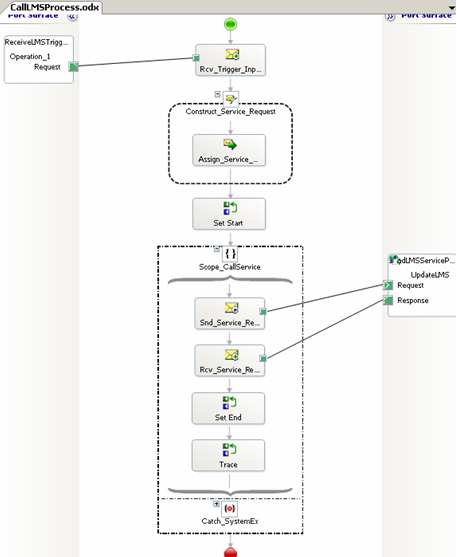
    You ever find that newsgroup post on a technical subject that absolutely saves the day? One of my projects has an orchestration that calls a web service. I call this service in a “loop” because if a call fails (for “business” or “technical” reasons), it may need to retried. So, until I set a “ProcessComplete” flag, the loop continues.

    That said, if I DO get an error, I send the message out for review. If I don’t get a response within an hour, I auto-retry the service again. This is done with a transactional scope (long-running) and a timeout. So naturally I have to use correlation to send a message out of my orchestration, and potentially receive a message back. However, after setting this up the first time, I got a
    Correlation set may be initialized only once
    error. This makes sense since I had a global correlation set, and was potentially initializing it over and over in a loop. After staring at my computer for 4 minutes thinking, I did a quick search online and came across a newsgroup post where my new best friend, Tomas Restrepo, reminded me that a *scope* can have its own local correlations sets.

    Sure enough, after moving the correlation set to the local scope, everything compiled fine.

    Technorati Tags:

  • Calling .NET Components From Inline XSLT In BizTalk

    Here’s one for you. Last week I encountered a particularly tricky multi-part mapping scenario. I had to build a destination message that contained groupings from the two source messages. Each record in the first source message created a destination node, and each record in the second source message created a destination node directly beneath the related first source record. To make matters tougher, every destination record has an attribute containing a sequential number. So out of this …

    <source1>
      <Node1><Node1>
      <Node2></Node2>
    </source1>
    <source2>
      <NodeRelatedToNode1></NodeRelatedToNode1>
      <NodeRelatedToNode1></NodeRelatedToNode1>
      <NodeRelatedToNode2></NodeRelatedToNode2>
    </source2>

    The destination was supposed to look like this …

    <destination>
      <Node1 page=”1″><Node1>
      <NodeRelatedToNode1 page=”2″></NodeRelatedToNode1>
      <NodeRelatedToNode1 page=”3″></NodeRelatedToNode1>
      <Node2 page=”4″></Node2>
      <NodeRelatedToNode2 page=”5″></NodeRelatedToNode2>
    </destination>

    The grouping part wasn’t too tough, just used a Scripting functoid with the XSLT Call Template and a little hand written XSL. The hard part was creating the sequential “page” numbers. Those familiar with XSLT know that the “variables” in XSLT are basically constants, so you can’t create a variable and increment it. I considered building some sort of recursion to get my incremented number, but in the end, decided to call a custom .NET component from my map’s XSLT. I built a C# component that had a member variable, and a method called “GetNext()” which incremented and then returned the next sequential number. I then set my map’s Custom Extension XML to an XML document referencing my custom component. Now in my XSLT Call Template I could get the next “page” number each time I built a destination node. Neat!
    See here for an example of doing this.

    Here’s where a “quirk” was introduced. When I deployed this map, and ran multiple documents through it, the first document had it’s paging correct (e.g. pages 1-5), but the next messages had the wrong values (e.g. 6-10, 11-16, etc). What was happening was that somehow this custom C# component was being shared! The “increment” kept counting on each orchestration call! My C# component wasn’t built as a “static” object, and I assumed that the scope of each custom object was the individual map (or orchestration) instance.

    I still have no idea why this happened, but to ensure it wouldn’t keep happening, I added a method to the custom component called “Reset()” which set the counter to 0. Then at the top of the map I call out to that method to ensure that each map starts its counter at 0.

    Thoughts as to why this happens? Wild stuff.

    Technorati Tags:

  • Consuming Web Services in BizTalk Without Web Reference

    Twice last week, I received WSDLs to consume that BizTalk didn’t like. That is, when I would try and load the WSDL via Add Web Reference, I’d get an error like the following:

    Could not generate BizTalk files. Unable to import WebService/Schema. Unable to import
    binding ‘WebServiceBinding’ from namespace
    http://xmlns.company.com/interface/project/SubmitSubjectImpl&#8217;. Unable to import operation
    ‘SubmitSubject’. The element ‘http://xmlns.company.com/project/subject:subjectrequest&#8217; is
    missing.

    I also tried from a “regular” .NET project, and no luck. One of the WSDLs used “imports” (a no-no for importing the web reference), and I’m convinced that the other WSDL’s problem was indeed namespace based. Now in both cases, I didn’t have the luxury of telling the WSDL owner to make changes. So how to get around this? Inspired a bit by Jon’s blog, I decided to try using the .NET Framework tool wsdl.exe. For the WSDL using “imports”, I executed WSDL.exe passing in the WSDL, and parameters for each schema used. Sure enough, I was able to generate a valid C# proxy class. The other offending WSDL was also successfully processed using WSDL.exe. As a result, I now had a proxy class needed to consume this service.

    Next I added that proxy class to a .NET class library, built, and GAC’ed it. Next I used the provided schema files to create messages in a BizTalk orchestration corresponding to the request and response message. Finally, I connected this to a “two way” port in the orchestration.

    After deploying the BizTalk project, I had to configure the necessary SOAP send port. Unlike a “regular” SOAP send port, I was not using an orchestration port as the proxy. Instead, I am now pointing to the proxy class generated by WSDL.exe. On the Web Service tab of the SOAP port, I chose the assembly and method I needed.

    Now assuming everything was set up right, I should have been able to call the web service with no problem. But, if we stick with the base assumption that I’m a total meatball, of COURSE it didn’t work the first time. Instead I got this …


    A message sent to adapter “SOAP” on send port “Company.Dept.Project.SendTibcoSvc.SOAP” with URI “http://machinename:1234/ProcessDefinitions/WebService&#8221; is suspended.
    Error details: Failed to serialize the message part “subjectrequest” into the type “subjectrequest” using namespace “http://xmlns.company.com/project/subject&#8221;. Please ensure that the message part stream is created properly.

    Obviously the proxy couldn’t serialize my XML message. So, I output the message I was sending to the port, and tried validating it against my schema. Sure enough, I got validation errors like The string ” is not a valid XsdDateTime value. and The string ” is not a valid Integer value.. So, I fixed the source problems, and validation succeeded. Finally, when calling the service again, everything worked perfectly.

    Moral of story: you can consume web services WITHOUT using a “web reference” as long as you can build the proxy class. Good stuff.

    Technorati Tags: ,

  • Script for Automatically Creating BizTalk Solution Structure

    Every organization (and developer) has their own development project structure. I’ve set up a BizTalk project structure that my company will use for all new BizTalk projects. To make life easy, I also built a simple VBScript file to automatically build the structure for us.

    My folder structure looks like this:

    I’ve got a spot for deployment packages (Installation), test files, instance data, file adapter pickup/dropoff (Filedrops), strong name key(s), and the actual projects. What’s nice is that each BizTalk project’s strong name key reference looks the same (..\..\..\..\Keys\MyCompany.snk). No hard coded file path. So far, this has worked really well for me.

    To make construction of this structure easier, I built the following script. Just copy and paste it into a .vbs file and you’re good to go.

    ‘*******************************************

    ‘ BizTalk Project Structure Creation Script
    ‘ Created by: Richard Seroter
    https://seroter.wordpress.com

    ‘*******************************************

    ‘declare variables
    Dim objFSO, objFolder, strDirectory, strProjectName, strRootFolder, strCurrentFolder

    ‘request data from user
    strDirectory = InputBox(“Set path here (e.g. C:\BizTalk\Projects)”, “Set path”)
    strProjectName = InputBox(“Set project here (e.g. MyCompany.Department.Project):”, “Set project”)

    ‘set root folder of the project
    strRootFolder = strDirectory & “\” & strProjectName

    ‘ Create FileSystemObject
    Set objFSO = CreateObject(“Scripting.FileSystemObject”)

    ‘ Create BizTalk project root folder
    Set objFolder = objFSO.CreateFolder(strRootFolder)

    ‘create BizTalk folder: Documentation
    strCurrentFolder = strRootFolder & “\” & “Documentation”
    Set objFolder = objFSO.CreateFolder(strCurrentFolder)

    ‘create BizTalk folder: Filedrop
    strCurrentFolder = strRootFolder & “\” & “Filedrop”
    Set objFolder = objFSO.CreateFolder(strCurrentFolder)

    ‘create BizTalk folder: Installation
    strCurrentFolder = strRootFolder & “\” & “Installation”
    Set objFolder = objFSO.CreateFolder(strCurrentFolder)

    ‘create BizTalk folder: Installation –> Bindings
    strCurrentFolder = strRootFolder & “\” & “Installation” & “\” & “Bindings”
    Set objFolder = objFSO.CreateFolder(strCurrentFolder)

    ‘create BizTalk folder: Installation –> Packages
    strCurrentFolder = strRootFolder & “\” & “Installation” & “\” & “Packages”
    Set objFolder = objFSO.CreateFolder(strCurrentFolder)

    ‘create BizTalk folder: Installation –> Scripts
    strCurrentFolder = strRootFolder & “\” & “Installation” & “\” & “Scripts”
    Set objFolder = objFSO.CreateFolder(strCurrentFolder)

    ‘create BizTalk folder: Instance Data
    strCurrentFolder = strRootFolder & “\” & “Instance Data”
    Set objFolder = objFSO.CreateFolder(strCurrentFolder)

    ‘create BizTalk folder: Keys
    strCurrentFolder = strRootFolder & “\” & “Keys”
    Set objFolder = objFSO.CreateFolder(strCurrentFolder)

    ‘create BizTalk folder: Projects
    strCurrentFolder = strRootFolder & “\” & “Projects”
    Set objFolder = objFSO.CreateFolder(strCurrentFolder)

    ‘create BizTalk folder: Templates
    strCurrentFolder = strRootFolder & “\” & “Templates”
    Set objFolder = objFSO.CreateFolder(strCurrentFolder)

    ‘create BizTalk folder: Tests
    strCurrentFolder = strRootFolder & “\” & “Tests”
    Set objFolder = objFSO.CreateFolder(strCurrentFolder)

    WScript.Echo “Finished creating ” & strProjectName
    WScript.Quit

    Any changes you might suggest?

    Technorati Tags:

  • Reusing BizTalk Oracle Adapter DSN

    I finally had the excuse to use BizTalk Server 2006 Single Sign On for application configuration data. In one of my current BizTalk projects, I’m using a long running transaction which loops through and starts up other orchestrations. When those orchestrations finish, I’m using partner bound ports to return a response. As I receive batches of responses back, I’m logging the “last update time” to an Oracle table.

    Side note: I’m a believer in *not* using the database adapters (i.e. SQL Server, Oracle) for every possible database interaction. That is, for scalar queries, or simple updates, I like just using a basic utility component and ADO.NET. It’s a little less overhead and saves me from unnecessarily creating orchestration messages. Now, there’s plenty of value in using database adapters (scalability, retries, generated schemas, etc), but for quick and dirty database communication, I’ll stick with the no-adapter solution.

    So, since this solution already includes Oracle database access (and thus has a System DSN set up), I wanted to try and reuse that configuration in my Utility component. The ADO.NET OracleConnection didn’t like the “DSN” connection property, so I used the OdbcConnection instead. However, I still have to enter a password for the connection string. So using the various resources for doing “SSO as a configuration store” (see here, here, and here) I’m able to store the password in SSO, and still reuse my existing DSN configuration. My final code looked like this …


    //get the encrypted password from BizTalk SSO using SSOConfigHelper from BizTalk sample
    string oraclePasswordString = SSOConfigHelper.Read(“ProjCode”, “passwordString”);

    //create the connection string
    oracleConnString = “DSN=ProjDevDb;pwd=” + oraclePasswordString + “;”;

    //instantiate the connection and command
    OdbcConnection oracleConn = new OdbcConnection(oracleConnString);
    OdbcCommand oracleComm = new OdbcCommand(oracleQueryString, oracleConn);

    Now I haven’t implemented any sort of caching, but the “oraclePasswordString” is set in the class constructor, and then I have a method that uses it for the logging function. So, I only make the call to SSO once per process.

    So there you go. Reusing an existing Oracle DSN in custom code, while securely storing the password in Enterprise Single Sign On.

    Technorati Tags:

  • New BizTalk Book Out

    Big congrats to Darren Jefford for finishing Professional BizTalk 2006. Darren throws out a quick summary of each chapter here. Given how few books existed for those struggling to learn BizTalk Server 2004, it’s a welcome change to see so many topoftheline books available for BizTalk Server 2006.

    Technorati Tags:

  • Fun With BizTalk, XPath, and Namespaces

    The BizTalk Xpath statements usually required for my projects never seem to be as simple as the examples I find online. Usually, it’s because I’m stuck using namespaces, unlike virtually every sample Xpath ever written.

    Last week I was working with an XML document where I wanted to capture the unique values in a repeating set. There are a few ways to do this, but I ended up going with the way Stephen Kaufman showed here:

    <xsl:variable name=”unique-countries”
    select=”//cities/city[not(@country=preceding-sibling::city/@country)]/@country” />

    In the above example, you end up with a variable containing all the unique countries that correspond to the many cities in the list. My challenge was that I was going to use this variable within a map, using Inline XSLT as part of the Scripting functoid. And, my inbound document has elements from multiple namespaces. Using a namespace prefix was not going to work, so I had to write my elements in the
    “//*[localname()=’node’ namespaceuri()=’namespace’]” way instead of the easier “//node” or (“//ns1:node”) way. Thank goodness for the Visual XPath tool which made testing my Xpath much easier.

    You can’t just swap the node names in the above Xpath with the “[localname()=” namespaceuri()=”]” equivalent, as there are subtle differences. So given that my XML looked like this:


    <Results>
     <QueryRecord>
      <DomainID></DomainID>
      <PageName></PageName>
    </QueryRecord>
    <QueryRecord>
      <DomainID></DomainID>
      <PageName></PageName>
     </QueryRecord>
    </Results>

    Let’s say I have two nodes I need to use in the Xpath statement:

    My “converted” Xpath now looks like this:

    <xsl:variable name=”unique-domains” select=”//*[local-name()=’QueryRecord’ and namespace-uri()=’http://namespace1′%5D[not(*[local-name()=’DOMAINID’ and namespace-uri()=’http://namespace1′%5D/text()=preceding-sibling::*[local-name()=’QueryRecord’ and namespace-uri()=’http://namespace1′%5D/*[local-name()=’DOMAINID’ and namespace-uri()=’http://namespace1′%5D/text())]/*[local-name()=’DOMAINID’ and namespace-uri()=’http://namespace1′%5D” />

    Got that? Yowza. So I’m getting all the unique “domain ids” by grabbing each “domain id” where it doesn’t match a previous instance in the node tree. The main syntax difference between this Xpath and the one at the top is the “*” peppered around. If not included, you’ll get all sorts of does not evaluate to node set errors.

    Any other “Xpath with namespaces in BizTalk” war stories or tips to share?

    Technorati Tags:

  • View XSLT Output In Internet Explorer

    Yesterday I was working on some XSLT stylesheets, and was testing them in Internet Explorer. That is, I was applying the <?xml-stylesheet type=”text/xsl” href=”<stylesheet>.xsl”?> declaration to the top of my XML document, and then viewing the transformed output in IE. However, you can’t view the underlying result of the output in IE, only the original XML source.

    After scrounging around, I came across this tool from Microsoft which adds a shell to Internet Explorer that lets you view the XSLT output in the browser. Once installed (and don’t forget the last step of installing the *.inf files), you can right click the browser window and do a “View XSL Output”. Nice.

    Technorati Tags:

  • A Walk Through the BizTalk 2006 Oracle Adapter

    Two of the six BizTalk projects I’m currently working on require me to access Oracle databases. So, I set out to prove out four major uses cases for the out-of-the-box Oracle BizTalk adapter.

    Scenario #1 – Receive messages into BizTalk by polling an entire table

    In this case, I need to pull in all of records for a given table. To do this, I created a new Oracle receive location in BizTalk. Under Managing Events I chose the table I wanted to poll.


    That “adapter wizard” form opens up when selecting Managing Events. Then, using a previously set up ODBC connection, the adapter interrogates the Oracle database for available tables. Here I’ve chosen the “Departments” table. Next I created a send port that had a subscription to the receive port (basic “wiretap” pattern). The output from the Oracle polling looked like this …

    Notice that the message root is TableChangeEvent and that the message has well-defined fields.

    Scenario #2 – Receive messages into BizTalk using custom SQL script

    Now I also want to poll the Oracle table with more detail than the “select * from department” which is used by the direct table polling above. So in the Managing Events for the receive location, I now choose the NativeSQL option …

    Now, because I’m using NativeSQL I can utilize the “Poll SQL Statement” field in the receive location.

    As you can see, my fancy SQL code is simply returning a subset of fields, and only where the “department_id = 10”. After setting up another send port to grab this message directly from the receive location, I got the following output …

    Notice now that my root node is SQLEvent and that I don’t get an easy-to-use response. I get a collection of parameters, and then I get the actual values which correspond to those parameters. I can understand why it’s returned this way, but, it’ll require me to use an intelligent map to normalize the data to a more usable structure.

    Scenario #3 – Send message to Oracle using table-specific operator

    So what happens if I want to use an orchestration to call into Oracle and retrieve a dataset? First I did an “Add Generated Items” and pointed to a pre-configured Oracle receive/send port, and then I browsed to the table I wanted …

    Once again I’m using the “Departments” table. When I finish up the wizard, I end up with a schema like this …

    This may look familiar to you if you’ve used some of the other line-of-business adapters. You’ve got what amounts to a multi-part schema where you choose the “operation” you wish to consume. So if you want to do an “Insert” into the Oracle table, you pass in a message of type “Insert” and expect back an “InsertResponse”. In our case, I want to use the “Query” message, which allows me to apply both a filter (e.g. “department_id = 10”) and a “maxRows” property. My orchestration now looks like this after I reference the auto-generated “port type” …

    I can simply use the port operation that corresponds to my desired table function. The response returned from the Oracle adapter in this scenario looks like this …

    Notice that it is of type “QueryResponse” and that it has a nicely typed schema.

    Scenario #4 – Send message to Oracle based on custom SQL

    The final case involves using the orchestration to make a more complicated call to the Oracle database. For instance, if you wanted to do a cross-table insert, or do any sort of operation where the “stock” operations were too restrictive. I started by using the “Add Generated Items” wizard again, but this time, I chose NativeSQL as my service to consume.

    In my example, the “custom” SQL was still very simplistic. The orchestration’s Construct shape included the instruction:

    OracleCustomQuery_Request.parameters.StatementText = “SELECT DEPARTMENT_ID, DEPARTMENT_NAME FROM HR.DEPARTMENTS WHERE DEPARTMENT_ID = 30;”;

    So, a very similar query to the one in “scenario #3”, but, here I chose only a subset of columns. The auto-generated port type causes my orchestration to look like this …

    So what does this custom call output? As you might guess, something a lot like “scenario #2” …

    So there you go, a quick lap around the adapter. I know some folks rave about the TopXML Oracle adapter, but for now, this is what I’ll be working with.

    Technorati Tags:

  • Building a Complete Certificate Scenario With BizTalk Server 2006

    I’m working on a BizTalk project where we’re testing the use of security certificates, and I’ve just had a bear of a time finding thorough walkthroughs of setting this up. It’s barely mentioned in the available BizTalk books, and while the BizTalk 2004 whitepaper (which has now been added to the BizTalk 2006 documentation) has some very nice coverage, it wasn’t exactly what I wanted. So, after much toil (and threats of lighting myself on fire), I present a step-by-step for building a certificate scenario using test certificates.

    I’ve used the .NET Framework tool makecert to build local test certificates. The hardest part for me was getting the correct series of command line parameters to build the cert I wanted. I finally put together one that worked:


    makecert -r -pe -n “CN=www.seroter.com” -b 02/01/2007 -e 01/01/2036 -eku 1.3.6.1.5.5.7.3.1 -ss my -sr currentuser -sky exchange -sp “Microsoft RSA SChannel Cryptographic Provider” -sy 12

    For a description of the available parameters, check out the MSDN page for makecert.

    What this did, was create a (self-signed) certificate, and placed it in my “current user” personal store.

    You can see from the shot here that the certificate’s private key is included.

    So first, I exported the private key certificate out. To do this, I selected the certificate, right-clicked, and chose export. As you can see below, I chose to Yes, export the private key and created the .pfx file.

    Next I exported the public key. This is the one that I would give partners. I selected the certificate again, right-clicked and exported. This time, I chose not to export the public key, and created a .cer file.

    Now I jumped into the Other People certificate store to import the public certificate (.cer file). Why? Well the Current User/Personal/Certificates store is where certificates go for decrypting inbound messages. This store is account specific, so I’m using the account that the receiving host is running under. The store under the Local Computer/Other People/Certificates is for public certificates used to sign outbound messages. The “other people” then have a corresponding private key to decrypt the inbound messages.

    As you can see here, the public certificate doesn’t have a private key attached.

    Within BizTalk, I created both send and receive pipelines. The send pipeline has the MIME/SMIME Encoder component included with the Enable Encryption set to true.

    The receive pipeline has the MIME/SMIME Decoder component.

    Within my send port (which uses my new send pipeline), I set up the Certificates tab to point to the public certificate. The Browse button pulls up any certs in the Other People store.

    Finally, the BizTalk Host that contains the receive pipeline (and port) must be configured. The host has a Certificates tab where once again I can browse. This time, it looks for the Personal store of the BizTalk Host account.

    After creating a local folder structure for dropping off and picking messages up (e.g. pick up clear text, drop off encrypted, pick up encrypted, drop off clear text), and setting up the ports, the “encryption” send port outputs the following message …

    After picking the encrypted message up, BizTalk decrypts it and sends me this …

    There you go. Let me tell you, there was a LOT of silent fist-pumping in my office this afternoon after I got this working. Hopefully someone else finds this useful as well!

    Technorati Tags: