One of our BizTalk developers had a requirement to collect related messages and send a single email summary with details about those messages. I built the example below to help her out.
In this scenario, a series of independent, but related, messages are sent to BizTalk. Each of these messages will have a “batch ID” which connects them as well as a “batch count” value which identifies the total number of messages in the batch. As you might expect, I’ll need a convoy to collect these messages. The interesting part was how to build up the email data which summarized the results of the processing for a given batch.
First, I have a schema that represents an individual message.
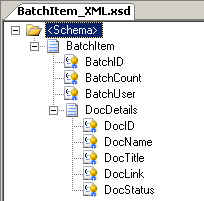
As you can see, I have details about the batch, and then a record containing details about the document that was processed through BizTalk. These fields are mostly populated by the system called by BizTalk earlier in the process and those new values need to be reported back to the initiator of the submission.
The next schema represents the email content being sent back to the initiator. There is a summarization of the batch of records they submitted, and then one section where successfully processed documents are recorded, and a section where failed documents are recorded.
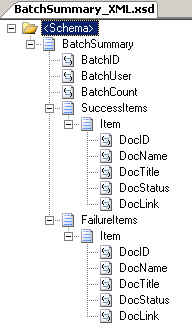
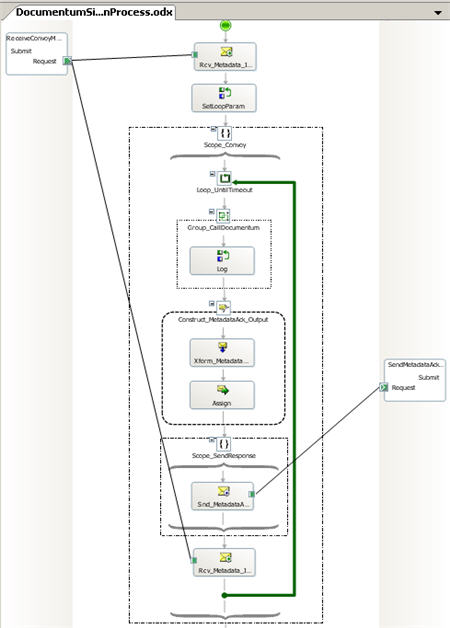
Next, we need a convoy orchestration that processes all messages for a given batch. The first receive shape initializes a correlation set on “batch ID” (from a separate property schema) and then initializes the loop variables. This loop will run until all the number of messages received is equal to the “batch count” in the message.

The meat of this orchestration is the part that builds up the email message. I have a helper class that accepts data from each batch message, and stores it in a member variable until I’m ready to return the completed, aggregate message. Now, I could have chosen to build some sort of custom type object, and when the loop was complete, turn that object into the XML representation of my email schema. But, I’d rather cut out that middle man. So, I passed my “BatchSummary” schema (above) through the .NET Framework xsd.exe tool to get a type object that directly mapped to the schema. That type is used as a member variable of my helper class.
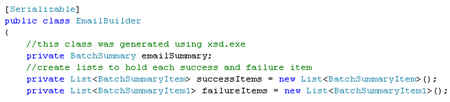
You’ll notice that I also created a few lists to hold the success and failure item types. The “BatchSummary” object takes in an array of success and failure items, but during the running of the convoy, I have no idea how many success or failure items I have, and thus couldn’t properly initialize an array of the necessary size. So, by creating a list, and simply adding to it along the way, I can postpone array creation until later.
Within this class I have operations to add message data elements to the appropriate “success” or “failure” list object, and then finally, the convoy orchestration should call the operation below to get a “completed” batch summary object.

The next part is fun. I created an orchestration message for the batch email message, but, instead of choosing the XSD file for the “Message Type”, I chose the object generated by the xsd.exe tool.

This .NET object has all the necessary metadata to automagically serialize into an XML message on the way out of the orchestration. At the end of the orchestration loop, I have a “message assignment” shape where I create the orchestration message by calling the appropriate operation on my helper class.

Because I want to take this XML payload and turn it into an HTML email, I need to massage the data on the way out. For this scenario, I used the XslTranformComponent sample from the BizTalk SDK (C:\Program Files\ Microsoft BizTalk Server 2006\ SDK\ Samples\ Pipelines\ XslTransformComponent). After building this pipeline component and GAC-ing it, I created a new send pipeline and dropped this component there. Finally, I wrote an XSLT stylesheet which took the XML and prettied it up. Now, when I drop three files (all with the same “batch ID”) into BizTalk, I get the following email:
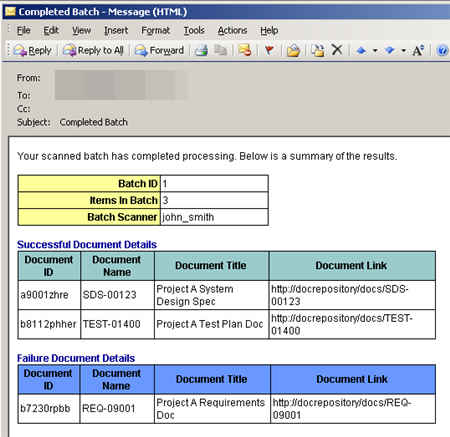
Nice! So, with fairly few moving parts, I collected a bunch of related messages, built up a new composite message on the fly, and then send a .NET object-type orchestration message out, which had an XSLT transform applied before being emailed to the target recipient.
Technorati Tags: BizTalk



 Richard Seroter's Architecture Musings