A group I’m working with was looking to use SharePoint to capture data entered by a number of international employees. They asked if SharePoint could restrict access to a given list item based on the value in a particular column. So, if the user created a line item designated for “Germany”, then automatically, the list item would only allow German users to read the line. My answer was “that seems possible, but that’s not out of the box behavior.” So, I went and built the necessary Windows Workflow, and thought I’d share it here.
In my development environment, I needed Windows Groups to represent the individual countries. So, I created users and groups for a mix of countries, with an example of one country (“Canada”) allowing multiple groups to have access to its items.
Next, I created a new SharePoint list where I map the country to the list of Windows groups that I want to provide “Contributor” rights to.

Next, I have the actual list of items, with a SharePoint “lookup” column pointing back to the “country mapping” list.
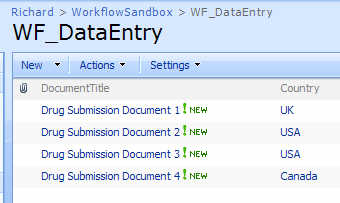
If I look at any item’s permissions upon initial data entry, I can see that it inherits its permissions from its parent.

So, what I want to do is break that inheritance, look up the correct group(s) associated with that line item, and apply those permissions. Sounds like a job for Windows Workflow.
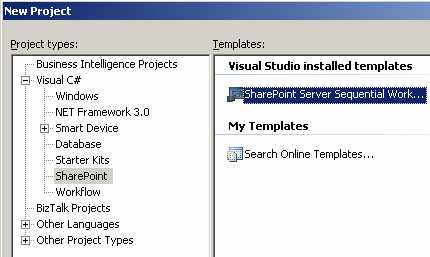
After creating the new SharePoint Sequential Workflow, I strong named the assembly, and then built it (with nothing in it yet) and GAC-ed it so that I could extract the strong name key value.
Next, I had to fill out the feature.xml, workflow.xml and modify the PostBuildActions.bat file.

My feature.xml file looks like this (with values you’d have to change in bold) …
<Feature
Id=”18EC8BDA-46B2-4379-9ED1-B0CF6DE46C61″
Title=”Data Driven Permission Change Feature”
Description=”This feature adds permissions” Version=”12.0.0.0″ Scope=”Site” ReceiverAssembly=”Microsoft.Office.Workflow.Feature, Version=12.0.0.0, Culture=neutral, PublicKeyToken=71e9bce111e9429c” ReceiverClass= “Microsoft.Office.Workflow.Feature. WorkflowFeatureReceiver” xmlns=”
http://schemas.microsoft.com/sharepoint/”> <ElementManifests>
<ElementManifest Location=”workflow.xml” /> </ElementManifests> <Properties> <Property Key=”GloballyAvailable” Value=”true” /> <Property Key=”RegisterForms” Value=”*.xsn” /> </Properties> </Feature>
So far so good. Then my workflow.xml file looks like this …
<Elements xmlns=”
http://schemas.microsoft.com/sharepoint/”> <Workflow
Name=”Data Driven Permission Change Workflow”
Description=”This workflow sets permissions”
Id=”80837EFD-485E-4247-BDED-294C70F6C686″
CodeBesideClass= “DataDrivenPermissionWF.PermissionWorkflow”
CodeBesideAssembly= “DataDrivenPermissionWF, Version=1.0.0.0, Culture=neutral, PublicKeyToken=111111111111″ StatusUrl=”_layouts/WrkStat.aspx”> <Categories/> <MetaData> <AssociateOnActivation>false</AssociateOnActivation> </MetaData> </Workflow> </Elements>
After this, I had to change the PostBuildActions.bat file to actually point to my SharePoint site. By default, it publishes to “http://localhost”. Now I can actually build the workflow. I’ve kept things pretty simple here. After adding the two shapes, I set the token value and changed the names of the shapes.
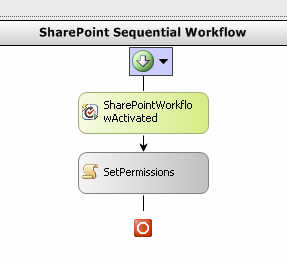
The “Activated” shape is responsible for setting member variables.
private void SharePointWorkflowActivated_Invoked (object sender, ExternalDataEventArgs e) { //set member variable values from //the inbound list context webId = workflowProperties.WebId; siteId = workflowProperties.SiteId; listId = workflowProperties.ListId; itemId = workflowProperties.ItemId; }
Make sure that you’re not an idiot like me and spend 30 minutes trying to figure out why all these “workflow properties” were empty before realizing that you haven’t told the workflow to populate it.
The meat of this workflow now all rests in the next “code” shape. I probably could have (and would) refactor this into more modular bits, but for now, it’s all in a single shape.
I start off by grabbing fresh references to the SharePoint web, site, list and item by using the IDs captured earlier. Yes, I know that the workflow properties collection has these as well, but I went this route.
//all the id’s for the site, current list and item SPSite site = new SPSite(siteId); SPWeb web = site.OpenWeb(webId); SPList list = web.Lists[listId]; SPListItem listItem = list.GetItemById(itemId);
Next, I can explicitly break the item’s permission inheritance.
//break from parent permissions listItem.BreakRoleInheritance(false);
Next, to properly account for updates, I went and removed all existing permissions. I needed this in the case that you pick one country value, and decide to change it later. I wanted to make sure that no stale or invalid permissions remained.
//delete any existing permissions in the //case that this is an update to an item SPRoleAssignmentCollection currentRoles = listItem.RoleAssignments; foreach (SPRoleAssignment role in listItem.RoleAssignments) { role.RoleDefinitionBindings.RemoveAll(); role.Update(); }
I need the country value actually entered in the line item, so I grab that here.
//get country value from list item string selectedCountry = listItem[“Country”].ToString(); SPFieldLookupValue countryLookupField = new SPFieldLookupValue(selectedCountry);
I used the SPFieldLookupValue type to be able to easily extract the country value. If read as a straight string, you get something like “1;#Canada” where it’s a mix of the field ID plus value.
Now that I know which country was entered, I can query my country list to figure out what group permissions I can add. So, I built up a CAML query using the “country” value I just extracted.
//build query string against second list string queryString = “<Where><Eq> <FieldRef Name=’Title’ /> <Value Type=’Text’>”+ countryLookupField.LookupValue +”</Value> </Eq></Where>”; SPQuery countryQuery = new SPQuery(); countryQuery.Query = queryString; //perform lookup on second list Guid lookupListGuid = new Guid(“9DD18A79-9295-47BC-A4AA-363D53DA2336”); SPList groupList = web.Lists[lookupListGuid]; SPListItemCollection countryItemCollection = groupList.GetItems(countryQuery)
We’re getting close. Now that I have the country list item collection, I can yank out the country record, and read the associated Windows groups (split by a “;” delimiter).
//get pointer to country list item SPListItem countryListItem = countryItemCollection[0]; string countryPermissions = countryListItem[“CountryPermissionGroups”].ToString(); char[] permissionDelimiter = { ‘;’ }; //get array of permissions for this country string[] permissionArray = countryPermissions.Split(permissionDelimiter);
Now that I have an array of permission groups, I have to explicitly add them as “Contributors” to the list item.
//add each permission for the country to the list item foreach (string permissionGroup in permissionArray) { //create”contributor” role SPRoleDefinition roleDef = web.RoleDefinitions.GetByType(SPRoleType.Contributor); SPRoleAssignment roleAssignment = new SPRoleAssignment( permissionGroup, string.Empty, string.Empty, string.Empty); roleAssignment.RoleDefinitionBindings.Add(roleDef); //update list item with new assignment listItem.RoleAssignments.Add(roleAssignment); }
After all that, there’s only one more line of code. And, it’s the most important one.
//final update listItem.Update();
Whew. Ok, when you build the project, by default, the solution isn’t deployed to SharePoint. When you’re ready to deploy to SharePoint, go ahead and view the project properties, look at the build events, and change the last part of the post build command line from NODEPLOY to DEPLOY. If you build again, your Visual Studio.NET output window should show a successful deployment of the feature and workflow.
Back in the SharePoint list where the data is entered, we can now add this new workflow to the list. Whatever name you gave the workflow should show up in the choices for workflow templates.
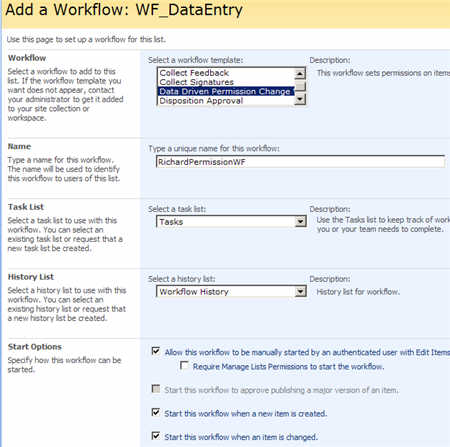
So, if I enter a new list item, the workflow immediately fires and I can see that the permissions for the Canadian entry now has two permission groups attached.

Also notice (in yellow) the fact that this list item no longer inherits permissions from its parent folder or list. If I change this list item to now be associated with the UK, and retrigger the workflow, then I only have a single “UK” group there.

So there you go. Making data-driven permissions possible on SharePoint list items. This saves a lot of time over manually going into each item and setting it’s permissions.
Thoughts? Any improvements I should make?
Technorati Tags: SharePoint












 Richard Seroter's Architecture Musings