Author: Richard Seroter

  • Sending StreamInsight Events to BizTalk Through New Web (SOAP/REST) Adapter

    One StreamInsight usage scenario frequently discussed by the product team involves sending a subset of events (or aggregated complex events) to the Enterprise Service Bus for additional processing and distribution.  As I’ve mentioned before, StreamInsight doesn’t come with any out-of-the-box adapters.  So if you want to make this usage scenario a reality, it’s up to you to figure out how to do it.  In this post, I hope to give you a head start (and code) to making this happen.  I’ve built a StreamInsight web adapter which lets StreamInsight send either SOAP or REST-style messages to an endpoint. We can use this adapter to send messages to BizTalk, or any web endpoint.  Buckle up, this is a long one.

    Designing the Adapter

    In the StreamInsight SDK  you’ll find some solid examples of StreamInsight adapters that you can use as a template to build your own.  I’ve built a few so far myself and demonstrate how to build an MSMQ publication adapter in my new book.  But I hadn’t built a consumer adapter yet, so I had to think about the right design strategy.

    The first design choice was whether to build a typed or untyped adapter.  While typed adapters are easier to craft since you are building to a known data payload, you don’t get any reuse out of the adapter.  So, the first (easy) decision was to build an untyped adapter that could send any payload to a web endpoint.

    The second consideration was how to call the downstream web endpoint.  I decided to use the System.Net.HttpWebRequest object to publish the payload and not try to do an IOC pattern with proxy classes.  By using this mechanism, I can apply the same code to call a SOAP endpoint or invoke various HTTP verbs on a RESTful endpoint.

    Finally, I had to decide how to actually convert the StreamInsight events to the expected XML payload of my web endpoints.  I figured that leveraging XSLT was a solid plan.  I can take the inbound event, and via a runtime configuration property, apply an XML transformation stylesheet to the event and produce output that my web endpoint requires.

    Ok, with all of these considerations in place, let’s build the adapter.  Note that you are completely allowed to disagree with any of the choices above and modify my adapter to fit your needs.

    Building the Adapter

    First off, I built the adapter’s configuration object.  These are the settings that we apply at runtime when we bind a StreamInsight query to an adapter.  Consider this to be reference data that we don’t want to hardcode into our adapter.

    public struct WebOutputConfig
        {
            public string XslPath { get; set; }
            public string ServiceAddress { get; set; }
            public string HttpMethod { get; set; }
            public string SoapAction { get; set; }
            public bool IsSoap { get; set; }
        }
    

    Note that my configuration accepts the path to an XSLT file, the URL of the target service, the HTTP method to apply, and if we are calling a SOAP endpoint, what the SOAP Action value is.

    Next I create my actual adapter class.  It inherits from the untyped PointOutputAdapter class.

    public class WebPointOutput: PointOutputAdapter
        {
            //store reference to CEP event
            private CepEventType bindTimeEventType;
            private string serviceAddress;
            private string httpMethod;
            private string soapAction;
            private bool isSoap;
            private XslCompiledTransform consumerXform;
    
            public WebPointOutput(WebOutputConfig configInfo, CepEventType eventType)
            {
                this.bindTimeEventType = eventType;
                this.serviceAddress = configInfo.ServiceAddress;
                this.httpMethod = configInfo.HttpMethod;
                this.soapAction = configInfo.SoapAction;
                this.isSoap = configInfo.IsSoap;
    
                //load up transform
                consumerXform = new XslCompiledTransform(false);
                consumerXform.Load(configInfo.XslPath);
            }
      }
    

    The adapter stores internal references to the configuration values it received and the constructor instantiates the XSL transformation object using the XSL path passed into the adapter.

    Before writing the primary operation which calls the service, we need a helper function which takes the key/value pairs from the CEP event and creates a dictionary out of them.  We will later convert this dictionary into a generic XML structure that we’ll apply our XSLT against.

    private Dictionary<string, string> GetCepEventFields(PointEvent currentEvent)
            {
                Dictionary<string, string> cepFields = new Dictionary<string, string>();
    
                for (int ordinal = 0; ordinal < bindTimeEventType.FieldsByOrdinal.Count; ordinal++)
                {
                    CepEventTypeField evtField = bindTimeEventType.FieldsByOrdinal[ordinal];
                    cepFields.Add(evtField.Name, currentEvent.GetField(ordinal).ToString());
                }
                return cepFields;
            }
    

    See above that I loop through all the fields in the event and add each one (name and value) to a dictionary object.

    Now we can build our primary function which takes the StreamInsight event and calls the web endpoint.  After the code snippet, I’ll comment on a few key points.

    private void ConsumeEvents()
      {
          //create new point event
          PointEvent currentEvent = default(PointEvent);
          try
          {
              while (true)
              {
                  if (AdapterState.Stopping == AdapterState)
                  {
                     Stopped();
                     return;
                  }
    
                  if (DequeueOperationResult.Empty == Dequeue(out currentEvent))
                 {
                     Ready();
                     return;
                  }
    
                 //only publish insert events and ignore CTIs
                 if (currentEvent.EventKind == EventKind.Insert)
                 {
                    // ** begin service call
                    //convert CEP message to XML for transformation
                    XDocument intermediaryDoc = new XDocument(
                    new XElement("Root",
                    GetCepEventFields(currentEvent).Select(field => new XElement("Property",
                        new XElement("Name", field.Key),
                        new XElement("Value", field.Value)
                        ))));
    
                    //transform CEP event fields to output format
                    XDocument returnDoc = new XDocument();
                    using (XmlWriter writer = returnDoc.CreateWriter())
                    {
                      consumerXform.Transform(intermediaryDoc.CreateReader(), (XsltArgumentList)null, writer);
                    }
    
                    //call service
                    HttpWebRequest req = (HttpWebRequest)HttpWebRequest.Create(serviceAddress);
                    req.Method = httpMethod;
                    req.ContentType = "text/xml";
                    if (isSoap)
                        req.Headers.Add("SOAPAction", soapAction);
    
                    using (Stream reqStream = req.GetRequestStream())
                    {
                        var bytes = Encoding.UTF8.GetBytes(returnDoc.ToString());
                        reqStream.Write(bytes, 0, bytes.Length);
                        reqStream.Close();
                    }
    
                    var resp = (HttpWebResponse)req.GetResponse();
                   }
    
                 // Every received event needs to be released.
                 ReleaseEvent(ref currentEvent);
             }
          }
          catch (AdapterException e)
          {
             System.IO.File.WriteAllText(
                @"C:\temp\" + System.Guid.NewGuid().ToString() + "_eventerror.txt", "Error: " + e.ToString());
           }
       }
    

    First, notice that I do NOT emit CTI events.  Next see that I use a bit of LINQ to take the results of the event-to-dictionary conversion and create an XML document (XDocument) consisting of name/value pairs.  I then take this “intermediary XML” and pass it through an XslCompiledTransform using whichever XSLT was provided during adapter configuration.  The resulting XML is then streamed to the web endpoint via the HttpWebRequest object.  There are probably performance improvements that can be done here, but hey, it’s a proof-of-concept!

    The final piece of this adapter is to fill in the required “start” and “resume” operations.

    public override void Resume()
            {
                new Thread(this.ConsumeEvents).Start();
            }
    
            public override void Start()
            {
                new Thread(this.ConsumeEvents).Start();
            }
    
            protected override void Dispose(bool disposing)
            {
                base.Dispose(disposing);
            }
    

    Finally, I have to create an adapter factory which spins up my adapter when the StreamInsight query gets started up.  Since we are using an untyped adapter, there isn’t any logic needed to pick the “right” output adapter.

    public class WebOutputFactory : IOutputAdapterFactory<WebOutputConfig>
     {
         public OutputAdapterBase Create(WebOutputConfig configInfo, EventShape eventShape, CepEventType cepEventType)
         {
             OutputAdapterBase adapter = default(OutputAdapterBase);
             adapter = new WebPointOutput(configInfo, cepEventType);
    
             return adapter;
         }
     }
    

    With that, we have a complete StreamInsight consumer adapter.

    Using the Adapter

    How can we use this fancy, new adapter?  In one scenario, we can use StreamInsight to process a high volume of events, filter out the “noise”, and amplify events of specific interest.  Or, we can empower StreamInsight to look for trends within the stream over a particular time duration and share these complex events whenever one is encountered.

    2010.07.08StreaminsightBts03

    For this post, I’ll show the latter example.  I have a StreamInsight application which generates call center events every half second and sends them to an embedded StreamInsight server.   I do some aggregation over a window of time and if a complex event is detected, the web adapter is called and BizTalk receives the message for further processing.  Note that nothing prevents me from substituting WCF Services or Azure-based services for BizTalk in this case.  Well, except for security which I have NOT added to my adapter.  Didn’t figure out a clean way to store and send credentials yet.

    BizTalk Setup

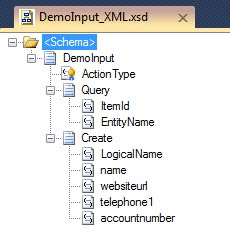
    Let’s set up the BizTalk application that StreamInsight will publish to.  First I created a simple schema that represents the event data I want BizTalk to receive.

    2010.07.08StreaminsightBts02

    In real life I’d add an orchestration or two to process the event data, but this post is already ginormous and you all get the point.  So, let’s jump right to exposing this schema as part of a BizTalk service contract.  I walked through the BizTalk WCF Publishing Wizard and produced a one-way service that takes in my CallThresholdEvent message.

    2010.07.08StreaminsightBts01

    Once the service is created, I built the requisite receive port/location and a send port which subscribes on the CallThresholdEvent message.

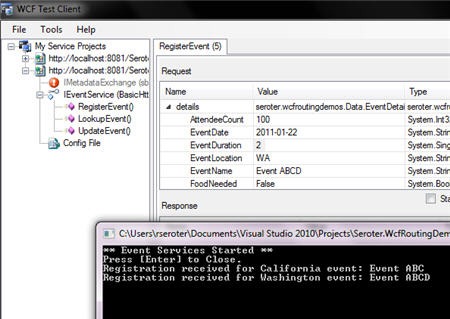
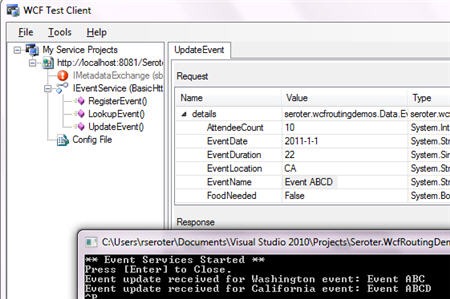
    All we need now is the right XSLT to transform the CEP event message to the WCF service contract message format.  How do we get that? The easiest way to get the correct XML is to invoke the service in the WCF Test Client and steal the SOAP payload it builds to call the service.  I pointed the WCF Test Client to my endpoint and invoked the service.

    2010.07.08StreaminsightBts04

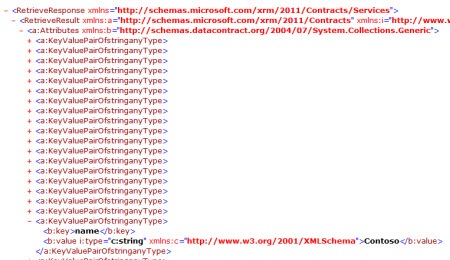
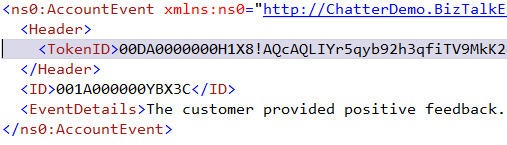
    Once I confirmed that the service worked (and emitted a file from the send port), I switched the view from “formatted” to “xml” and could view the XML that was sent across the wire.

    2010.07.08StreaminsightBts05

    I took the “request” XML and created a new XSLT file with this request structure created in the root template.

    <xsl:template match="*">
        <s:Envelope xmlns:s="http://schemas.xmlsoap.org/soap/envelope/">
          <s:Header>
            <!--<Action s:mustUnderstand="1" xmlns="http://schemas.microsoft.com/ws/2005/05/addressing/none">PublishThresholdEvent</Action>-->
          </s:Header>
          <s:Body xmlns:xsi="http://www.w3.org/2001/XMLSchema-instance" xmlns:xsd="http://www.w3.org/2001/XMLSchema">
            <CallThresholdEvent xmlns="http://BizTalkEventProcessor">
              <ProductName xmlns="">
                <xsl:value-of select="Property[Name = 'EvtProd']/Value"/>
              </ProductName>
              <CallCategory xmlns="">
                <xsl:value-of select="Property[Name = 'EvtType']/Value"/>
              </CallCategory>
              <OccuranceCount xmlns="">
                <xsl:value-of select="Property[Name = 'EvtCount']/Value"/>
              </OccuranceCount>
              <TimeReceived xmlns=""></TimeReceived>
            </CallThresholdEvent>
          </s:Body>
        </s:Envelope>
      </xsl:template>
    

    Note that you should NOT send the Action header as WCF takes care of that and the service endpoint barfs with an HTTP 500 if you send it.  It also takes roughly 96 hours to figure out that this is the problem.  Consider yourself warned.

    At this point, I have all I need in BizTalk to call the service successfully.

    StreamInsight Setup

    The first query in my StreamInsight application performs an aggregation of events over a “tumbling” window.

    var inputStream = CepStream<CallCenterRequestEventType>.Create("input", typeof(CallCenterAdapterFactory), config, EventShape.Point);
    
     var callTypeCount =
              from w in inputStream
              group w by new { w.RequestType, w.Product } into appGroup
              from x in appGroup.TumblingWindow(
                      TimeSpan.FromSeconds(15),
                      HoppingWindowOutputPolicy.ClipToWindowEnd)
               select new EventTypeSummary
               {
                   EvtType = appGroup.Key.RequestType,
                   EvtProd = appGroup.Key.Product,
                   EvtCount = x.Count()
                };
    

    In the query above, I take the call center event input stream and put the incoming events into groups based on the event type (e.g. “Info Request”, “Product Complaint”, “Account Change”) and product the customer is calling about.  I base these groups on a tumbling window that lasts 15 seconds.  This means that the window is flushed every 15 seconds and started fresh.  I then take the output of the window grouping and put it into a new, known type named EventTypeSummary.  If I use an anonymous type here instead, I get a “System.IndexOutOfRangeException: Index was outside the bounds of the array” error.

    I next take the result of the first query and make it the input into a second query.  This one looks at any groups emitted by the first query and filters them based on a criteria my ESB is interested in.

    var callTypeThreshold =
                from summary in callTypeCount
                where summary.EvtCount > 3 && summary.EvtType == "Product Complaint"
                select summary;
    

    Above, I am looking for any “summary events” where the call type is a product complaint and there have been more than 3 of them for a specific product (during a given window).

    Before I register my query, I need to define the StreamInsight adapter configuration for my web endpoint.  Recall above that we defined a structure to hold parameters that we will pass into the adapter at runtime.

    var webAdapterBizTalkConfig = new WebOutputConfig()
     {
        HttpMethod = "POST",
        IsSoap = true,
        ServiceAddress = "http://localhost/BizTalkEventProcessingService/BizTalkEventProcessingService.svc",
        SoapAction = "PublishThresholdEvent",
        XslPath = @"[path]\CallCenterEvent_To_BizTalkSoapService.xslt"
      };
    

    Above, you’ll see the service address pointing to my BizTalk-generated WCF endpoint, the SOAP action for my service, and a pointer to the XSLT that I created to transform the CEP event to a SOAP payload.

    Finally, I registered the query and start it.

    var allQuery = callTypeThreshold.ToQuery(
                             myApp,
                             "Threshold Events",
                             string.Empty,
                             typeof(WebOutputFactory),
                             webAdapterBizTalkConfig,
                             EventShape.Point,
                             StreamEventOrder.FullyOrdered);
    

    You can see that I pass in my web adapter factory type and the adapter configuration properties defined earlier.

    The Result

    When all this is in place, I start up my StreamInsight application, begin generating events, and can observe BizTalk messages getting written to disk.

    2010.07.08StreaminsightBts06

    In this post we saw how I can link StreamInsight with BizTalk Server through a WCF channel.  You can grab the source code for the StreamInsight Web Adapter here. I’ve done some basic testing of the adapter against both RESTful and SOAP services, but there are great odds that you’ll find something I missed.  However, it hopefully gives you a great head start when building a StreamInsight solution that emits events to web endpoints.

    Share

  • Updated Ways to Store Data in BizTalk SSO Store

    One of my more popular tools has been the BizTalk SSO Configuration Data Storage Tool.  At the time I built that, there was no easy way to store and manage Single Sign On (SSO) applications that were used purely for secure key/value pair persistence.

    Since that time, a few folks (that I know of) have taken my tool and made it better.  You’ll find improvements from Paul Petrov here (with update mentioned here), and most recently by Mark Burch at BizTorque.net.  Mark mentioned in his post that Microsoft had stealthily released a tool that also served the purpose of managing SSO key/values, so I thought I’d give the Microsoft tool a quick whirl.

    First off, I downloaded my own SSO tool, which I admittedly haven’t had a need to use for quite some time.  I was thrilled that it worked fine on my new BizTalk 2010 machine.

    2010.07.05sso01

    I created (see above) a new SSO application named SeroterToolApp which holds two values.  I then installed the fancy new Microsoft tool which shows up in the Start Menu under SSO Application Configuration.

    2010.07.05sso02

    When you open the tool, you’ll find a very simple MMC view that has Private SSO Application Configuration as the root in the tree.  Somewhat surprisingly, this tool does NOT show the SSO application I just created above in my own tool.  Microsoft elitists, think my application isn’t good enough for them.

    2010.07.05sso03

    So let’s create an application here and see if my tool sees it.  I right-click that root node in the tree and choose to add an application.  You see that I also get an option to import an application and choosing this prompts me for a “*.sso” file saved on disk.

    2010.07.05sso04

    After adding a new application, I right-clicked the application and chose to rename it.

    2010.07.05sso05

    After renaming it MicrosoftToolApp, I once again right-clicked the application and added a key value pair.  It’s nice that I can create the key and set its value at the same time.

    2010.07.05sso06

    I added one more key/value pair to the application.  Then, when you click the application name in the MMC console, you see all the key/value pairs contained in the application.

    2010.07.05sso07

    Now we saw earlier that the application created within my tool does NOT show up in this Microsoft tool, but what about the other way around?  If I try and retrieve the application created in the Microsoft tool, sure enough, it appears.

    2010.07.05sso08

    For bonus points, I tried to change the value of one of the keys from my tool, and that change is indeed reflected in the Microsoft tool.

    2010.07.05sso09

    2010.07.05sso10

    So this clearly shows that I am a much better developer than anyone at Microsoft.  Or more likely, it shows that somehow the applications that my tool creates are simply invisible to Microsoft products.  If anyone gets curious and wants to dig around, I’d be somewhat interested in knowing why this is the case.

    It’s probably a safe bet moving forward to use the Microsoft tool to securely store key/value pairs in Enterprise Single Sign On.  That said, if using my tool continues to bring joy into your life, than by all means, keep using it!

    Share

  • Interview Series: Four Questions With … Saravana Kumar

    Happy July and welcome to the 22nd interview with a connected technology thought leader.  Today we’re talking to Saravana Kumar who is an independent consultant, BizTalk MVP, blogger, and curator of the handy BizTalk 24×7 and BizTalk BlogDoc communities.  The UK seems to be a hotbed for my interview targets, and I should diversify more, but they are just so damn cheery.

    On with the interview! 

    Q: Each project requires the delivery team to make countless decisions with regards to the design, construction and deployment of the solution. However, there are typically a handful of critical decisions that shape the entire solution. Tell us a few of the most important decisions that you make on a BizTalk project.

    A: Every project is different, but there is one thing common across all of them: having a good support model after its live. I’ve seen on numerous occasions projects missing out on requirement gathering to put a solid application support model. One of the key decisions I’ve made on the project I’m on is to use BizTalk’s Business Activity Monitoring (BAM) capabilities to  build a solid production support model with the help of Microsoft Silverlight. I’ve briefly hinted about this here in my blog. There is a wide misconception, BAM is used only to capture key business metrics, but the reality is its just a platform capable of capturing key data at a high volume system in an efficient way. The data could be purely technical monitoring stuff not necessarily Business metrics.   Now we get end to end visibility across various layers and a typical problem analysis takes minutes not hours.

    Another important decision I make on a typical BizTalk project is to think about performance in very early stages. Typically you need to get the non-functional SLA requirements way upfront. Because this will effect some of the key decisions, a classic one is whether to use orchestrations or design the solution purely using messaging only pattern.

    There are various other areas I’ll be interested to write here like DR, consistent build/deployment across multiple environment, consistent development solution structure, schema design etc.   But in the interest of space I’ll move on to the next question!

    Q: There are so many channels for discovering and learning new things about technology. What are your day-to-day means for keeping up to date, and where do you go to actually invest significant time in technology?

    A: For the past few years ( 5-6 years) the discovery part for me is always blogs. You get the lead from there and if something interests you, you build up the links from there by doing further searching on the topic.  I can quote on one of  my recent experience on knowing about FMSB (Financial Messaging Service Bus). This is something built on top of our BizTalk ESB Toolkit for the vertical Financial services market. I just came to know about this from one of the blog posts, who came to know about this from chatting to someone in BizTalk booth during TechEd.

    When it comes to learning part, my first preference these days are videos. We are living in the age of information overload, the biggest challenge is finding the right material.  These days video materials gets to the public domain almost instantaneously. So, for example if I’m not going to PDC or TechEd, I normally schedule the whole thing as if like I’m attending the conference and go through the videos in next 3-4 weeks. This way I don’t miss out on any big news.

    Q: As a consultant, how do you decide to recommend that a client uses a beta product like BizTalk Server 2010 or completely new product like Windows Azure Platform AppFabric? Do you find that you are generally more conservative or adventurous in your recommendations?

    A: I work mainly with Financial services client, where projects and future directions are driven by Business and not by Technology.  So, unless otherwise there is really pressing need from Business it will be difficult to recommend a cutting edge technology.  I also strongly believe the technology is there to support the business and not vice versa. That doesn’t mean our applications are still running on Excel Macros and 90’s style VB 4.0 applications.  Our state of the art BPM platform, which helps Business process paper application straight through processing (STP) right from opening the envelope to committing the deal in our AS 400 systems is built using BizTalk Server 2006. We started this project just after BizTalk Server 2006 was released (not Beta, but just after it RTM’ed). To answer your question, if there is a real value for Business in upcoming beta product, I’ll be heading in that direction. Whether I’m conservative or adventurous will depend on the steak. For BizTalk Server 2010 I’ll be bit adventurous to get some cheap wins (just platform upgrade is going to give us certain % of performance gain with minimal or no risk), but for technology like Azure either on premise or cloud I’ll be bit conservative and wait for the both right business need and maturity of the technology itself.

    Q [stupid question]: It’s summertime, so that means long vacations and the occasional “sick day” to enjoy the sunshine. Just calling the office and saying “I have a cold” is unoriginal and suspicious. No, you need to really jazz it up to make sure that it sounds legitimate and maybe even a bit awkward or uncomfortable. For instance, you could say “I’m physically incapable of wearing pants today” or “I cut myself while shaving … my back.” Give us a decent excuse to skip work and enjoy a summer day.

    A: As a consultant, I don’t get paid if I take day off sick. But that doesn’t stop me from thinking about a crazy idea. How about this :  I ate something very late last night in the local kebab shop and since then I’m constantly burping every 5 minutes non-stop with a disgusting smell. 🙂

    Thanks Saravana, and everyone enjoy their summer vacations!

    Share

  • Leveraging and Managing the StreamInsight Standalone Host

    In my recent post that addressed the key things that you should know about Microsoft StreamInsight, I mentioned the multiple hosting options that are at your disposal.  Most StreamInsight examples (and documentation) that you find demonstrate the “embedded” server option where the custom application that you build hosts the StreamInsight engine in-process.  In this post, I’m going to dig into how you take advantage of the out-of-process standalone server for StreamInsight.  I’m also going to give you a little application I created that fills the gaps in the visual tooling for StreamInsight.

    If you chose to leverage the embedded server model, your code would probably start off something like this:

    //create embedded server
    using (Server server = Server.Create("RSEROTER"))
    {
    
    //create application in the embedded server
    var myApp = server.CreateApplication("SampleEvents");
    
    // .. create query, start query
    
    }
    

    This type of solution is perfectly acceptable and provides the developer with plenty of control over the way the queries are managed.  However, you don’t get the high availability and reuse that the standalone server offers.

    Creating the Host

    So how do we use the remote, standalone host?  When you install StreamInsight, you are given the option to create a server host instance.

    2010.06.27si05

    Above, you can see that I created an instance named RSEROTER.  When the installation is completed, a folder is created in the StreamInsight directory.

    2010.06.27si01

    A Windows Service is also created for this instance, and it uses a configuration file from folder created above.

    2010.06.27si02

    Configuring the Host

    To be able to start this Windows Service, you’ll have to make sure that the endpoint address referenced in the service’s configuration file matches a registered endpoint for the server.  The configuration file for this StreamInsight host looks like this:

    2010.06.27si03

    The endpoint address for the StreamInsight Management Service needs to be one of the addresses in my server’s reserved list.  Go to a command prompt and type netsh http show urlacl to see reserved endpoints and associated accounts.  Mine looks like this:

    2010.06.27si04

    If your addresses and permissions line up, your service will start just fine. If your StreamInsight Windows Service uses a logon account that doesn’t have rights to the reserved endpoint, then the Windows Service won’t start. If the values in the configuration file and the registered endpoint list differ, the service won’t start. If you plan on using both an embedded and standalone server model concurrently, you will want to register a different URL and port for the embedded endpoints.

    In my case, I changed the user account associated with my registered endpoint so that the StreamInsight Windows Service could open the endpoint. First I deleted the existing registered entry by using netsh http delete urlacl url=http://localhost:80/StreamInsight/RSEROTER/ and then added a new entry back with the right account (Network Service in my case) via netsh http add urlacl url=http://localhost:80/StreamInsight/RSEROTER user=”Network Service”. The StreamInsight installation guide has more details on setting up the right user accounts to prevent “access is denied” errors when connecting the debugger or trying to create/read server applications.

    Considerations for Standalone Host Model

    Now that you have a StreamInsight server instance started up, what should you know? Unlike the “embedded” StreamInsight hosting model where your application starts up and runs the StreamInsight engine in process, the standalone model uses a remote connection-based strategy.  The other thing to remember is that because you are using an out-of-process service, you also have to strong-name and GAC the assemblies containing your event payload definitions and adapters. Note that if you forget to start the Windows Service, you’ll get a warning that the WCF endpoint is in a faulted state.  Finally, be aware that you can only explicitly create a management endpoint in code if you have an embedded server.

    Before I show you how to deploy queries to this standalone host, I should tell you about the management activities you CANNOT do via the only graphical tool that StreamInsight provides, the StreamInsight Event Flow Debugger.  The Debugger allows you to view existing applications, show queries included in applications, and both start and stop queries.  What you CANNOT do graphically is create applications, delete applications and delete queries.  So, I’ve built a tool that lets you do this.

    The New StreamInsight Server Manager

    Prior to writing code that connects to the StreamInsight server and deploys queries, I want to create the application container on the server.  I open up my StreamInsight Server Manager, connect to my endpoint (value read from my application’s configuration file) and choose to Create a new server application.

    2010.06.27si06

    Once you have an application, you can right-click it and choose to either Delete the application or view any queries associated with it.

    2010.06.27si07

    Coding to and Using the Standalone Server Instance

    Let’s write some code!  I’ve built a console application that creates or starts a StreamInsight query.  First off, I use a “connect” operation to link to my standalone server host.

    //connect to standalone server
    using(Server server = Server.Connect(new System.ServiceModel.EndpointAddress(@"http://localhost/StreamInsight/RSEROTER")))
    {
    
    }
    

    I then find the application that I created earlier.

    Application myApp;
    //get reference to existing application
    myApp = server.Applications["CallCenterEvents"];
    

    If my query is already on the server, than this application will just start it up.  Note that I could have also used my StreamInsight Server Manager or the Event Flow Debugger to simply start a server query.  I don’t need a custom application for that if I have a standalone server model.  But, this is what starting the query in code looks like:

    //if query already exists, just start it
    if (myApp.Queries.ContainsKey("All Events"))
    {
    Query eventQuery = myApp.Queries["All Events"];
    eventQuery.Start();
    
    //wait for keystroke to end
    Console.ReadLine();
    
    eventQuery.Stop();
    
    }
    

    If my query does NOT exist, then I create the query and start it up.  When I start my custom application, I can see from the StreamInsight Event Flow Debugger that my query is running.

    2010.06.27si08

    If I flip to my StreamInsight Server Manager application, I can also see the query (and it’s status).

    2010.06.27si09

    Unlike the Event Flow Debugger, this application also lets you delete queries.

    2010.06.27si10

    Because I’m using the standalone server host option, I could choose to stop my custom application and my query is still available on the server.  I can now start and stop this query using the Event Flow Debugger or my StreamInsight Server Manager.

    2010.06.27si11

    Summary

    I expect that we’ll soon see more from Microsoft on building highly available StreamInsight solutions by using the standalone instance model.  This model is a great way to get reuse out of adapters and queries and get metadata durability in a central server host.  When using the standalone instance model you just have to remember the few things I pointed out above (e.g. using the GAC, getting the management endpoint set up right).

    You can grab the executable and source code for the StreamInsight Server Manager here.  As you can expect from me in these situations, this is hardly production code.  But, it works fairly well and solves a problem.  It also may prove a decent example of how to access and loop through StreamInsight applications and queries.  Enjoy.

    Share

  • 6 Things to Know About Microsoft StreamInsight

    Microsoft StreamInsight is a new product included with SQL Server 2008 R2.  It is Microsoft’s first foray into the event stream processing and complex event processing market that already has its share of mature products and thought leaders.  I’ve spent a reasonable amount of time with the product over the past 8 months and thought I’d try and give you a quick look at the things you should know about it.

    1. Event processing is about continuous intelligence.  An event can be all sorts of things ranging from a customer’s change of address to a meter read on an electrical meter.  When you have an event driven architecture, you’re dealing with asynchronous communication of data as it happens to consumers who can choose how to act upon it.  The term “complex event processing” refers to gathering knowledge from multiple (simple) business events into smaller sets of summary events.  I can join data from multiple streams and detect event patterns that may have not been visible without the collective intelligence. Unlike traditional database driven applications where you constantly submit queries against a standing set of data, an event processing solution deploys a set of compiled queries that the event data passes through.  This is a paradigm shift for many, and can be tricky to get your head around, but it’s a compelling way to compliment an enterprise business intelligence strategy and improve the availability of information to those who need it.
    2. Queries are written using LINQ.  The StreamInsight team chose LINQ as their mechanism for authoring declarative queries.  As you would hope, you can write a fairly wide set of queries that filter content, join distinct streams, perform calculations and much more.  What if I wanted to have my customer call center send out a quick event whenever a particular product was named in a customer complaint?  My query can filter out all the other products that get mentioned and amplify events about the target product:
      var filterQuery =
            from e in callCenterInputStream
            where e.Product == "Seroterum" select e;
      

      One huge aspect of StreamInsight queries relates to aggregation.  Individual event calculation and filtering is cool, but what if we want to know what is happening over a period of time?  This is where windows come into play.  If I want to perform a count, average, or summation of events, I need to specify a particular time window that I’m interested in.  For instance, let’s say that I wanted to know the most popular pages on a website over the past fifteen minutes, and wanted to recalculate that total every minute.  So every minute, calculate the count of hits per page over the past fifteen minutes.  This is called a Hopping Window. 

      var activeSessions = from w in websiteInputStream
                                  group w by w.PageName into pageGroup
                                  from x in pageGroup.HoppingWindow(
                                      TimeSpan.FromMinutes(15),
                                      TimeSpan.FromMinutes(1),
                                      HoppingWindowOutputPolicy.ClipToWindowEnd)
                                  select new PageSummarySummary
                                  {
                                      PageName = pageGroup.Key,
                                     TotalRequests = x.Count()
                                   };
      

      I’ll have more on this topic in a subsequent blog post but for now, know that there are additional windows available in StreamInsight and I HIGHLY recommend reading this great new paper on the topic from the StreamInsight team.

    3. Queries can be reused and chained.  A very nice aspect of an event processing solution is the ability to link together queries.  Consider a scenario where the first query takes thousands of events per second and filters out the noise and leaves me only with a subset of events that I care about.  I can use the output of that query in another query which performs additional calculations or aggregation against this more targeted event stream.  Or, consider a “pub/sub” scenario where I receive a stream of events from one source but have multiple output targets.  I can take the results from one stream and leverage it in many others.
    4. StreamInsight uses an adapter model for the input and output of data.  When you build up a StreamInsight solution, you end up creating or leveraging adapters.  The product doesn’t come with any production-level adapters yet, but fortunately there are a decent number of best-practice samples available.  In my upcoming book I show you how to build an MSMQ adapter which takes data from a queue and feeds it into the StreamInsight engine.  Adapters can be written in a generic, untyped fashion and therefore support easy reuse, or, they can be written to expect a particular event payload.  As you’d expect, it’s easier to write a specific adapter, but there are obviously long term benefits to building reusable, generic adapters.
    5. There are multiple hosting options.  If you choose, you can create an in-process StreamInsight server which hosts queries and uses adapters to connect to data publishers and consumers.  This is probably the easiest option to build, and you get the most control over the engine.  There is also an option to use a central StreamInsight server which installs as a Windows Service on a machine.  Whereas the first option leverages a “Server.Create()” operation, the latter option uses a “Server.Connect()” manner for working with the Engine.  I’m writing a follow up post shortly on how to leverage the remote server option, so stay tuned.  For now, just know that you have choices for hosting.
    6. Debugging in StreamInsight is good, but overall administration is immature.   The product ships with a fairly interesting debugging tool which also acts as the only graphical UI for doing rudimentary management of a server.  For instance, when you connect to a server (in process or hosted) you can see the “applications” and queries you’ve deployed.
      2010.6.22si01
      When a query is running, you can choose to record the activities, and then play back the stream.  This is great for seeing how your query was processed across the various LINQ operations (e.g. joins, counts). 
      2010.6.22si02
      Also baked into the Debugger are some nice root cause analysis capabilities and tracing of an event through the query steps.  You also get a fair amount of server-wide diagnostics about the engine and queries.  However, there are no other graphical tools for administering the server.  You’ll find yourself writing code or using PowerShell to perform other administrative tasks.  I expect this to be an area where you see a mix of community tools and product group samples fill the void until future releases produce a more robust administration interface.

    That’s StreamInsight in a nutshell.  If you want to learn more, I’ve written a chapter about StreamInsight in my upcoming book, and also maintain a StreamInsight Resources page on the book’s website.

  • I’m Heading to Sweden to Deliver a 2-Day Workshop

    The incomparable Mikael Håkansson has just published the details of my next visit to Sweden this September. After I told Mikael about my latest book, we thought it might be epic to put together a 2 day workshop that highlights the “when to use what” discussion.  Two of my co-authors, Stephen Thomas and Ewan Fairweather, will be joining me for busy couple of days at the Microsoft Sweden office.  This is the first time that Stephen and Ewan have seen my agenda, so, surprise guys!

    We plan to summarize each core technology in the Microsoft application platform and then dig into six of the patterns that we discuss in the book.  I hope this is a great way to introduce a broad audience to the nuances of each technology and have a spirited discussion of how to choose the best tool for a given situation.

    If other user groups would be interested in us repeating this session, let me know.  We take payment in the form of plane tickets, puppies or gold bullion.

    Share

  • Impact of Namespace Style Choice on BizTalk Components

    I could make up a statistic that says “83% of all BizTalk schemas use the namespace automatically assigned to it” and probably not be wildly off.  That said, I wondered if BizTalk handled all the different namespace styles in the same way.  Specifically, does BizTalk care if we use schemas with traditional “URL-style” namespaces, URN namespaces, single value namespaces, and empty namespaces?  Short answer: it doesn’t matter.

    I suspect that many XSD designers currently go with a URL-based approach like so:

    2010.06.10ns01

    However, you could also prefer to go with a Uniform Resource Name style like this:

    2010.06.10ns02

    You might also choose to do something easier for you to understand, which might be a single identifier.  For instance, you could just use a namespace called “Enterprise” for company wide schemas, or “Vendor” for all external partner formats.

    2010.06.10ns03

    Finally, you may say “forget it” and not use a namespace at all.

    2010.06.10ns04

    The first thing I tested was simple routing.  The subscription for a URN-style message looked like this:

    2010.06.10ns05

    The “single value” format subscription looks like this:

    2010.06.10ns06

    Finally, if you have no namespace at all on your schema, the message subscription could look like this:

    2010.06.10ns07

    In that case, all you have is the root node name.  After testing each routing scenario, as you might expect, they all work perfectly fine.  I threw a property schema onto each schema, and there were no problems routing there either.

    I also tested each schema with the Business Rules Engine and each worked fine as well.

    Moral of the story?  Use a namespace style that works best for your organization, and, put some real thought into it.  For instance, if a system that you have to integrate with can’t do namespaces, don’t worry about changing the problem system since BizTalk can work just fine.

    I didn’t go through all the possible orchestration, mapping and WCF serialization scenarios, but would expect that we’d see similar behavior.  Any other real-life tales of namespaces you wish to share?

    Share

  • Announcing My New Book: Applied Architecture Patterns on the Microsoft Platform

    So my new book is available for pre-order here and I’ve also published our companion website. This is not like any technical book you’ve read before.  Let me back up a bit.

    Last May (2009) I was chatting with Ewan Fairweather of Microsoft and we agreed that with so many different Microsoft platform technologies, it was hard for even the most ambitious architect/developer to know when to use which tool.  A book idea was born.

    Over the summer, Ewan and I started crafting a series of standard architecture patterns that we wanted to figure out which Microsoft tool solved best.  We also started the hunt for a set of co-authors to bring expertise in areas where we were less familiar.  At the end of the summer, Ewan and I had suckered in Stephen Thomas (of BizTalk fame), Mike Sexton (top DB architect at Avanade) and Rama Ramani (Microsoft guy on AppFabric Caching team).   All of us finally pared down our list of patterns to 13 and started off on this adventure.  Packt Publishing eagerly jumped at the book idea and started cracking the whip on the writing phase.

    So what did we write? Our book starts off by briefly explaining the core technologies in the Microsoft application platform including Windows Workflow Foundation, Windows Communication Foundation, BizTalk Server, SQL Server (SSIS and Service Broker), Windows Server AppFabric, Windows Azure Platform and StreamInsight.  After these “primer” chapters, we have a discussion about our Decision Framework that contains our organized approach to assessing technology fit to a given problem area.  We then jump into our Pattern chapters where we first give you a real world use case, discuss the pattern that would solve the problem, evaluate multiple candidate architectures based on different application technologies, and finally select a winner prior to actually building the “winning” solution.

    In this book you’ll find discussion and deep demonstration of all the key parts of the Microsoft application platform.  This book isn’t a tutorial on any one technology, but rather,  it’s intended to provide the busy architect/developer/manager/executive with an assessment of the current state of Microsoft’s solution offerings and how to choose the right one to solve your problem.

    This is a different kind of book. I haven’t seen anything like it.  Either you will love it or hate it.  I sincerely hope it’s the former, as we’ve spent over a year trying to write something interesting, had a lot of fun doing it, and hope that energy comes across to the reader.

    So go out there and pre-order, or check out the site that I set up specifically for the book: http://AppliedArchitecturePatterns.com.

    I’ll be sure to let you all know when the book ships!

  • Interview Series: Four Questions With … Dan Rosanova

    Greetings and welcome to the 21st interview in my series of chats with “connected technology” thought leaders.  This month we are sitting down with Dan Rosanova who is a BizTalk MVP, consultant/owner of Nova Enterprise Systems, trainer, regular blogger, and snappy dresser.

    Let’s jump right into our questions!

    Q: You’ve been writing a solid series of posts for CIO.com about best practices for service design and management.  How should architects and developers effectively evangelize service oriented principles with CIO-level staff whose backgrounds may range from unparalleled technologist to weekend warrior?  What are the key points to hit that can be explained well and understood by all?

    A: No matter their background successful CIOs all tend to have one trait I see a lot: they are able to distil a complex issue into simple terms. IT is complex, but the rest of our organizations don’t care, they just want it to work and this is what the CIO hears. Their job is to bridge this gap.

    The focus of evangelism must not be technology, but business. By focusing on business functionality rather than technical implementations we are able to build services that operate on the same taxonomies as the business we serve. This makes the conversation easier and frames the issues in a more persuasive context.

    Service Orientation is ultimately about creating business value more than technical value. Standardization, interoperability, and reuse are all cost savers over time from a technical standpoint, but their real value comes in terms of business operational value and the speed at which enterprises can adapt and change their business processes.

    To create value you must demonstrate


    • Interoperability
    • Standardization
    • Operational flexibility
    • Decoupling of business tasks from technical implementation (implementation flexibility)
    • Ability to compose existing business functions together into business processes
    • Options to transition to the Cloud – they love that word and it’s in all the publications they read these days. I am not saying this to be facetious, but to show how services are relevant to the conversations currently taking place about Cloud.

    Q: When you teach one of your BizTalk courses, what are the items that a seasoned .NET developer just “gets” and which topics require you to change the thinking of the students?  Why do you think that is?

    A: Visual Studio Solution structure is something that the students just get right away once shown the right way to do it for BizTalk. Most developers get into BizTalk with single project solutions that really are not ideal for real world implementations and simply never learn better. It’s sort of an ‘ah ha’ moment when they realize why you want to structure solutions in specific ways.

    Event based programming, the publish-subscribe model central to BizTalk, is a big challenge for most developers. It really turns the world they are used to upside down and many have a hard time with it. They often really want to “start at the beginning” when in reality, you need to start at the end, at least in your thought process. This is even worse for developers from a non .NET background. Those who get past this are successful; those who do not tend to think BizTalk is more complicated than the way “they do things”.

    Stream based processing is another one students struggle with at first, which is understandable, but is critical if they are ever to write effective pipeline components. This, more than anything else is probably the main reason BizTalk scales so well. BizTalk has amazing stream classes built into it that really should be open to more of .NET.

    Q: Whenever a new product (or version of a product) gets announced, we all chatter about the features we like the most.  Now that BizTalk Server 2010 has been announced in depth, what features do you think will have the most immediate impact on developers?  On the other hand, if you had your way, which feature would you REMOVE from the BizTalk product?

    A: The new per Host tuning features in 2010 have me pretty jazzed. It is much better to be able to balance performance in a single BizTalk Group rather than having to resort to multiple groups as we often did in the past.

    The mapper improvements will probably have the greatest immediate impact on developers because we can now realistically refactor maps in a pretty easy fashion. After reading your excellent post Using the New BizTalk Mapper Shape in a Windows Workflow Service I definitely feel that a much larger group of developers is about to be exposed to BizTalk.

    About what to take away, this was actually really hard for me to answer because I use just about every single part of the product and either my brain is in sync with the guys who built it, or it’s been shaped a lot by what they built. I think I would take away all the ‘trying to be helpful auto generation’ that is done by many of the tools. I hate how the tools do things like default to exposing an Orchestration in the WCF Publishing Wizard (which I think is a bad idea) or creating an Orchestration with Multi Part Message Types after Add Generated Items (and don’t get me started on schema names). The Adapter Pack goes in the right direction with this and they also allow you to prefix names in some of the artifacts.

    Q [stupid question]: Whenever I visit the grocery store and only purchase a couple items, I wonder if the cashier tries to guess my story.  Picking up cold medicine? “This guy might have swine flu.”  Buying a frozen pizza and a 12-pack of beer? “This guy’s a loner who probably lets his dog kiss him on the mouth.”  Checking out with a half a dozen ears of corn and a tube of lubricant?  “Um, this guy must be in a fraternity.”  Give me 2-4 items that you would purchase at a grocery store just to confuse and intrigue the cashier.

    A: I would have to say nonalcoholic beer and anything. After that maybe caviar and hot dogs would be a close second.

    Thanks Dan for participating and making some good points.

    Share

  • Using the New BizTalk Mapper Shape in a Windows Workflow Service

    So hidden within the plethora of announcements about the BizTalk Server 2010 beta launch was a mention of AppFabric integration.  The best that I can tell, this has to do with some hooks between BizTalk and Windows Workflow.  One of them is pretty darn cool, and I’m going to show it off here.

    In my admittedly limited exposure thus far to Windows Workflow (WF), one thing that jumped out was the relatively clumsy way to copy data between objects.  Now, you get a new “BizTalk Mapper” shape in your Windows Workflow activity palette which lets you use the full power of the (new) BizTalk Mapper from within a WF.

    First off, I created a new .NET 4.0 Workflow Service.  This service accepts bookings into a Pet Hotel and returns a confirmation code.  I created a pair of objects to represent the request and response messages.

    namespace Seroter.Blog.WorkflowServiceXForm
    {
        public class PetBookingRequest
        {
            public string PetName { get; set; }
            public PetList PetType { get; set; }
            public DateTime CheckIn { get; set; }
            public DateTime CheckOut { get; set; }
            public string OwnerFirstName { get; set; }
            public string OwnerLastName {get; set; }
        }
    
        public class PetBookingConfirmation
        {
            public string ConfirmationCode { get; set; }
            public string OwnerName { get; set; }
            public string PetName { get; set; }
        }
    
        public enum PetList
        {
            Dog,
            Cat,
            Fish,
            Barracuda
        }
    }
    

    Then I created WF variables for those objects and associated them with the request and response shapes of the Workflow Service.

    2010.5.24wfmap01

    To show the standard experience (or if you don’t have BizTalk 2010 installed), I’ve put an “Assignment” shape in my workflow to take the “PetName” value from the request message and stick it into the Response message.

    2010.5.24wfmap02

    After compiling and running the service, I invoked it from the WCF Test Client tool.  Sure enough, I can pass in a request object and get back the response with the “PetName” populated.

    2010.5.24wfmap03

    Let’s return to our workflow.  When I installed the BizTalk 2010 beta, I saw a new shape pop up on the Windows Workflow activity palette.  It’s under a “BizTalk” tab name and called “Mapper.”

    2010.5.24wfmap04

    Neato.  When I drag the shape onto my workflow, I’m prompted for the data types of my source and destination message.  I could choose primitive types, or custom types (like I have).

    2010.5.24wfmap05

    After that, I see an unconfigured “Mapper” shape in my workflow. 

    2010.5.24wfmap06

    After setting the explicit names of my source and destination variables in the activity’s Property window, I clicked the “Edit” button of the shape.  I’m asked whether I want to create a new map, or leverage an existing one.

     2010.5.24wfmap07

    This results in a series of files being generated, and a new *.btm file (BizTalk Map) appears.

    2010.5.24wfmap08

    In poking around those XSD files, I saw that two of them were just for base data type definitions, and one of them contained my actual message definition.  What also impressed me was that my code enumeration was properly transferred to an XSD enumeration.

    2010.5.24wfmap09

    Now let’s look at the Mapper itself.  As you’d expect, we get the shiny new Mapper interface included in BizTalk Server 2010.  I’ve got my source data type on the left and destination data type on the right.

    2010.5.24wfmap10

    What’s pretty cool is that besides getting the graphical mapper, I also get access to all the standard BizTalk functoids.  So, I dragged a “Concatenate” functoid onto the map and joined the OwnerLastName and OwnerFirstName and threw it into the OwnerName field.

    2010.5.24wfmap11

    Next, I want to create a confirmation code out of a GUID.  I dragged a “Scripting” functoid onto the map and double clicked.  It’s great that double-clicking now brings up ALL functoid configuration options.  Here, I’ve chosen to embed some C# code (vs. pointing to external assembly or writing custom XSLT) that generates a new GUID and returns it.  Also, notice that I can set “Inline C#” as a default option, AND, import from an external class file.  That’s fantastic since I can write and maintain code elsewhere and simply import it into this limited editor.

    2010.5.24wfmap13

    Finally, I completed my map by connected the PetName nodes.

    2010.5.24wfmap12

    After once again building and running the Workflow Service, I can see that my values get mapped across, and a new GUID shows up as my confirmation value.

    2010.5.24wfmap14

    I gotta be honest, this was REALLY easy.  I’m super impressed with where Windows Workflow is and think that adding the power of the BizTalk Mapper is a killer feature.  What a great way to save time and even get reuse from BizTalk projects, or, aid in the migration of BizTalk solutions to WF ones.

    UPDATE: Apparently this WF activity gets installed when you install the WCF LOB Adpater SDK update for BizTalk Server 2010.  JUST installing BizTalk Server 2010 won’t provide you the activity.

    Share