Hopefully you learned something new this week. If not, find an item or two below that scratches that itch, even if it’s not a topic area you usually study. Have a great weekend!
[blog] The Written Word. Terrific little post about the art of writing well. It takes practice, and most of us aren’t practicing enough!
[article] A crisis of spending and cloud-based GenAI. Companies are spending on AI, but where is the money coming from? This article says it’s coming from redirecting existing spend, which has implications.
Public cloud is awesome, full stop. In 2023, it’s easy to take for granted that you can spin up infrastructure in dozens of countries in mere minutes, deploy databases that handle almost limitless scale, and access brain-melting AI capabilities with zero setup. The last decade has seen an explosion of new cloud services and capabilities that make nearly anything possible.
But with all this new power comes new complexity. A hyperscale cloud now offers 200+ services and it can often feel like you have to know everything to get anything done. Cloud needs a new interface, and I think AI is a big part of it. Last month, Google Cloud triggered a shift in the cloud market with Duet AI (in preview) that I expect everyone else to try and follow. At least I hope so! Everything else feels very dated all of a sudden. AI will make it fun to use cloud again, whether you’re a developer, ops person, data expert, or security pro. I’ve been using this Google Cloud AI interface for months now, and I’ll never look at cloud the same way again. Here are six ways that an AI-assisted Google Cloud has already helped me do better work.
1. I get started faster and stay in a flow-state longer because of inline AI-powered assistance
Many of us spend a big portion of our day looking through online assets or internal knowledge repos for answers to our questions. Whether it’s “what is [technology X]?”, or “how do I write Java code that does [Y]?”, it’s not hard to spend hours a day context-switching between data sources.
Duet AI in Google Cloud helps me resist most of these distracting journeys through the Internet and helps me stay in the zone longer. How?
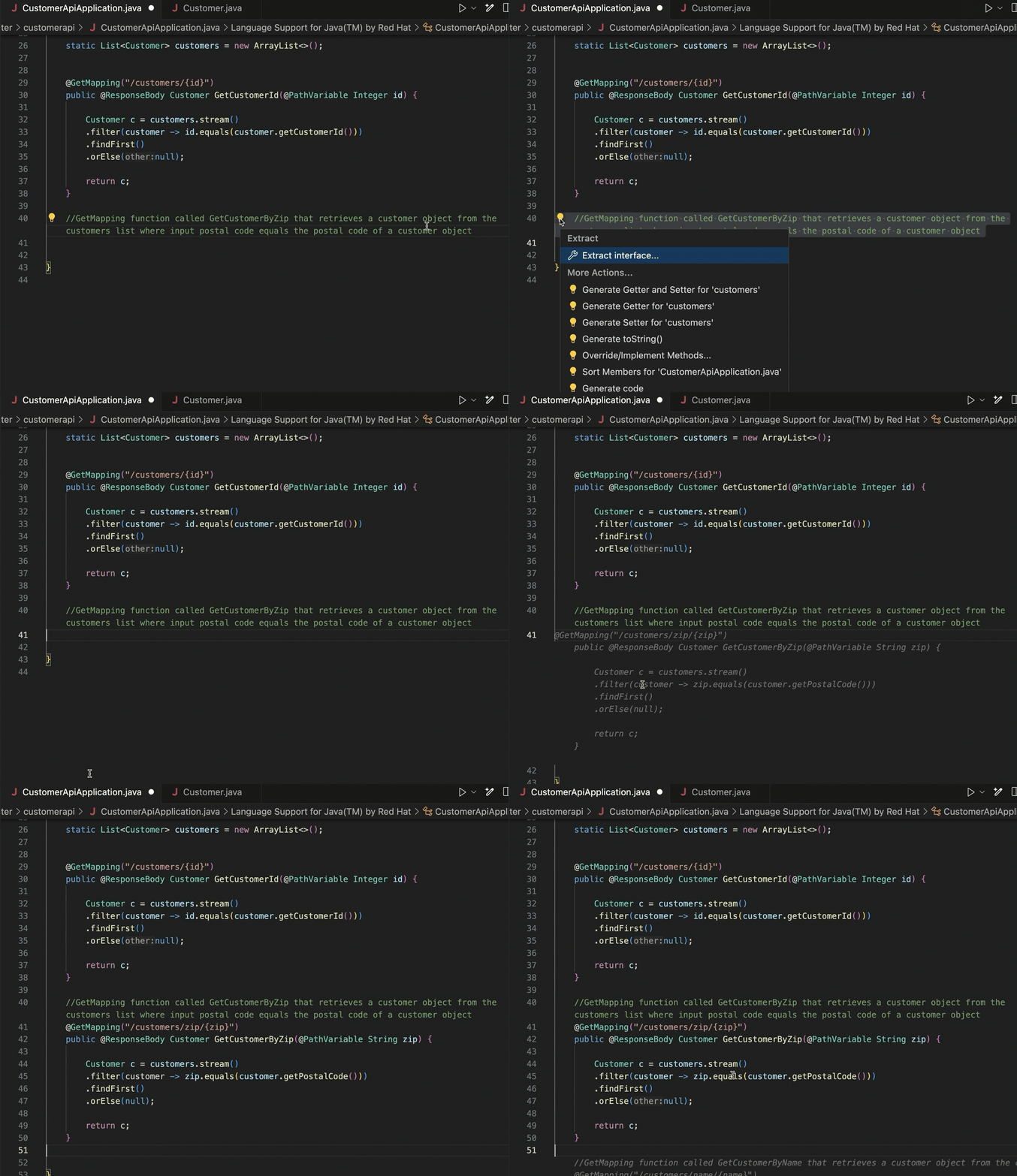
First, the code assistance for developers in the IDE is helpful. I don’t code often enough to remember everything anymore, so instead of searching for the right syntax to use Java streams to find a record in a list, I can write a prompt comment and get back the right Java code without leaving my IDE.
And for declarative formats that I never remember the syntax of (Terraform scripts, Kubernetes YAML), this in-place generation gives me something useful to start with.
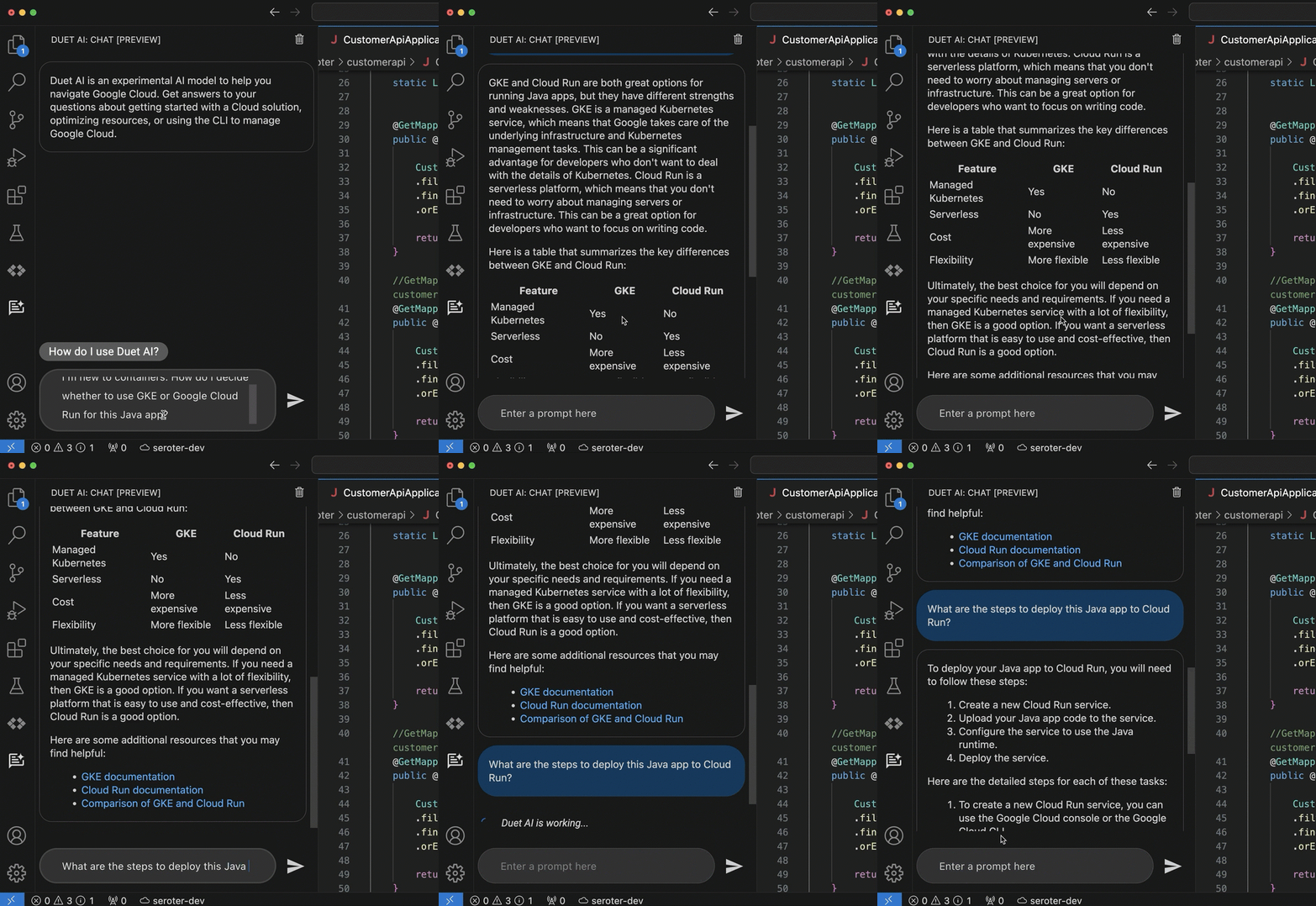
The coding assistance (code generation, and test generation) is great. But what really keeps me in a flow state is the inline chat within my IDE. Maybe I want to figure out which of the two major container services in Google Cloud I should use. And then after I choose one, how to walk through a deployment. Instead of jumping out to a browser and spending all sorts of time finding the answer, I’m doing it right where I work.
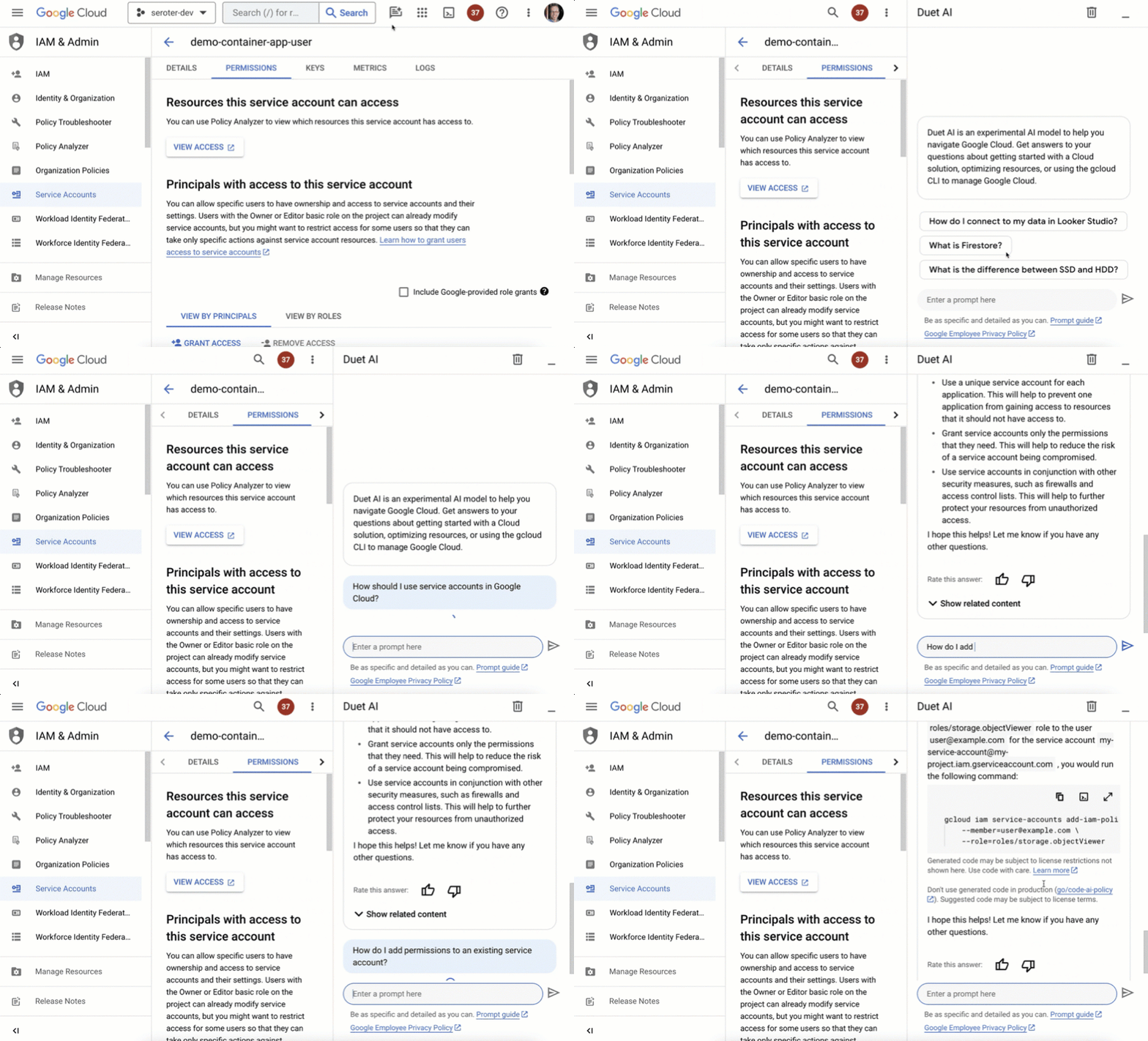
But life doesn’t just happen in the IDE. As I’m learning new products or managing existing apps, I might be using the UI provided by my cloud provider. The Google Cloud Console is a clean interface, and we’ve embedded our AI-based chat agent into every page.
I might want to learn about service accounts, and then figure out how to add permissions to an existing one. It’s so great to not have to fumble around, but rather, have a “Google expert” always sitting in the sidebar.
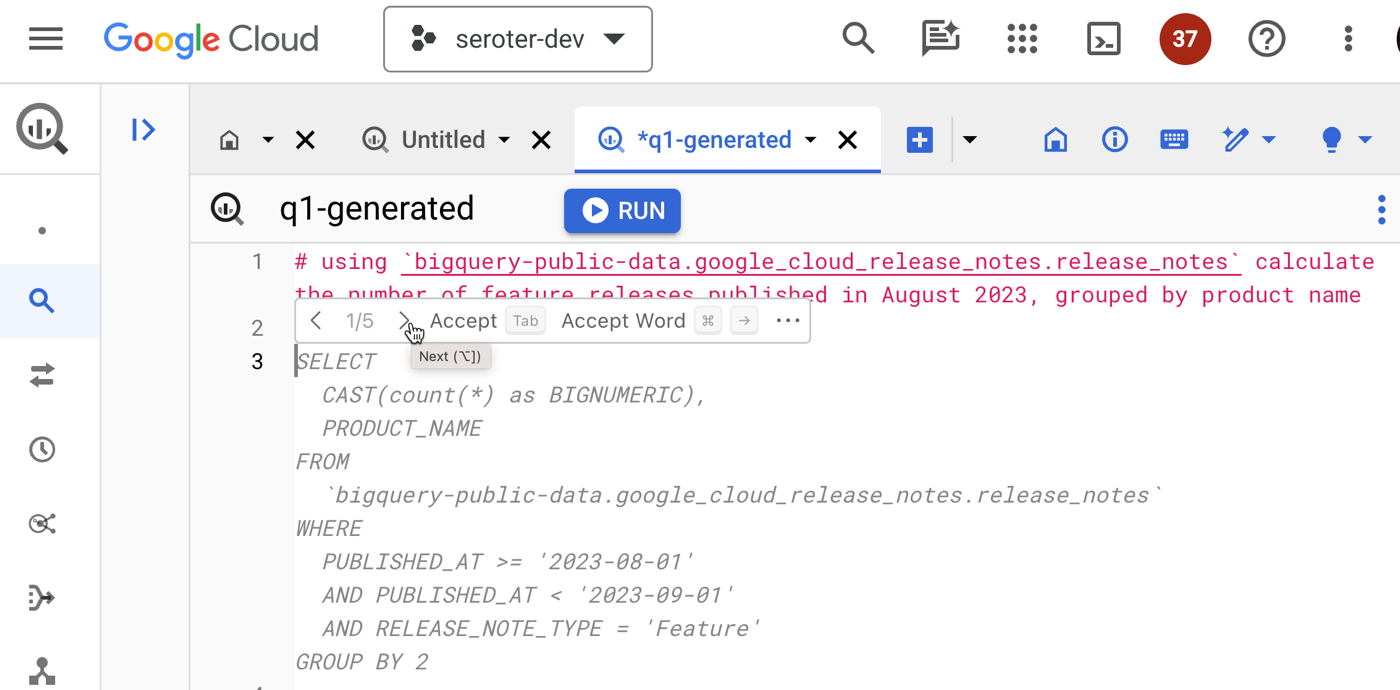
The same inline context sits in a variety of cloud services, such as BigQuery. Instead of jumping out of the Console to figure out complex query syntax, I can use natural language to ask for what I want, Duet AI infers the table schema, and generates a valid query.
I find that I’m finishing tasks faster, and not getting distracted as easily.
2. I’m saving time when helpful suggestions turn into direct action
Information is nice, actionable information is even better.
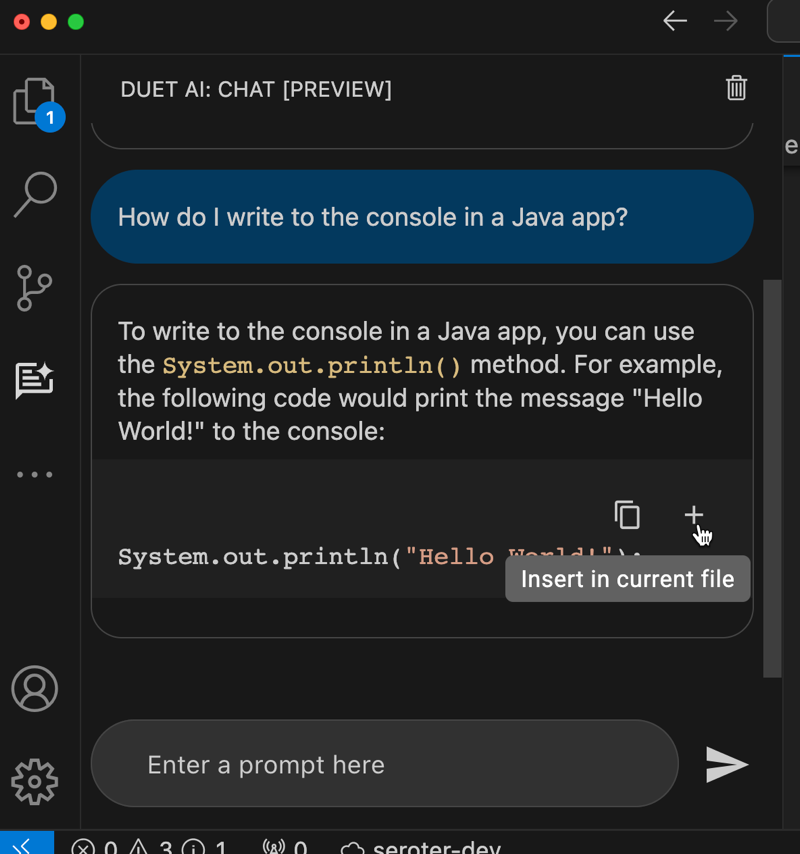
I showed above that the coding assistant gives me code or YAML. From within the IDE chat, I can do something like ask “how do I write to the console in a Java app” and take the resulting code and immediately inject it into the code file by clicking a button. That’s a nice feature.
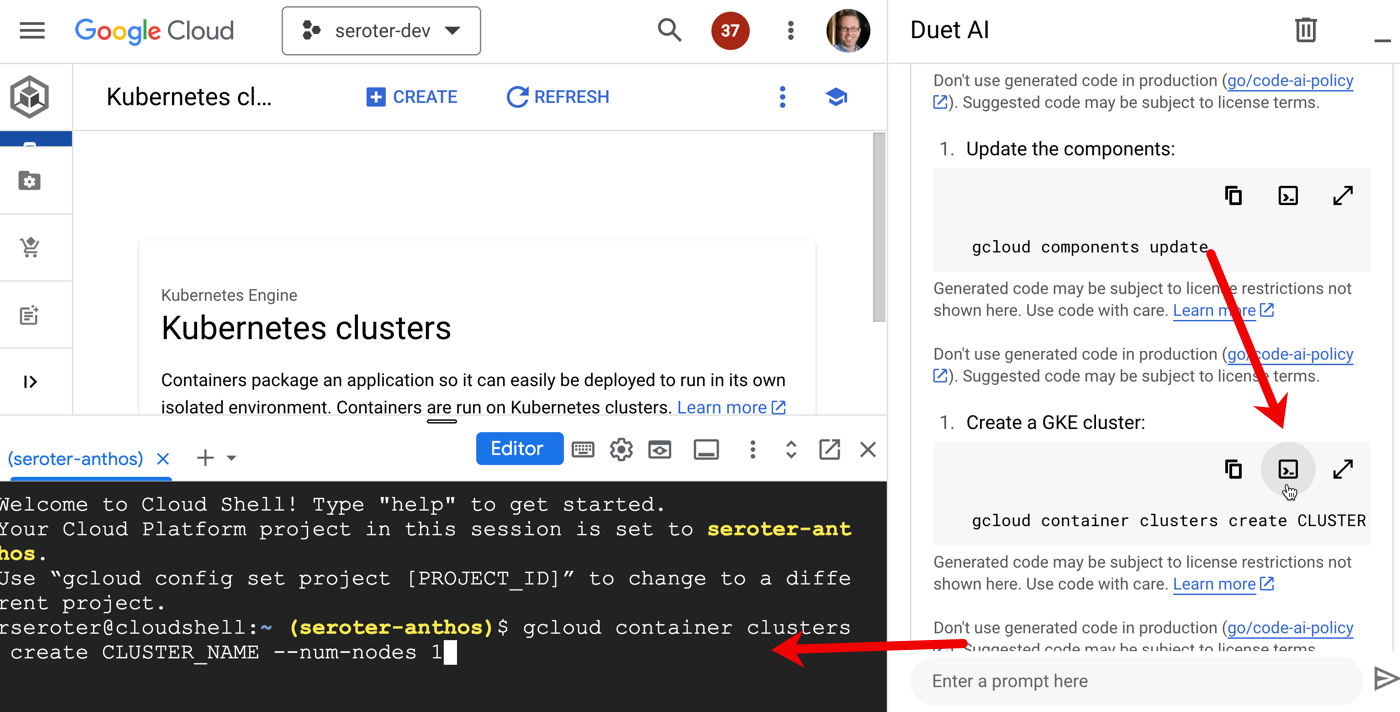
And in the Cloud Console, the chat sidebar offers multiple action items for any generated scripts. I can copy any code or script to the clipboard, but I can also run the command directly in the embedded Cloud Shell. How cool is that? What a quick way to turn a suggestion into action.
3. I’m doing less context-switching because of consistent assistance across many stages of the software lifecycle
This relates to the entirety of Google’s AI investment where I might use Google Search, Bard, Workspace, and Cloud to get my work done.
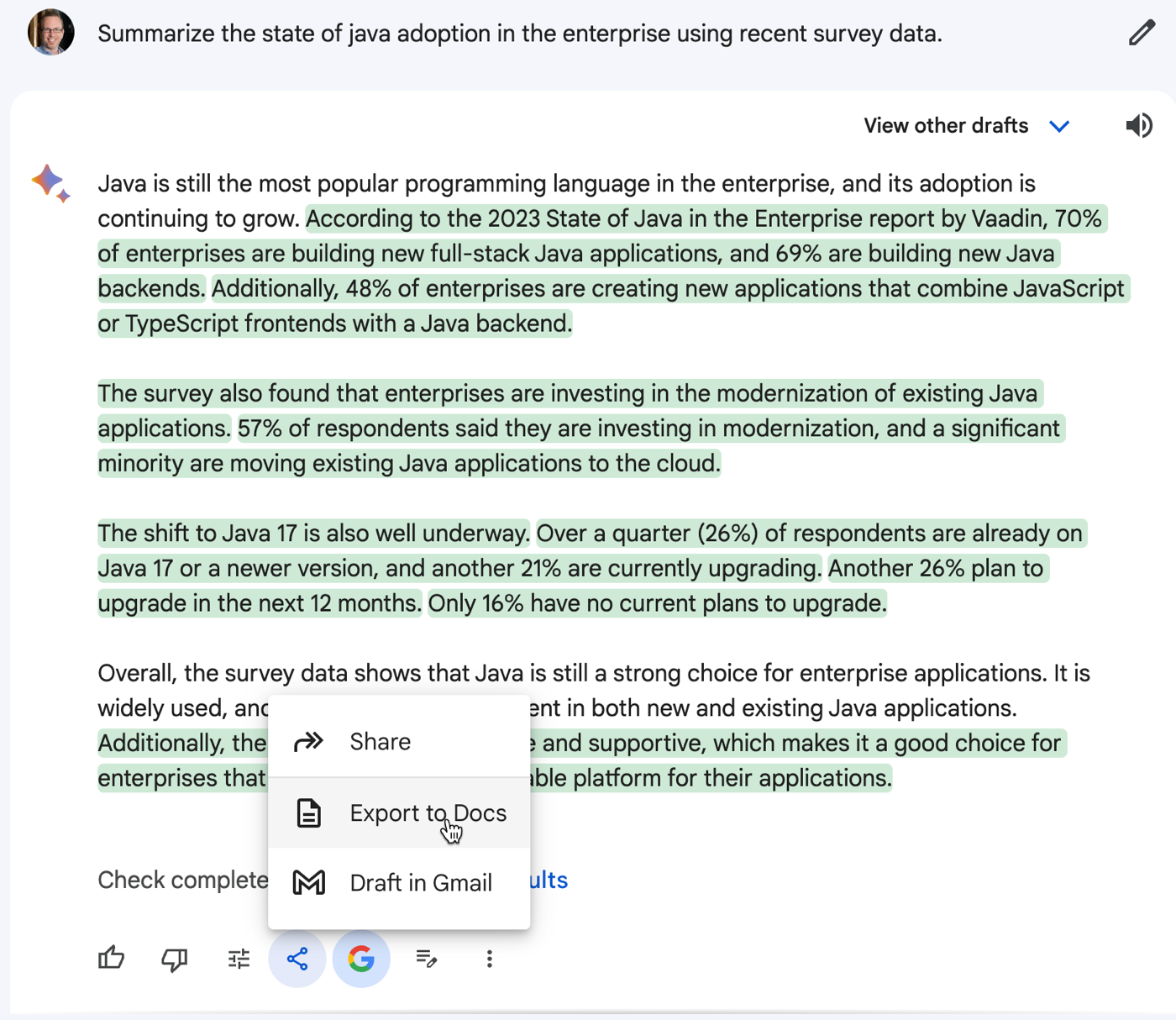
Bard can help me brainstorm ideas or do basic research before dumping the results into requirement spec in Google Docs.
I may sketch out my initial architecture in our free and fun Architecture Diagramming Tool and then ask Bard to find resilience or security flaws in my design.
Then I can use Duet AI in Google Cloud to code up the application components, introduce tests, and help me set up my CI/CD pipeline. From design, to development, to ops, I’m getting AI assistance in a single platform without bouncing around too much. Not bad!
4. I’m building better the first time because I get recommended best practices as I go along
Sometimes our “starter” code makes its way to production, right? But what if it was easier to apply best practices earlier in the process?
We trained Duet AI in Google Cloud on millions of pages of quality Google Cloud docs and thousands of expert-written code samples, and this helps us return smart suggestions early in your development process.
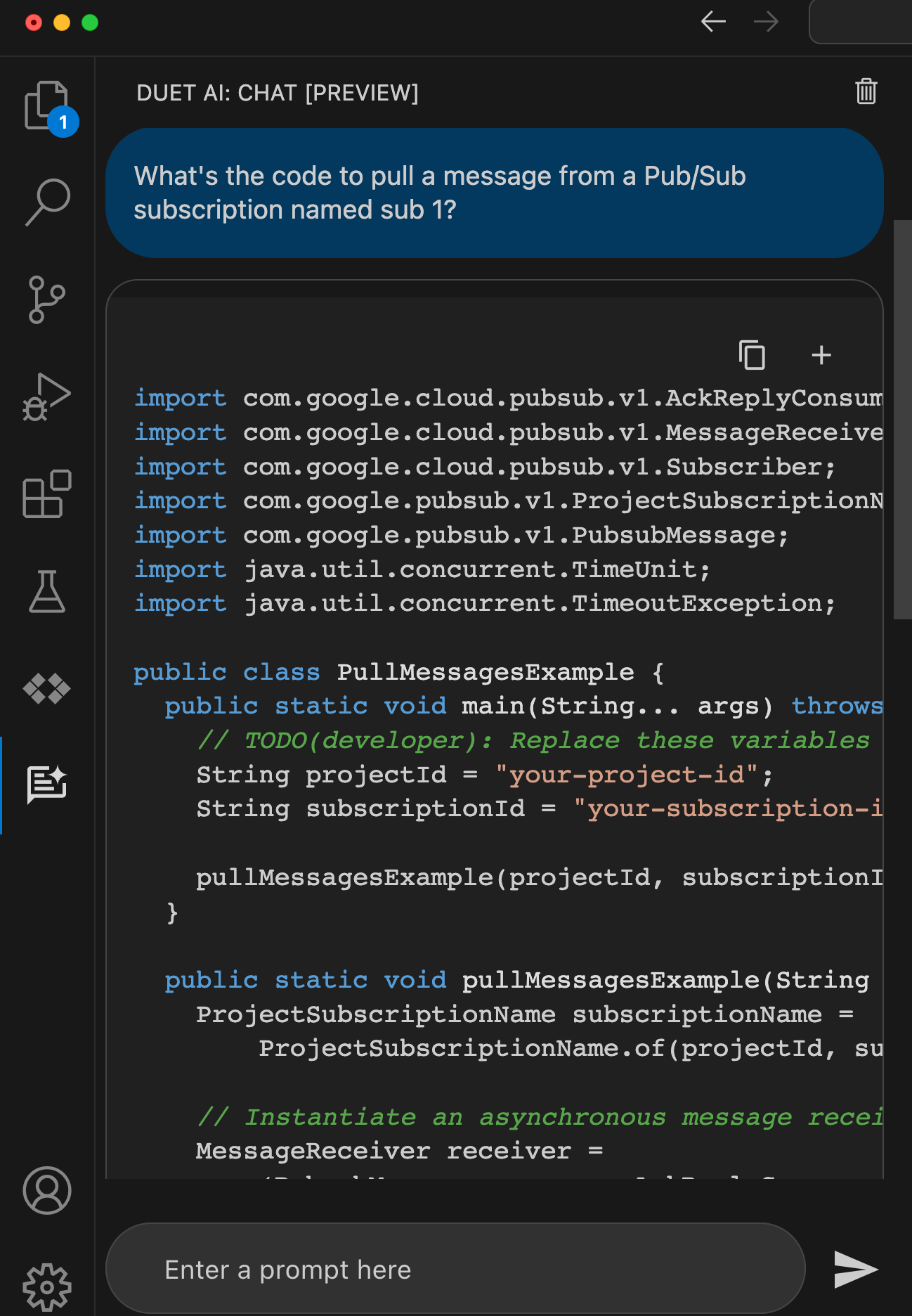
When I ask for something like “code to pull message from a Google Cloud Pub/Sub subscription” I want quality code back that works at scale. Sure enough, I got back code that looks very similar to what a dev would find by hunting through our great documentation.
With effective model prompting, I can get back good architectural, code, and operational insights so that I build it right the first time.
5. I’m analyzing situations faster because of human-readable summaries of low-level details
I’m excited to see the start of more personalized and real-time insights powered by AI. Let’s take two examples.
First, our Security Command Center will show me real-time AI-generated summaries of “findings” for a given threat or vulnerability. I like these more human readable, contextual write-ups that help me make sense of the security issue. Great use of generative AI here.
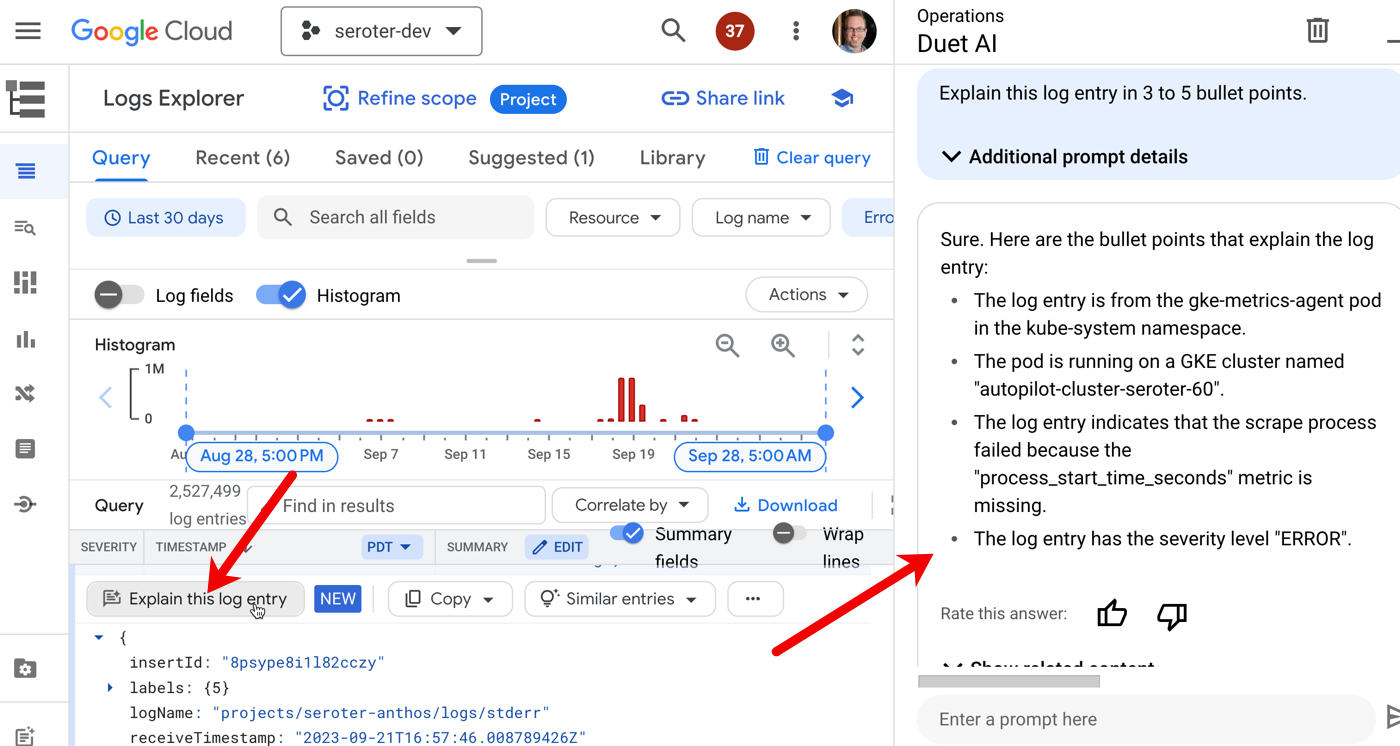
Another case is Duet AI integration with Cloud Logging. Log entries have a “explain this log entry” button which asks the integrated Chat experience to summarize the log and make it more digestible.
I’d like to see a lot more of this sort of thing!
6. I’m not locked out of doing things on my own or customizing my experience
There aren’t any tradeoffs here. In past platforms I’ve used, we traded convenience for flexibility. That was a hallmark of PaaS environments: use an efficient abstraction in exchange for robust customization. You got helpful guardrails, but were limited what you could do. Not here. AI is making the cloud easier, but not keeping you from doing anything yourself. And if you want to build out your own AI services and experiences, we offer some of the world’s best infrastructure (TPUs, FTW) and an unparalleled AI platform in Vertex AI. Use our Codey model yourself, mess with your favorite open models, and more. AI is here to help, not force you into a box.
The Google Cloud folks have this new marketing slogan plastered on buildings and billboards all over the place. Have you seen it? I took this picture in San Francisco:
Don’t dismiss it as one of the usual hype-y statements from vendors. Things have changed. The “boomer clouds” have to evolve quickly with AI assistance or they’ll disappoint you with a legacy-style interface. Fun times ahead!
We’ve finished a week of promo reviews this week at Google. It causes my imposter syndrome to flare up, as I’m surrounded by people doing tremendous work and are more talented than I am. But, that’s a great motivator to keep learning and growing. There are a few pieces below that taught me new things today.
[blog] Working at a Startup vs in Big Tech. There’s a difference, no doubt. I’ve done 3-ish startups, and a couple Big Tech places. Your experience doesn’t just depend on company size; it relates to your role, stage of career, and the specific company.
##
Want to get this update sent to you every day? Subscribe to my RSS feed or subscribe via email below:
Today is Google’s 25th birthday. I’m old enough to be its dad! Check out a few links related to that (the birthday, not my fathering of an internet company), as well as some terrific tech content.
[blog] Google at 25: By the numbers. Fun set of insights using different numbers to represent the significant impact that Google has on the world.
[site] ThoughtWorks Radar Volume 29. I always look forward to these updates. This explores the techniques, tools, platforms, and languages that you should adopt, consider, or hold.
[blog] MySQL High Availability. Flipkart does a lot of MySQL, and built a home-grown solution to manage the high availability of their clusters.
[docs] Optimize costs with FinOps hub. Will clouds pay lip service to cost management assistance, and then make it hard to optimize? I hope not! Our new FinOps dashboard seems helpful.
It’s probably just me, but it feels like the technology introduction/adoption cycle is speeding up. More new platforms and tech, faster growth. it’s exciting, but I’m not sure how most folks are keeping up.
[article] Tech Works: When Should Engineers Use Generative AI? Good piece. Be aware of what you’re doing. But I do suspect that many of these underlying concerns about generative AI results will (a) fade as products improve and (b) not matter as the value outweighs the cost.
[youtube-video] Cloud Functions local debugging. It used to be tough to build and debug serverless functions anywhere but in the cloud. Not any more. Local dev and debugging is easier now.
[blog] Creating kids stories with Generative AI. Here’s a good use of AI! Generate bed time stories. We’re probably only a step or two away from generating mission statements, annual goals, and quarterly reports.
[blog] The Tech Marketer’s Problem. Everyone has an angle. Hey, me included. Coté suggests you be aware of that, but also don’t dismiss the angle outright.
Today’s my birthday, and I enjoyed a productive day at work, and hopefully, I’ll have a fun evening with the family. It’s a gift to take another lap around the sun, and I try to keep perspective of what’s really important in life!
[blog] Navigate The Seas Of Developer Experience. I’m seeing a volume increase from the big analyst firms on the topic of developer experience. Which means enterprises are hearing the same thing. Forrester did some good work exploring the various stakeholders of dev ex.
[blog] A Behind-the-Scenes Look at Chaos Testing. How do you know if your event-driven system can handle failure? This post from Yugabyte offers up a good list of server-side and client-side chaos scenarios to test a change data capture process.
[article] 5 Types of Stories Leaders Need to Tell. Storytelling isn’t natural for everyone, and can feel like “fluff” that gets in the way of explaining what needs to be done. But if you notice that folks don’t follow your lead, it may be because you haven’t painted the picture to move them.
[article] From Cloud-Hosted to Cloud-Native. Using cloud services as hosted versions of on-prem software rarely makes anyone happy. This talk and transcript looks at moving to a more modern architecture.
[blog] BYO Service Mesh on GKE Autopilot. There’s always a tug between fully-managed products and the desire for low-level configurations. Somehow, GKE Autopilot made this possible for Kubernetes in a useful way.
[article] Why Is It So Hard to Leave a Bad Job? I like my job, but we’ve all been in a place where we wanted to make a change. These are good reasons, and mitigation for concerns, for switching.
##
Want to get this update sent to you every day? Subscribe to my RSS feed or subscribe via email below:
My last day of this European trip was a good one. I had some educational customer meetings in Madrid, and of course, a late dinner. Back to San Diego midday tomorrow.
[blog] New Research: Will AI Kill The Low-Code Market? Peek at some new Forrester research. It won’t kill low-code overall, but it may kill any first-gen low-code products that don’t incorporate AI.
Started the day in Paris, ended it in Frankfurt. Another great day of customer chats and meeting interesting new people. Both things that introverts like me LOVE doing!
[blog] Developer Perceptions of Productivity and Security. How might YOU interpret these survey results? Do devs think AI-generated code is valuable enough to accept the security flaws? Or do devs not even think of security up front?
[site] Free for Developers. If you don’t like paying for things, you’ll like this site that lists all sorts of free tiers and free products for popular dev services.
[blog] Hello, Java 21. Josh offers a good look at what’s good about this latest version of the popular programming language.
[blog] How 4 historic buildings became Google workspaces. Fun look at four interesting locations that became Google offices. I’ve visited two, but really want to get up to the Spruce Goose location in LA.
##
Want to get this update sent to you every day? Subscribe to my RSS feed or subscribe via email below:
During these quick European trips, I never get used to how late these people eat dinner. But another good day here in Paris, with a chance to talk about developer experience, generative AI, and how Google does DevOps.
[blog] Which Kinds of Tests Should I Write? Revisited. I like the designation of “customer tests” (ways to prove value, such as functional tests), and “programmer tests” (code does what you want, using something like unit tests).
[blog] static-server: an HTTP server in Go for static content. Sometimes you just need a simple server running so that you can test out a variety of use cases. Here’s the few lines it takes to get a Go server running.
[blog] Capslock: What is your code really capable of? Here’s a new tool from Google that analyzes your code (Go, for now) and tells you about privileged operations (such as network operations). I can imagine this being helpful before you check in code, or during CI pipelines.
[blog] Backstage on GKE, Cloud Run, and Cloud SQL. Platform engineering folks and others like Backstage as a platform for building dev portals. It can be hard to use, so I like demos like this that show how to get it running in Kubernetes or serverless container environments.
[article] Exploring Generative AI. Is generative AI any different than classic code generators? Yes, yes it is.
[blog] Bard can now connect to your Google apps and services. This is a terrific update to our free-to-use, powerful generative AI chat experience. Use connectors, double-check answers, and share conversations with others.
I’m in Paris today after an uneventful trip over the weekend. Yesterday, I got to walk around all afternoon, which was fun and exhausting. Tomorrow, I’m speaking at a local event. Enjoy the links below!
[blog] Notes on Teaching Test Driven Development. Some good commentary here on TDD, especially the reminder that the goal of your test suite isn’t too reveal if code is perfect or not (with 100% coverage!), but whether your code is ready to ship.
[blog] Why You Should Advertise Your “Tech Debt.” No one wants to work on “tech debt” when it’s positioned as such. No, think about the desired outcome you’re after, and prioritize it that way!
[blog] Bun hype. How we learned nothing from Yarn. Good contrarian take on all the excitement over Bun, the JavaScript runtime. Specifically, it touches on the point made above that “better” is a short-lived advantage in most cases.



 Richard Seroter's Architecture Musings