Month: August 2020

  • First look: Triggering Google Cloud Run with events generated by GCP services

    First look: Triggering Google Cloud Run with events generated by GCP services

    When you think about “events” in an event-driven architecture, what comes to mind? Maybe you think of business-oriented events like “file uploaded”, “employee hired”, “invoice sent”, “fraud detected”, or “batch job completed.” You might emit (or consume) these types of events in your application to develop more responsive systems. 

    What I find even more interesting right now are the events generated by the systems beneath our applications. Imagine what your architects, security pros, and sys admins could do if they could react to databases being provisioned, users getting deleted, firewall being changed, or DNS zone getting updated. This sort of thing is what truly enables the “trust, but verify” approach for empowered software teams. Let those teams run free, but “listen” to things that might be out of compliance.

    This week, the Google Cloud team announced Events for Cloud Run, in beta this September. What this capability does is let you trigger serverless containers when lifecycle events happen in most any Google Cloud service. These lifecycle events are in the CloudEvents format, and distributed (behind the scenes) to Cloud Run via Google Cloud PubSub. For reference, this capability bears some resemblance to AWS EventBridge and Azure Event GridIn this post, I’ll give you a look at Events for Cloud Run, and show you how simple it is to use.

    Code and deploy the Cloud Run service

    Developers deploy containers to Cloud Run. Let’s not get ahead of ourselves. First, let’s build the app. This app is Seroter-quality, and will just do the basics. I’ll read the incoming event and log it out. This is a simple ASP.NET Core app, with the source code in GitHub

    I’ve got a single controller that responds to a POST command coming from the eventing system. I take that incoming event, serialize from JSON to a string, and print it out. Events for Cloud Run accepts either custom events, or CloudEvents from GCP services. If I detect a custom event, I decode the payload and print it out. Otherwise, I just log the whole CloudEvent.

    namespace core_sample_api.Controllers
    {
        [ApiController]
        [Route("")]
        public class Eventsontroller : ControllerBase
        {
            private readonly ILogger<Eventsontroller> _logger;
            public Eventsontroller(ILogger<Eventsontroller> logger)
            {
                _logger = logger;
            }
            [HttpPost]
            public void Post(object receivedEvent)
            {
                Console.WriteLine("POST endpoint called");
                string s = JsonSerializer.Serialize(receivedEvent);
                //see if custom event with "message" root property
                using(JsonDocument d = JsonDocument.Parse(s)){
                    JsonElement root = d.RootElement;
                    if(root.TryGetProperty("message", out JsonElement msg)) {
                        Console.WriteLine("Custom event detected");
                        JsonElement rawData = msg.GetProperty("data");
                        //decode
                        string data = System.Text.Encoding.UTF8.GetString(Convert.FromBase64String(rawData.GetString()));
                        Console.WriteLine("Data value is: " + data);
                    }
                }
                Console.WriteLine("Data: " + s);
            }
        }
    }
    

    After checking all my source code into GitHub, I was ready to deploy it to Cloud Run. Note that you can use my same repo to continue on this example!

    I switched over to the GCP Console, and chose to create a new Cloud Run service. I picked a region and service name. Then I could have chosen either an existing container image, or, continuous deployment from a git repo. I chose the latter. First I picked my GitHub repo to get source from.

    Then, instead of requiring a Dockerfile, I picked the new Cloud Buildpacks support. This takes my source code and generates a container for me. Sweet. 

    After choosing my code source and build process, I kept the default HTTP trigger. After a few moments, I had a running service.
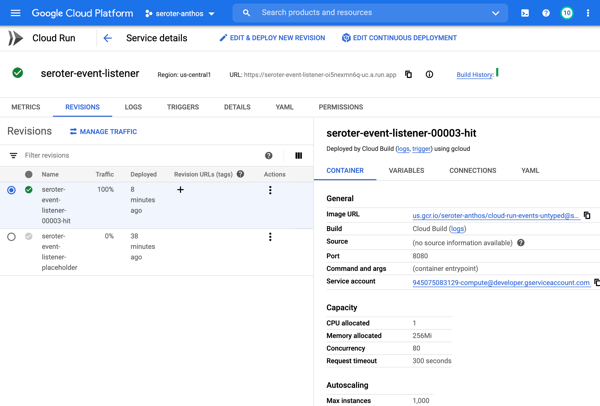
    Add triggers to Cloud Run

    Next up, adding a trigger. By default, the “triggers” tab shows the single HTTP trigger I set up earlier. 

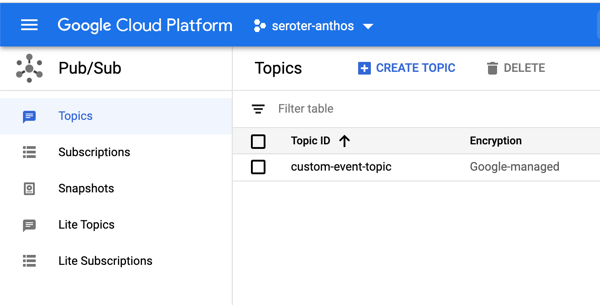
    I wanted to show custom events in addition to CloudEvents ones, so I went to the PubSub dashboard and created a new queue that would trigger Cloud Run.
    Back in the Cloud Run UX, I added a new trigger. I chose the trigger type of “com.google.cloud.pubsub.topic.publish” and picked the Topic I created earlier. After saving the trigger, I saw it show up in the list.

    After this, I wanted to trigger my Cloud Run service with CloudEvents. If you’re receiving events from Google Cloud services, you’ll have to enable Data Access Logs so that events can be spun up from Cloud Logs. I’m going to listen for events from Cloud Storage and Cloud Build, so I turned on audit logging for each.

    All that was left to define the final triggers. For Cloud Storage, I chose the storage.create.bucket trigger.

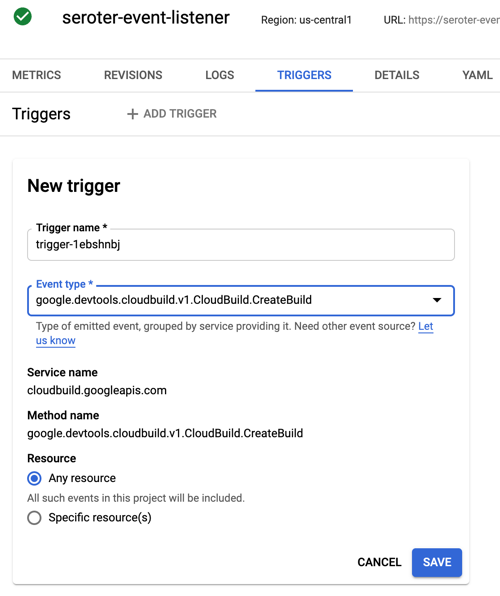
    I wanted to react to Cloud Build, so that I could see whenever a build started.
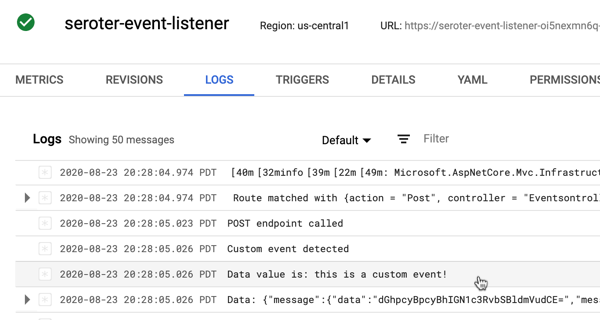
    Terrific. Now I was ready to test. I sent in a message to PubSub to trigger the custom event.

    I checked the logs for Cloud Run, and almost immediately saw that the service ran, accepted the event, and logged the body.
    Next, I tested Cloud Storage by adding a new bucket.

    Almost immediately, I saw a CloudEvent in the log.

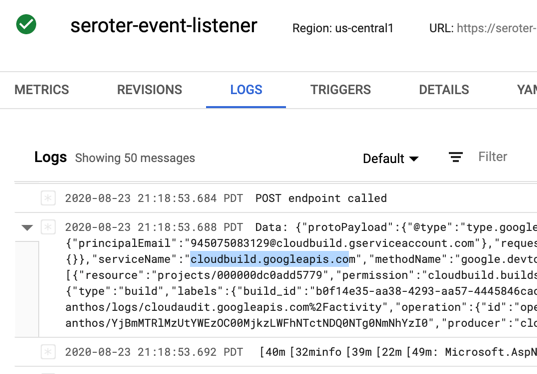
    Finally, I kicked off a new Build pipeline, and saw an event indicating that Cloud Run received a message, and logged it.
    If you care about what happens inside the systems your apps depend on, take a look at the new Events for Cloud Run and start tapping into the action.

  • I’m looking forward these 8 sessions at Google Cloud Next ’20 OnAir (Week 7)

    I’m looking forward these 8 sessions at Google Cloud Next ’20 OnAir (Week 7)

    It’s here. After six weeks of OTHER topics, we’re up to week seven of Google Cloud Next OnAir, which is all about my area: app modernization. The “app modernization” bucket in Google Cloud covers lots of cool stuff including Cloud Code, Cloud Build, Cloud Run, GKE, Anthos, Cloud Operations, and more. It basically addresses the end-to-end pipeline of modern apps. I recently sketched it out like this:

    I think this the biggest week of Next, with over fifty breakout sessions. I like that most of the breakouts so far have been ~20 minutes, meaning you can log in, set playback speed to 1.5x, and chomp through lots of topic quickly. 

    Here are eight of the sessions I’m looking forward to most:

    1. Ship Faster, Spend Less By Going Multi-Cloud with Anthos. This is the “keynote” for the week. We’re calling out a few product announcements, highlighting some new customers, and saying keynote-y things. You’ll like it.
    2. GKE Turns 5: What’s New? All Kubernetes aren’t the same. GKE stands apart, and the team continues solving customer problems in new ways. This should be a great look back, and look ahead.
    3. Cloud Run: What’s New? To me, Cloud Run has the best characteristics of PaaS, combined with the the event-driven, scale-to-zero of serverless functions. This is the best place I know of to run custom-built apps in the Google Cloud (or anywhere, with Anthos).
    4. Modernize Legacy Java Apps Using Anthos. Whoever figures out how to unlock value from existing (Java) apps faster, wins. Here’s what Google Cloud is doing to help customers improve their Java apps and run them on a great host.
    5. Running Anthos on Bare Metal and at the Edge with Major League Baseball (MLB). Baseball’s back, my Slam Diego Padres are fun again, and Anthos is part of the action. Good story here.
    6. Getting Started with AnthosAnthos Deep Dive: Part OneAnthos Deep Dive: Part Two. Am I cheating by making three sessions into one entry? Fine, you caught me. But this three part trilogy is a great way to grok Anthos and understand its value.
    7. Develop for Cloud Run in the IDE with Cloud Code. Cloud Code extends your IDE to support Google Cloud, and Cloud Run is great. Combine the two, and you’ve got some good stuff.
    8. Event-Driven Microservices with Cloud Run. You’re going to enjoy this one, and seeing what’s now possible.

    I’m looking forward to this week. We’re sharing lots of fun progress, and demonstrating some fresh perspectives on what app modernization should look like. Enjoy watching!

  • I’m looking forward these 7 sessions at Google Cloud Next ’20 OnAir (Weeks 5 + 6)

    Nearly halfway through the “Summer of Google”, there’s been some significant announcements, and plenty of interesting talks. We’ve shared the names of some new Google Cloud customers—Deutsche Bank, Goldman Sachs, Spotify, Best Buy and more—and announced some pretty cool stuff—think Confidential VMs, BigQuery Omni, a Certificate Authority Service, a new undersea cable, a cloud migration program, plus the usual barrage of new things we’re constantly shipping for you. The conference is still free to sign up for, and you can catch up on everything you’ve missed.

    Week five content is available on August 11, and week six material is binge-able on August 18. Week five is all about Data Analytics and the focus of week six is Data Management and Databases.

    Here’s what looks good to me in week five:

    These sessions look appealing in week six:

    It was hard to just pick a few talks! Check those out, and stay tuned for a final look at the last three weeks of this summer extravaganza.

  • Think all Kubernetes look alike? Look for differences in these six areas.

    Think all Kubernetes look alike? Look for differences in these six areas.

    I feel silly admitting that I barely understand what happens in the climactic scene of the 80s movie Trading Places. It has something to do with short-selling commodities—in this case, concentrated orange juice. Let’s talk about commodities, which Investopedia defines as:

    a basic good used in commerce that is interchangeable with other goods of the same type. Commodities are most often used as inputs in the production of other goods or services. The quality of a given commodity may differ slightly, but it is essentially uniform across producers.

     Our industry has rushed to declare Kubernetes a commodity, but is it? It is now a basic good used as input to other goods and services. But is uniform across producers? It seems to me that the Kubernetes API is commoditized and consistent, but the platform experience isn’t. Your Kubernetes experience isn’t uniform across Google Kubernetes Engine (GKE), AWS Elastic Kubernetes Service (EKS), Azure Kubernetes Service (AKS), VMware PKS, Red Hat OpenShift, Minikube, and 130+ other options. No, there are real distinctions that can impact your team’s chance of success adopting it. As you’re choosing a Kubernetes product to use, pay upfront attention to provisioning, upgrades, scaling/repair, ingress, software deployment, and logging/monitoring. 

    I work for Google Cloud, so obviously I’ll have some biases. That said, I’ve used AWS for over a decade, was an Azure MVP for years, and can be mostly fair when comparing products and services.

    1. Provisioning

    Kubernetes is a complex distributed system with lots of moving parts. Multi-cluster has won out as a deployment strategy (versus one giant mega cluster segmented by namespace), which means you’ll provision Kubernetes clusters with some regularity.

    What do you have to do? How long does it take? What options are available? Those answers matter! 

    Kubernetes offerings don’t have identical answers to these questions:

    • Do you want clusters in a specific geography?
    • Should clusters get deployed in an HA fashion across zones?
    • Can you build a tiny cluster (small machine, single node) and a giant cluster?
    • Can you specify the redundancy of the master nodes? Is there redundancy?
    • Do you need to choose a specific Kubernetes version? 
    • Are worker nodes provisioned during cluster build, or do you build separately and attach to the cluster?
    • Will you want persistent storage for workloads?
    • Are there “special” computing needs, including large CPU/memory nodes, GPUs, or TPUs?
    • Are you running Windows containers in the cluster?

    As you can imagine, since GKE is the original managed Kubernetes, there’s lots of options for you when building clusters. Or, you can do a one-click install of a “starter” cluster, which is pretty great.

    2. Upgrades

    You got a cluster running? Cool! Day 2 is usually where the real action’s at. Let’s talk about upgrades, which are a fact of life for clusters. What gets upgraded? Namely the version of Kubernetes, and the configuration/OS of the nodes themselves. The level of cluster management amongst the various providers is not uniform.

    GKE supports automated upgrades of everything in the cluster, or you can trigger it manually. Either way, you don’t do any of the upgrade work yourself. Release channels are pretty cool, too. DigitalOcean looks somewhat similar to GKE, from an upgrade perspective. AKS offers manually triggered upgrades. AWS offers kinda automated or extremely manual (i.e. creating new node groups or using Cloud Formation), depending on whether you used managed or unmanaged worker nodes.

    3. Scaling / Repairs

    Given how many containers you can run on a good-sized cluster, you may not have to scale your cluster TOO often. But, you may also decide to act in a “cloudy” way, and purposely start small and scale up as needed.

    Like with most any infrastructure platform, you’ll expect to scale Kubernetes environments (minus local dev environments) both vertically and horizontally. Minimally, demand that your Kubernetes provider can scale clusters via manual commands. Increasingly, auto-scaling of the cluster is table-stakes. And don’t forget scaling of the pods (workloads) themselves. You won’t find it everywhere, but GKE does support horizontal pod autoscaling and vertical pod autoscaling too.

    Also, consider how your Kubernetes platform handles the act of scaling. It’s not just about scaling the nodes or pods. It’s how well the entire system swells to absorb the increasing demand. For instance, Bayer Crop Science worked with Google Cloud to run a 15,000 node cluster in GKE. For that to work, the control planes, load balancers, logging infrastructure, storage, and much more had to “just work.” Understand those points in your on-premises or cloud environment that will feel the strain.

    Finally, figure out what you want to happen when something goes wrong with the cluster. Does the system detect a down worker and repair/replace it? Most Kubernetes offerings support this pretty well, but do dig into it!

    4. Ingress

    I’m not a networking person. I get the gist, and can do stuff, but I quickly fall into the pit of despair. Kubernetes networking is powerful, but not simple. How do containers, pods, and clusters interact? What about user traffic in and out of the cluster? We could talk about service meshes and all that fun, but let’s zero in on ingress. Ingress is about exposing “HTTP and HTTPS routes from outside the cluster to services within the cluster.” Basically, it’s a Layer 7 front door for your Kubernetes services.

    If you’re using Kubernetes on-premises, you’ll have some sort of load balancer configuration setup available, maybe even to use with an ingress controller. Hopefully! In the public cloud, major providers offer up their load-balancer-as-a-service whenever you expose a service of type “LoadBalancer.” But, you get a distinct load balancer and IP for each service. When you use an ingress controller, you get a single route into the cluster (still load balanced, most likely) and the traffic is routed to the correct pod from there. Microsoft, Amazon, and Google all document their way to use ingress controllers with their managed Kubernetes.

    Make sure you investigate the network integrations and automation that comes with your Kubernetes product. There are super basic configurations (that you’ll often find in local dev tools) all the way to support for Istio meshes and ingress controllers.

    5. Software Deployment

    How do you get software into your Kubernetes environment? This is where the commoditization of the Kubernetes API comes in handy! Many software products know how to deploy containers to a Kubernetes environment.

    Two areas come to mind here. First, deploying packaged software.  You can use Helm to deploy software to most any Kubernetes environment. But let’s talk about marketplaces. Some self-managed software products deliver some form of a marketplace, and a few public clouds do. AWS has the AWS Marketplace for Containers. DigitalOcean has a nice little marketplace for Kubernetes apps. In the Google Cloud Marketplace, you can filter by Kubernetes apps, and see what you can deploy on GKE, or in Anthos environments. I didn’t notice a way in the Azure marketplace to find or deploy Kubernetes-targeted software.

    The second area of software deployment I think about relates to CI/CD systems for custom apps. Here, you have a choice of 3rd party best-of-breed tools, or whatever your Kubernetes provider bakes in. AWS CodePipeline or CodeDeploy can deploy apps to ECS (not EKS, it seems). Azure Pipelines looks like it deploys apps directly to AKS. Google Cloud Build makes it easy to deploy apps to GKE, App Engine, Functions, and more.

    When thinking about software deployment, you could also consider the app platforms that run atop a Kubernetes foundation, like Knative and in the future, Cloud Foundry. These technologies can shield you from some of the deployment and configuration muck that’s required to build a container, deploy it, and wire it up for routing.

    6. Logging/Monitoring

    Finally, take a look at what you need from a logging and monitoring perspective. Most any Kubernetes system will deliver some basic metrics about resource consumption—think CPU, memory, disk usage—and maybe some Kubernetes-specific metrics. From what I can tell, the big 3 public clouds integrate their Kubernetes services with their managed monitoring solutions. For example, you get visibility into all sorts of GKE metrics when clusters are configured to use Cloud Operations.

    Then there’s the question of logging. Do you need a lot of logs, or is it ok if logs rotate often? DigitalOcean rotates logs when they reach 10MB in size. What kind of logs get stored? Can you analyze logs from many clusters? As always, not every Kubernetes behaves the same!

    Plenty of other factors may come into play—things like pricing model, tenancy structure, 3rd party software integration, troubleshooting tools, and support community come to mind—when choosing a Kubernetes product to use, so don’t get lulled into a false sense of commoditization!