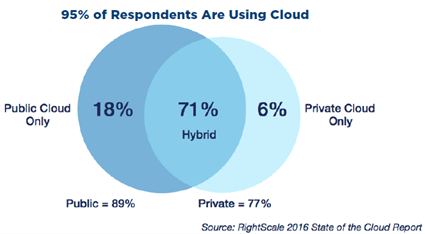
 RightScale recently announced the results of their annual “State of the Cloud” survey. You can find the report here, and my InfoQ.com story here. A lot of people participated in the survey, and the results showed that a majority of companies are growing their public cloud usage, but continuing to invest heavily in on-premises “cloud” environments. When I was reading this report, I was thinking about the implications on a company’s application integration strategy. As workloads continue to move to cloudy hosts and companies start to get addicted to the benefits of cloud (from the survey: “faster access to infrastructure”, “greater scalability”, “geographic reach”, “higher performance”), does that change what they think about running integration services? What are the options for a company wondering where to host their application/data integration engine, and what benefits and risks are associated with each choice?
The options below should apply whether you’re doing real-time or batch integration, high throughput messaging or complex orchestration, synchronous or asynchronous communication.
Option #1 – Use an Integration-as-a-Service engine in the public cloud
It may make sense to use public cloud integration services to connect your apps. Or, introduce these as edge intake services that still funnel data to another bus further downstream.
Benefits
- Easy to scale up or down. One of the biggest perks of a cloud-based service is that you don’t have to do significant capacity planning up front. For messaging services like Amazon SQS or the Azure Service Bus, there’s very little you have to consider. For an integration service like SnapLogic, there are limits, but you can size up and down as needed. The key is that you can respond to bursts (or troughs) in usage by cutting your costs. No more over-provisioning just in case you might need it.
- Multiple patterns available. You won’t see a glut of traditional ESB-like cloud integration services. Instead, you’ll find many high-throughput messaging (e.g. Google Pub/Sub) or stream processing services (e.g. Azure Stream Analytics) that take advantage of the elasticity of the cloud. However, if you’re doing bulk data movement, there are multiple viable services available (e.g. Talend Integration Cloud), if you’re doing stateful integration there are also services for that (e.g. Azure Logic Apps).
- No upgrade projects. From my experience, IT never likes funding projects that upgrade foundational infrastructure. That’s why you have servers still running Windows Server 2003, or Oracle databases that are 14 versions behind. You always tell yourself that “NEXT year we’ll get that done!” One of the seductive aspects of cloud-based services is that you don’t deal with that any longer. There are no upgrades; new capabilities just show up. And for all these cloud integration services, that means always getting the latest and greatest as soon as it’s available.
- Regular access to new innovations. Is there anything in tech more depressing than seeing all these flashy new features in a product that you use, and knowing that you are YEARS away from deploying it? Blech. The industry is changing so fast, that waiting 4 years for a refresh cycle is an eternity. If you’re using a cloud integration service, then you’re able to get new endpoint adapters, query semantics, storage enhancements and the like as soon as possible.
- Connectivity to cloud hosted systems, partners. One of the key reasons you’d choose a cloud-based integration service is so that you’re closer to your cloudy workloads. Running your web log ingest process, partner supply chain, or master-data management jobs all right next to your cloud-hosted databases and web apps gives you better performance and simpler connectivity. Instead of navigating the 12 layers of firewall hell to expose your on-premises integration service to Internet endpoints, you’re right next door.
- Distributed intake and consumption. Event and data sources are all over the place. Instead of trying to ship all that information to a centralized bus somewhere, it can make sense to do some intake at the edge. Cloud-based services let you spin up multiple endpoints in various geographies with ease, which may give you much more flexibility when taking in Internet-of-Things beacon data, orders from partners, or returning data from time-sensitive request/reply calls.
- Lower operational cost. You MAY end up paying less, but of course you could also end up paying more. Depends on your throughput, storage, etc. But ideally, if you’re using a cloud integration service, you’re not paying the same type of software licensing and hardware costs as you would for an on-premises system.
Risks
- High latency with on-premises systems. Unless your company was formed within the last 18 months, I’d be surprised if you didn’t have SOME key systems sitting in a local facility. While latency may not matter for some asynchronous workloads, if you’re taking in telemetry data from devices and making real-time adjustments to applications, every millisecond counts. Depending on where your home office is, there could be a bit of distance between your cloud-based integration engine and the key systems it talks to.
- Limited connectivity to on-premises systems (bi-directional). It’s usually not too challenging to get on-premises systems to reach out to the Internet (and push data to an endpoint), but it’s another matter to allow data to come *into* your on-premises systems from the Internet. Some integration services have solved this by putting agents on the local environment to facilitate secure communication, but realistically, it’ll be on you to extract data from cloud-based engines versus expecting them to push data into your data centers.
- Experience data leakage if data security isn’t properly factored in. If the data never leaves your private network, it can be easy to be lazy about security. Encrypt in transit? Ok. Encrypt the data as well? Nah. If that casual approach to security isn’t tightened up when you start passing data through cloud integration services, you could find yourself in trouble. While your data may be protected from others accidentally seeing it, you may have made it easy for others within your own organization to extract or tap into data they didn’t have access to before.
- Services are not as mature as software-based products, and focused mostly on messaging. It’s true that cloud-based solutions haven’t been around as long as the Tibcos, BizTalk Servers, and such. And, many cloud-based solutions focus less on traditional integration techniques (FTP! CSV files!) and more on Internet-scale data distribution.
- Opaque operational interfaces make troubleshooting more difficult. We’re talking about as-a-Service products here, so by definition, you’re not running this yourself. That means you can’t check out the server logs, add tracing logic, or view the memory consumption of a particular service. Instead, you only have the interfaces exposed by the vendor. If troubleshooting data is limited, you have no other recourse.
- Limited portability of the configuration between providers. Depending on the service you choose, there’s a level of lock-in that you have to accept. Your integration logic from one service can’t be imported into another. Frankly, the same goes for on-premises integration engines. Either way, your application/data integration platform is probably a key lock-in point regardless of where you host it.
- Unpredictable availability and uptime. A key value proposition of cloud is high availability, but you have to take the provider’s word for it that they’ve architected as such. If your cloud integration bus is offline, so are you. There’s no one to yell at to get it back up and running. Likewise, any maintenance to the platforms happens at a time that works for the vendor, not for you. Ideally you never see downtime, but you absolutely have less control over it.
- Unpredictable pricing on cost dimensions you may not have tracked before (throughput, storage). I’d doubt that most IT shops know their true cost of operations, but nonetheless, it’s possible to get sticker shock when you start paying based on consumption. Once you’ve sunk cost into an on-premises service, you may not care about message throughput or how much data you’re storing. You will care about things like that when using a pay-as-you-go cloud service.
Option #2 – Run your integration engine in a public cloud environment
If adopting an entirely managed public service isn’t for you, then you still may want the elastic foundation of cloud while running your preferred integration engine.
Benefits
- Run the engine of your choice. Like using Mule, BizTalk Server, or Apache Kafka and don’t want to give it up? Take that software and run it on public cloud Infrastructure-as-a-Service. No need to give up your preferred engine just because you want a more flexible host.
- Configuration is portable from on-premises solution (if migrating versus setting this up brand new). If you’re “upgrading” from fixed virtual machines or bare metal boxes to an elastic cloud, the software stays the same. In many cases, you don’t have to rewrite much (besides some endpoint addresses) in order to slide into an environment where you can resize the infrastructure up and down much easier.
- Scale up and down compute and storage. Probably the number one reason to move. Stop worrying about boxes that are too small (or large!) and running out of disk space. By moving from fixed on-premises environments to self-service cloud infrastructure, you can set an initial sizing and continue to right-size on a regular basis. About to beat the hell out of your RabbitMQ environment for a few days? Max out the capacity so that you can handle the load. Elasticity is possibly the most important reason to adopt cloud.
- Stay close to cloud hosted systems. Your systems are probably becoming more distributed, not more centralized. If you’re seeing a clear trend towards moving to cloud applications, then it may make sense to relocate your integration bus to be closer to them. And if you’re worried about latency, you could choose to run smaller edge instances of your integration bus that feed data to a centralized one. You have much more flexibility to introduce such an architecture when capacity is available anywhere, on-demand.
- Keep existing tools and skillsets around that engine. One challenge that you may have when adopting an integration-as-a-service product is the switching costs. Not only are you rebuilding your integration scenarios in a new product, but you’re also training up staff on an entirely new toolset. If you keep your preferred engine but move it to the public cloud, there are no new training costs.
- Low level troubleshooting available. If problems pop up – and of course they will – you have access to all the local logs, services, and configurations that you did before. Integration solutions are notoriously tricky to debug given the myriad locations where something could have gone amiss. The more data, the better.
- Experience easier integration scenarios with partners. You may love using BizTalk’s Trading Partner Management capabilities, but don’t like wrangling with network and security engineers to expose the right endpoints from your on-premises environment. If you’re running the same technology in the public cloud, you’ll have a simpler time securely exposing select endpoints and ports to key partners.
Risks
- Long distance from integrated systems. Like the risk in the section above, there’s concern that shifting your integration engine to the public cloud will mean taking it away from where all the apps are. Does the enhanced elasticity make up for the fact that your business data now has to leave on-premises systems and travel to a bus sitting miles away?
- Connectivity to on-premises systems. If your cloud virtual machines can’t reach your on-premises systems, you’re going to have some awkward integration scenarios. This is where Infrastructure-as-a-Service can be a little more flexible than cloud integration services because it’s fairly easy to set up a persistent, secure tunnel between cloud IaaS networks and on-premises networks. Not so easy to do with cloud messaging services.
- There’s a larger attack surface if engine has public IP connectivity. You may LIKE that your on-premises integration bus is hard to reach! Would-be attackers must breach multiple zones in order to attack this central nervous system of your company. By moving your integration engine to the cloud and opening up ports for inbound access, you’re creating a tempting target for those wishing to tap into this information-rich environment.
- Not getting any of the operation benefits that as-a-service products possess. One of the major downsides of this option is that you haven’t actually simplified much; you’re just hosting your software elsewhere. Instead of eliminating infrastructure headaches and focusing on connecting your systems, you’re still standing up (virtual) infrastructure, configuring networks, installing software, managing software updates, building highly available setups, and so on. You may be more elastic, but you haven’t reduced your operational burden.
- Few built in connectivity to cloudy endpoints. If you’re using an integration service that comes with pre-built endpoint adapters, you may find that traditional software providers aren’t keeping up with “cloud born” providers. SnapLogic will always have more cloud connectivity than BizTalk Server, for example. You may not care about this if you’re dealing with messaging engines that require you to write producer/consumer code. But for those that like having pre-built connectors to systems (e.g. IFTTT), you may be disappointed with your existing software provider.
- Availability and uptime, especially if the integration engine isn’t cloud-native. If you move your integration engine to cloud IaaS, it’s completely on you to ensure that you’ve got a highly available setup. Running ZeroMQ on a single cloud virtual machine isn’t going to magically provide a resilient back end. If you’re taking a traditional ESB product and running it in cloud VMs, you still likely can’t scale out as well as cloud-friendly distributed engines like Kafka or NATS.
Option #3 – Run your integration engine on-premises
Running an integration engine in the cloud may not be for you. Even if your applications are slowly (quickly?) moving to the cloud, you might want to keep your integration bus put.
Benefits
- Run the engine of your choice. No one can tell you what to do in your own house! Pick the ESB, messaging engine, or ETL tool that works for you.
- Control the change and maintenance lifecycle. This applies to option #2 to some extent, but when you control the software to the metal, you can schedule maintenance at optimal times and upgrade the software on your own timetable. If you’ve got a sensitive Big Data pipeline and want to reboot Spark ONLY when things are quiet, then you can do that.
- Close to all on-premises systems. Plenty of workloads are moving to public cloud, but it’s sure as heck not all of them. Or at least right now. You may be seeing commodity services like CRM or HR quickly going to cloud services, but lots of mission critical apps still sit within your data centers. Depending on what your data sources are, you may have a few years before you’re motivated to give your integration engine a new address.
- You can still reach out to Internet endpoints, while keeping inbound ports closed. If you’re running something like BizTalk Server, you can send data to cloud endpoints, and even receive data in (through the Service Bus) without exposing the service to the Internet. And if you’re using messaging engines where you write the endpoints, it may not really matter if the engine is on-site.
- Can get some elasticity through private clouds. Don’t forget about private clouds! While some may think private clouds are dumb (because they don’t achieve the operational benefits or elasticity of a public cloud), the reality is that many companies have doubled down on them. If you take your preferred integration engine and slide it over to your private cloud, you may get some of the elasticity and self-service benefits that public cloud customers get.
Risks
- Difficult to keep up to date with latest versions. As the pace of innovation and disruption picks up, you may find it hard to keep your backbone infrastructure up to date. By continuing to own the lifecycle of your integration software, you run the risk of falling behind. That may not matter if you like the version of the software that you are on – or if you have gotten great at building out new instances of your engines and swapping consumers over to them – but it’s still something that can cause problems.
- Subject to capacity limitations and slow scale up/out. Private clouds rarely have the same amount of hardware capacity that public clouds do. So even if you love dropping RabbitMQ into your private cloud, there may not be the storage or compute available when you need to quickly expand.
- Few native connectors to cloudy endpoints. Sticking with traditional software may mean that you stay stuck on a legacy foundation instead of adopting a technology that’s more suited to connecting cloud endpoints or high-throughput producers.
There’s no right or wrong answer here. Each company will have different reasons to choose an option above (or one that I didn’t even come up with!). If you’re interested in learning more about the latest advances in the messaging space, join me at the Integrate 2016 event (pre-registration here) in London on May 12-13. I’ll be doing a presentation on what’s new in the open source messaging space, and how increasingly popular integration patterns have changed our expectations of what an integration engine should be able to do.
 Salesforce has a super broad set of integration APIs ranging from traditional SOAP all the way to real-time streaming. How do you choose the right one? What are the best use cases for each? Last Fall I did a presentation on this particular topic for a local Salesforce User Group in Utah. I’ve spent the past few months taking that one hour presentation and turning that into a full-fledged Pluralsight training course. Yesterday, the result was released by Pluralsight.
 Richard Seroter's Architecture Musings