Month: March 2013

  • Yes Richard, You Can Use Ampersands in the BizTalk REST Adapter (And Some ASP.NET Web API Tips)

    A few months back, I wrote up a pair of blog posts (part 1, part 2) about the new BizTalk Server 2013 REST adapter. Overall, I liked it, but I complained about the  apparent lack of support for using ampersands (&) when calling REST services. That seemed like a pretty big whiff as you find many REST services that use ampersands to add filter parameters and such to GET requests. Thankfully, my readers set me straight. Thanks Henry Houdmont and Sam Vanhoutte! You CAN use ampersands in this adapter, and it’s pretty simple once you know the trick. In this post, I’ll first show you how to consume a REST service that has an ampersand in the URL, and, I’ll show you a big gotcha when consuming ASP.NET Web API services from BizTalk Server.

    First off, to demonstrate this I created a new ASP.NET MVC 4 project to hold my Web API service. This service takes in new invoices (and assigns them an invoice number) and returns invoices (based on query parameters). The “model” associated with the service is pretty basic.

    public class Invoice
        {
            public string InvoiceNumber { get; set; }
            public DateTime IssueDate { get; set; }
            public float PreviousBalance { get; set; }
            public float CurrentBalance { get; set; }
    
        }
    

    The controller is the only other thing to add in order to get a working service. My controller is pretty basic as well. Just for fun, I used a non-standard name for my query operation (instead of the standard pattern of Get<model type>) and decorated the method with an attribute that tells the Web API engine to call this operation on GET requests. The POST operation uses the expected naming pattern and therefore doesn’t require any special attributes.

    public class InvoicesController : ApiController
        {
            [System.Web.Http.HttpGet]
            public IEnumerable<Invoice> Lookup(string id, string startrange, string endrange)
            {
                //yank out date values; should probably check for not null!
                DateTime start = DateTime.Parse(startrange);
                DateTime end = DateTime.Parse(endrange);
    
                List<Invoice> invoices = new List<Invoice>();
    
                //create invoices
                invoices.Add(new Invoice() { InvoiceNumber = "A100", IssueDate = DateTime.Parse("2012-12-01"), PreviousBalance = 1000f, CurrentBalance = 1200f });
                invoices.Add(new Invoice() { InvoiceNumber = "A200", IssueDate = DateTime.Parse("2013-01-01"), PreviousBalance = 1200f, CurrentBalance = 1600f });
                invoices.Add(new Invoice() { InvoiceNumber = "A300", IssueDate = DateTime.Parse("2013-02-01"), PreviousBalance = 1600f, CurrentBalance = 1100f });
    
                //get invoices within the specified date range
                var matchinginvoices = from i in invoices
                                       where i.IssueDate >= start && i.IssueDate <= end
                                       select i;
    
                //return any matching invoices
                return matchinginvoices;
            }
    
            public Invoice PostInvoice(Invoice newInvoice)
            {
                newInvoice.InvoiceNumber = System.Guid.NewGuid().ToString();
    
                return newInvoice;
            }
        }
    

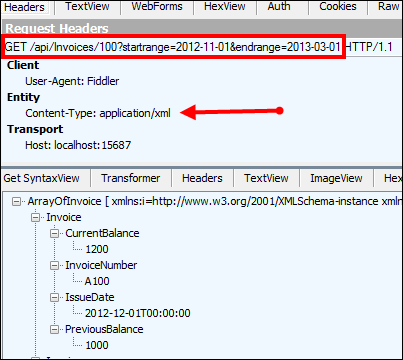
    That’s it! Notice that I expect the date range to appear as query string parameters, and those will automatically map to the two input parameters in the method signature. I tested this service using Fiddler and could make JSON or XML come back based on which Content-Type HTTP header I sent in.
    2013.03.19.rest01

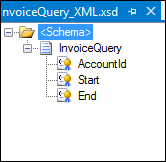
    Next, I created a BizTalk Server 2013 project in Visual Studio 2012 and defined a schema that represents the “invoice request” message sent from a source system. It has fields for the account ID, start date, and end date. All those fields were promoted into a property schema so that I could use their values later in the REST adapter.
    2013.03.19.rest03

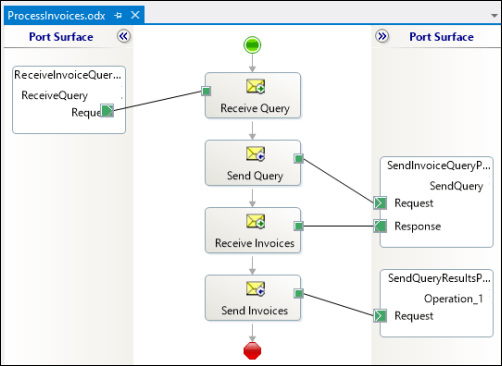
    Then I built an orchestration to send the request to the REST adapter. You don’t NEED To use an orchestration, but I wanted to show how the “operation name” on an orchestration port is used within the adapter. Note below that the message is sent to the REST adapter via the “SendQuery” orchestration port operation.
    2013.03.19.rest02

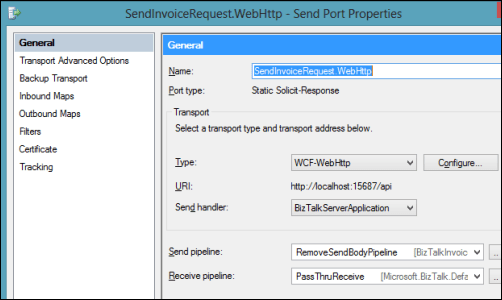
    In the BizTalk Administration console, I configured the necessary send and receive ports. The send port that calls the ASP.NET Web API service uses the WCF-WebHttp adapter and a custom pipeline that strips out the message of the GET request (example here; note that this will likely be corrected in the final release of BizTalk 2013).
    2013.03.19.rest04

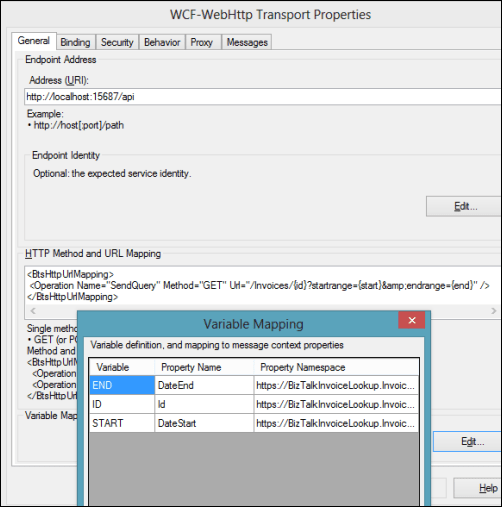
    In the adapter configuration, notice a few things. See that the “HTTP Method and URL Mapping” section has an entry that maps the orchestration port operation name to a URI. Also, you can see that I use an escaped ampersand (&amp;) in place of an actual ampersand. The latter throws and error, while the former works fine. I mapped the values from the message itself (via the use of a property schema) to the various URL variables.
    2013.03.19.rest05

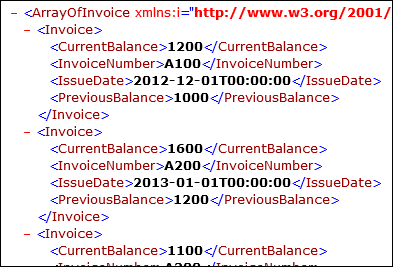
    When I started everything up and send a “invoice query” message into BizTalk, I quickly got back an XML document containing all the invoices for that account that were timestamped within the chosen date range.
    2013.03.19.rest06

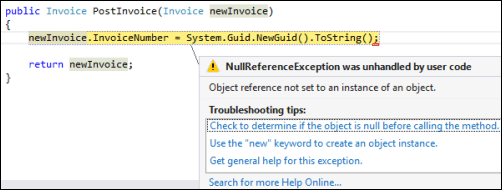
    Wonderful. So where’s the big “gotcha” that I promised? When you send a message to an ASP.NET Web API endpoint, the endpoint seems to expect a UTF-8 unless otherwise designated. However, if you use the default XMLTransmit pipeline component on the outbound message, BizTalk applies a UTF-16 encoding. What happens?
    2013.03.19.rest07

    Ack! The “newInvoice” parameter is null. This took me a while to debug, probably because I’m occasionally incompetent and there were also no errors in the Event Log or elsewhere. Once I figured out that this was an encoding problem, the fix was easy!

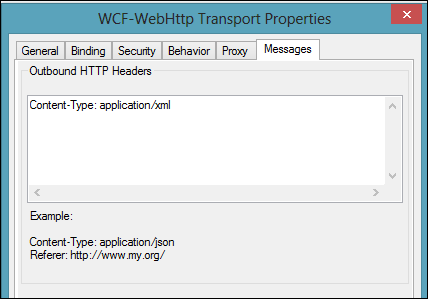
    The REST adapter is pretty configurable, including the ability to add outbound headers to the HTTP message. This is the HTTP header I added that still caused the error above.
    2013.03.19.rest08

    I changed this value to also specify which encoding I was sending (charset=utf16).
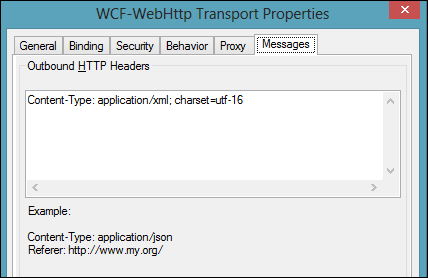
    2013.03.19.rest09

    After saving this updated adapter configuration and sending in another “new invoice” message, I got back an invoice with a new (GUID) invoice number.
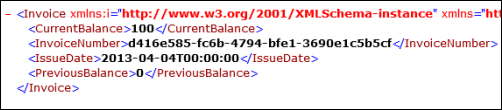
    2013.03.19.rest10

    I really enjoy using the ASP.NET Web API, but make sure you’re sending what the REST service expects!

  • 5 Things That I’ve Learned About Working Remotely

    In the past couple weeks there was an uproar in the tech community after it was learned that Yahoo! CEO Marissa Mayer was halting the “work from home” program and telling staff to get to the office. The response among techies was swift and mostly negative as the prevailing opinion was that this sort of “be at the office” mentality was archaic and a poor way to attract top talent.

    That said, I‘ve been working (primarily) remotely for the past eight months and definitely see the pros and cons. Microsoft’s Scott Hanselman wrote an insightful post that states that while working remotely is nice, there are also lousy aspects to it. I personally think that not every person, nor every job, makes sense for remote work. If you have poor time management skills at the office, they’ll be even worse when working remote! Also, if the role is particularly collaborative, I find it better to be physically around the team. I simply couldn’t have done my previous job (Lead Architect of Amgen’s R&D division) from home. There were too many valuable interactions that occurred by being around campus, and I would have done a worse job had I only dialed into meetings and chased people down via instant messenger.

    In my current job as a Senior Product Manager for Tier 3, working remotely has been a relatively successful endeavor. The team is spread out and we have the culture that makes remote work possible. I’ve learned (at least) five things over these past eight months, and thought I’d share.

    1. Relationship building is key. I learned this one very quickly. Since I’m not physically sitting with the marketing, sales, or engineering team every day, I needed to establish strong relationships with my colleagues so that we could effectively work together. Specifically, I needed them to trust me, and vice versa. If I say that a feature is important for the next sprint, then I want them to believe me. Or if I throw out a technical/strategy question that I need an answer to, I don’t want it ignored. I won’t get respect because of my title or experience (nor should I), but because I’ve proven (to them) that I’m well-prepared and competent to ask questions or push a new feature of our software. I also try give at least as much as I ask. That is, I make sure to actively contribute content and ideas to the team so that I’m not some mooch who does nothing but ask for favors or information from my teammates. I’ve made sure to work hard at creating personal and professional relationships with my whip-smart colleagues, and it’s paid off.
    2. Tools make a difference. All the relationships in the world wouldn’t help me if I couldn’t easily communicate with the team. Between Campfire, Microsoft Lync, GoToMeeting, and Trello, we have a pretty dynamic set of ways to quickly get together, ask questions, share knowledge, and track common activities. Email is too slow and SharePoint is too static, so it’s nice that the whole company regularly uses these more modern, effective ways to get things done. I rarely have “real” meetings, and I’m convinced that this is primarily because there Tier 3 has numerous channels to get answers without corralling 10 people into a conference room.
    3. I‘m measured on output, not hours. I found it interesting that Mayer used data from VPN logs to determine that remote workers weren’t as active as they should have been. It made me realize that my boss has no idea if I work 75 hours or 25 hours in a given week. Most of my access to “work” resources occurs without connecting to a Tier 3 VPN server. But at the same time, I don’t think my boss cares how many hours I work. He cares that I deliver on time, produce high quality work, and am available when the team needs me. If I meander for 75 hours on a low priority project, I don’t earn kudo points. If I crank out a product specification for a new service, quickly intake and prioritize customer requests, and crank out some blog posts and KB articles, then that’s all my boss cares about.
    4. Face time matters. I go up to the Tier 3 headquarters in Bellevue, WA at least one week per month. I wouldn’t have taken this job if that wasn’t part of the equation. While I get a lot done from the home office, it makes a HUGE personal and professional difference to be side-by-side with my colleagues on a regular basis. I’m able to work on professional relationships, sit in on conversations and lunch meetups that I would have missed remotely, and get time with the marketing and sales folks that I don’t interact with on a daily basis when I’m home. Just last week we had our monthly sprint planning session and I was able to be in the room as we assessed work and planned our March software release. Being there in person made it easier for me to jump in to clear up confusion about the features I proposed, and it was great to interact with each of the Engineering leads. Working remotely can be great, but don’t underestimate the social and business impact of showing your face around the office!
    5. Volunteer for diverse assignments. When I took this role, the job description was relatively loose and I had some freedom to define it. So, to make sure that I didn’t get pigeonholed as “that techie guy who works in Los Angeles and writes blog posts,” I actively volunteered to help out the marketing team, sales team, and engineering team wherever it made sense. Prepare a presentation for an analyst briefing? Sure. Offer to write the software’s release notes so that I could better understand what we do? Absolutely. Dig deeper into our SAML support to help our sales and engineering team explain it to customers while uncovering any gaps? Sign me up. Doing all sorts of different assignments keeps the work interesting while exposing me to new areas (and people) and giving me the chance to make an impact across the company.

    Working remotely isn’t perfect, and I can understand why a CEO of a struggling company tries to increase efficiency and productivity by bringing people back into the home office. But, an increasing number of people are working remotely and doing a pretty good job at it.

    Do any of you primarily work remotely? What has made it successful, or unsuccessful for you?