If you saw the recent announcement about the Adapter Pack 2.0 release, you may have seen the short reference to a tool that migrates “classic” SQL Adapter solutions to the new WCF SQL Adapter. This tool claims to:
- Works on the source project files
- Generates equivalent schema definitions for the operations used in the existing project
- Generates new maps to convert messages from older formats to the new format
- Modifies any existing maps to work with the new schemas
- A new project is created upon completion, which uses the SQL adapters from the BizTalk Adapter Pack v2
Given how much “migration pain” can be a big reason that old projects never get upgraded, I thought I’d run a quick test and see what happens.
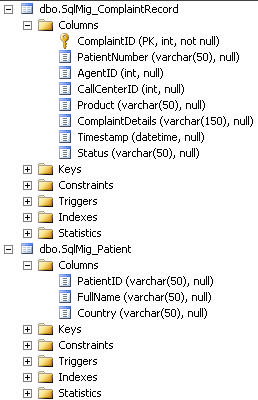
The SQL Server part of my solution consists of a pair of tables and pair of stored procedures. In my solution, I poll for new customer complaint records, and receive that data into an orchestration where I take the ID of the customer and query a different database for the full record of that customer.

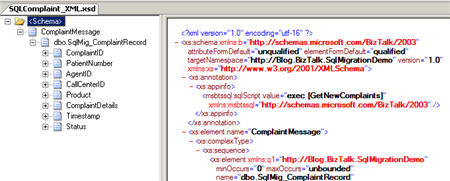
In my BizTalk Server 2006 R2 environment, I walked through the “Add Generated Items” wizard in Visual Studio.NET and pointed at the classic SQL Adapter in order to generate the schemas necessary to receive and query data. As you would expect, the message arriving from the SQL Adapter polling port has a single node representing the customer complaint.
The schema generated by the wizard for the patient record query has nodes for both the stored procedure request and result.

My orchestration is very straightforward as it receives the polled message, constructs the patient query using a map, executes its query, and broadcasts the result.

Great. After deploying this solution, I still need the messaging ports required to absorb and transmit the necessary data. My classic SQL Adapter receive location has the necessary settings to poll my database.

After adding two send ports (one using the classic SQL adapter to send my patient query, and another to drop my result to a FILE location), I started everything up and it worked perfectly. Now the fun part, migrating this bad boy.
Because this SQL adapter migration tool claims to work on the “project files” and not configuration bindings, I figured that I could package up the working Visual Studio.NET project and perform the migration in my BizTalk Server 2009 environment (which also had the Adapter Pack 2.0 beta installed).
When you install the Adapter Pack 2.0 beta, you get the SQL Migration tool. My SQL Server instance uses integrated authentication, so while I had to specify a “username” and “password” in the command line entry, I left them blank.
MigrationTool Sql –source=”Blog.BizTalk.SqlMigrationDemo.btproj”
-dest=”C:\SQL_Mig\Blog.BizTalk.SqlMigrationDemoConverted” –uri=mssql://<server>//DemoDb? –username= –password=
Once this query completes, you get a notice and a brand new project.

The new project also contains a conversion report showing what was added and changed in the solution. I can see two new files added, and two files that the migration tool says it can reuse with the new adapter.

If I open the actual project that the migration tool built, I can see new folders and a couple new files. The SqlBindingProcedure.dbo.xsd schema is also new.

Notice that I have a new (WCF SQL Adapter) binding file for my “send” transmission that looks up patient details. A note: the BizTalk project system in 2006 R2 is different than the new one in BizTalk 2009. So, because I transferred my R2 project to my 2009 environment and THEN ran the wizard, my new project is still in the R2 format. I had to manually create a new 2009 project and include all the files generated by the wizard instead of just opening up the generated btproj file.
The verdict? Well, pretty mixed. The schema it generated to replace my “query” schema is a mess. I get an untyped result set now.

And the map that the migration tool created simply took my original “patient query” format and mapped it to their new one. I guess I’m supposed to apply that at the send port and keep my existing “complaint to patient” map that’s in my orchestration?

Also, because the migration tool doesn’t appear to look at the runtime application configuration, I still have to manually create the receive location, which also seems like I have to manually recreate my inbound schema that can comply with the new WCF SQL Adapter format. I haven’t done all that yet because I’m not that motivated to do so.
So, there could be a few reasons for my non-seamless experience. First, I used stored procedures on all sides, so maybe that part isn’t fully baked yet. I also switched environments and took a working BizTalk 2006 R2 solution and ran the conversion tool on a BizTalk 2009 box. Finally, there’s a good chance this falls under the “Seroter Corollary” which states that when all else fails, let’s assume I’m an idiot.
Anyone else run this migration tool yet on an existing project? Any obvious things I may have missed that made my migration more work that rebuilding the project from scratch?
Technorati Tags: BizTalk Server, WCF


 Richard Seroter's Architecture Musings
Leave a comment