Scenario: I want to allow BizTalk Server 2006 (R1) to send XML (InfoPath forms) to a MOSS 2007 document library without resorting to hacks.
Resolution: I can’t use the out-of-the-box BizTalk SharePoint adapter (only BizTalk Server 2006 R2 works natively with MOSS 2007) so I decided to utilize the available SharePoint web services to upload my file. I wrote a wrapper web service to (a) encapsulate some additional logic (b) shield the BizTalk developer from understanding SharePoint services and (c) require no usage of the SharePoint 2007 object model.
What did this solution look like? I decided to use the CopyIntoItems method available on the SharePoint Copy web service. This allows you to send a byte array of data to a document library and have it appear as a new document. To hit the WSDL for this service, you’d go to:
http://<your sharepoint base url>/sites/<site name>/_vti_bin/Copy.asmx
Here you’ll see the CopyIntoItems operation. My wrapper service starts with a couple “using” statements …
using System.Net;   //for NetworkCredentials object
using System.Text;  //for encoding bytes
using System.IO;    //for stringwriter
using System.Xml;
Next I have my wrapper operation …
[WebMethod]
public string UploadXmlToSharePoint(string docToUpload,
string siteRoot,
string docLibrary,
string fileName,
string userName,
string password,
string domain)
I’m taking the XML document input as a string in order to make the schema easier in BizTalk, and, ensure I don’t lose my InfoPath processing instructions when transporting over the wire (which seemed to be happening when I used an XmlDocument type input parameter). Also note that I’m taking in a user/password/domain combo. This is to allow for reuse later down the line. The account used to call the SharePoint service MUST be a site administrator, so I’m making it an explicit parameter. The first thing I do inside my operation is build up the destination Uri based on the input parameters.
//build full destination Url
string destinationPath = siteRoot + "/" + docLibrary + "/" + fileName;
Next I have to take the input string and convert it to the byte array required by the MOSS web service …
//convert string to byte array
byte[] fileIn = ConvertDocToBytes(docToUpload);
...
private byte[] ConvertDocToBytes(string xmlString)
    {
        ASCIIEncoding encoding = new ASCIIEncoding();

        return encoding.GetBytes(xmlString);
    }
Now I need to instantiate some values needed by the MOSS service. First we have the “result” object which conveys the state of the copy transaction. Then I have a “FieldInformation” array which can be used to pass in specific field values. Note that you CANNOT pass in a null value here, or else you get a cryptic error when calling the service. You can make it blank, but don’t use a null parameter in its place. Finally, I create a destination Uri array.
//holds MOSS service response values
SharePointSvc.CopyResult[] results;

//required fieldinformation array
SharePointSvc.FieldInformation fieldInfo =
    new SharePointSvc.FieldInformation();
SharePointSvc.FieldInformation[] fieldInfoArray = { fieldInfo };

//destination url (notice that it's an array, meaning
//multiple sites COULD be targeted
string[] destUri = { destinationPath };
Now I can actually call this puppy. After instantiating the web service proxy class (generated by the Add Web Reference command), I need to provide explicit credentials.
//create instance of web service proxy
SharePointSvc.Copy copy = new SharePointSvc.Copy();

//pass valid credentials
copy.Credentials = new NetworkCredential(userName, password, domain);

//call primary operation;  sourceUri, doesn't matter here
copy.CopyIntoItems(
     "http://none",
     destUri,
     fieldInfoArray,
     fileIn,
     out results);
The last step is to actually check the “result” object for errors and return any errors back to the caller.
//check for error and return final result
if (results[0].ErrorMessage != null)
  {
    return "Error: " + results[0].ErrorMessage;
  }
  else
  {
    return "Success";
  }
Sweet. After building and deploying this service, I can call it from any client, BizTalk (2004/06) included. I’ll obviously want to securely store my credentials (using Enterprise Single Sign On) and not embed those in my client directly.
So if I call my service, and pass in a plain old XML file, it shows up in my document library as expected.
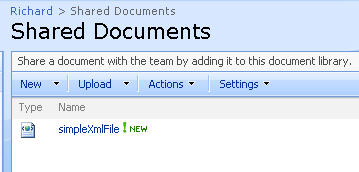
Now, if I send an InfoPath document to a Forms Library set up with an InfoPath template, the result is this …

Nice! The document is recognized as an InfoPath document (see the icon), and, the promoted columns are properly loaded.
So, if you’re interested in a fairly easy way to programmatically upload documents to a MOSS 2007 library, without having to use the SharePoint object model or BizTalk adapter, this web service might just work for you.
Technorati Tags: SharePoint, BizTalk


 Richard Seroter's Architecture Musings
Leave a comment