Month: December 2007

  • Building an RSSBus Feed for BizTalk Server

    A few months back, I demonstrated how to build a SQL query against the BizTalk databases which returned application-level activity metrics.   Now that the RSSBus Server has moved further along in its release cycle, I went ahead and built a more full-featured RSS feed out of BizTalk.

    Within the RSSBus infrastructure, one can build an “.rsb” file, which can be syndicated as RSS.

    So what’s contained in this “.rsb” file that makes my RSS feed so exciting?  Let’s look.  First off, I can specify input parameters to my feed, which are received via the URI itself.  Notice that you can also specify a default value, and, a restricted list of values.  In my case below, I’m only accepting activity metrics for one, two, seven and fourteen days back.

    <rsb:info 
    title="BizTalk Operations" description="BizTalk Operations Feed">
      <input name="app" default="App1" 
    desc="This is the name of the BizTalk application to query">
      <input name="interval" default="1" 
    desc="The number of historical days to show" values="1,2,7,14">
      <input name="servicefilter" default="" 
    desc="Keyword filter of results">
      <input name="typefilter" default="all" 
    desc="Show all service types/just messaging/just orchestration" 
    required="false">
     </rsb:info>

    What I’m trying to do here is have a single “feed” file, which can actually serve RSS data for a wide variety of applications and scenarios.  Instead of having to create a new RSS feed for each newly deployed BizTalk “application”, I can simply generate a new URI and not deploy a single new object.

    Now arguably the only way this solution will work is if we aren’t actually hitting the BizTalk databases each time a person refreshes their RSS feed.  I don’t want that additional load on our production system.  So, what are my caching options?  As it turns out (thanks to the spectacularly helpful RSSBus techs who helped me out), the caching capabilities are quite robust.  Here’s my caching declaration in my “.rsb” file ..

    <rsb:cache duration="120" 
    file="cache\\cache_[_input.app | tofilename]_
    [_input.interval | tofilename]_[_input.servicefilter | tofilename]_
    [_input.typefilter | tofilename].xml" />

    The first time this feed is hit (or when the cache duration has been exceeded), a cache file is created and named according to the URI parameters.  So if I hit this feed for application “ABC” and a “7 day” duration, filtered by all services with “SOAP” in the name, and only wanted “messaging” services, my cache file on disk would be named “cache_ABC_7_SOAP_messaging.xml”.  If someone else makes the same RSS request within the cache duration interval, then RSSBus will return the cached data (stored in the file) instead of actually querying my BizTalk databases again.  As you would expect, I have many cache files on my system at any one time to reflect the many RSS query permutations.

    Then, within my “.rsb” file, I use the RSSBus “sqlCall” connector and format all the results.  The “<rsb:match>” keyword is in place to suppress resulting values that don’t contain the input “service filter” value.   I then use the “<rsb:select>” and “<rsb:case>” keywords to do a switch statement based on the “type filter” value.  This allows me to show only orchestration services, messaging (send/receive) services, or both.

    So what’s the result?  To demonstrate the RSSBus server to some colleagues, I utilized our newly deployed MOSS 2007 infrastructure to add RSS data to my personal site.  After putting together the RSS query URI just the way I want it, I take that URI and apply it to the RSS webpart on my site.
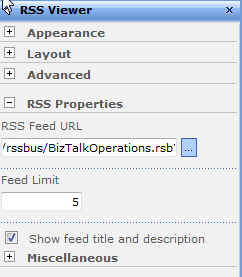
    I chose to show both the feed AND description since I put the BizTalk activity count in the item description.  After saving my web part changes, I can now see my RSS data from our “development” server.
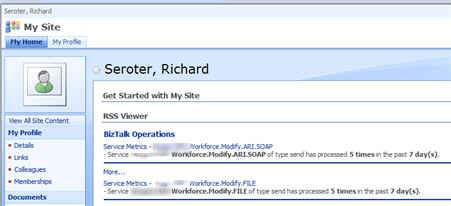

    Now I can provide URLs to the business owners of our various BizTalk applications and they can see regular performance metrics for their system.  RSSBus provides a pretty unique platform for building and maintaining RSS feeds from a wide variety of sources.  Providing operational metrics from enterprise systems may be one way that my company actually uses RSS to further business objectives.

    My last step is to add security to a given feed query, and the RSSBus folks are helping me through that right now.  I’d like to be able to restrict viewership of a given feed based on Active Directory group membership.  I’ll report back on the results.
    Technorati Tags: ,

  • Oracle ODBC Driver Problems After Database Upgrade

    Given that my posts on BizTalk + Oracle integration are consistently my most popular, I thought I’d add another one to the mix.

    The first BizTalk application that my company deployed required BizTalk to poll an Oracle 8i database.   When BizTalk was first installed here, we followed the documented instructions and installed the Oracle 9.2 client, and specifically, the Oracle 9.2.0.54 version of the ODBC driver.  For the most part, everything has been smooth sailing.

    Recently, we took that application down for to fix a bug in the Oracle view, and while that work was being done, the underlying Oracle database was upgraded from 8i to 9i.   No big deal, right?  Well, after the bug had been fixed in the Oracle view, and we turned the application back on in our “test” environment, we noticed some very bizarre behavior.

    After some initial investigation, I saw that the value (of type varchar2) being pulled from the Oracle database appeared to be truncated!  Only seven characters (out of eight) were being pulled, and, every other value came in empty.  Yowza. 

    So where to begin troubleshooting this?  The first place we looked was the database itself.  Had anything changed?  Oracle 9i has significantly more Unicode support, so we checked to see if data was improperly converted from 7-bit ASCII to Unicode.  The data appeared to be intact and unmolested. 

    Given that no changes had occurred on the BizTalk application itself, it seemed unlikely that BizTalk was the culprit.  We checked a few basic things such as the “maxLength” value (identical in both BizTalk schema and Oracle view), and also confirmed that the BizTalk binding configuration had not changed.

    So, next we looked at the connection to Oracle itself.  Was the ODBC connection the troublemaker here?  I decided to open Visual Studio.NET, and using the Server Explorer, create a connection to my Oracle database by reusing the existing Oracle ODBC DSN.  Sure enough, when I viewed the Oracle view in question, I saw truncated (and missing) values!  I knew positively that the underlying data was right, so the connection was the piece that was distorting my data.

    I confirmed this by going to a different environment (with the Oracle 10g client installed) and using Visual Studio.NET to browse the Oracle database table.  Using the 10g client, the data appeared correctly.

    So, in our development environment, our administrators tried downgrading our Oracle ODBC driver to 9.2.0.0.0.  When we did that, the data also appeared correctly.  However, I wasn’t comfortable downgrading, and suggested moving one Oracle ODBC version past the Microsoft-recommended 9.2.0.54.  We installed the 9.2.0.65 version of the ODBC driver, and once again, everything looked perfect.  After that, one of the DBAs suggested skipping 9.2.0.65 (due to a few noteworthy bugs) and jump to 9.2.0.8 (with the latest DST patch).

    So what the heck caused this?  I still don’t have a great answer.  The only change to this system was the database upgrade, but the DBAs were fairly confident that existing connections should not have been affected.  The set of tubes known as the internet turned up very few results.  There was some information on Oracle ODBC and Unicode, and some other gripes with the 9.2.0.54 driver, but nothing that  explained why the ODBC connection to the database mangled my result set.

    Moral of the story?  When troubleshooting these sorts of scenarios, check off each area that could have caused the problem, and use multiple environments (with different configurations) to isolate the problem.  Then when all else fails, upgrade Oracle drivers!

    Technorati Tags: ,

  • Changing Roles

    It’s been just about a year since I left Microsoft to take my current job, and after some success in my initial role, I’m switching teams and responsibilities.

    I was brought into this company to help establish our BizTalk practice.  After participating in 10 projects, teaching 8 classes (to 110+ colleagues), creating a few tools and frameworks, and writing up some best practices and checklists, it was time for new challenges.

    So, I’ve moved into our Solutions Architecture team as a Solutions Architect.  My job now is to execute architecture reviews, help define and guide architectural principles, design and model new systems, research and introduce new technologies, and more.   While I’ll remain the “BizTalk guy” here for a while, that’s no longer my central technology each and every day.

    Blog-wise, expect to continue seeing various tidbits and demonstrations of BizTalk concepts (because it’s still fun for me), but I’ll probably start peppering in other architectural topics that are on my mind.

    Technorati Tags: , ,

  • Microsoft Architecture Journal Reader Tool

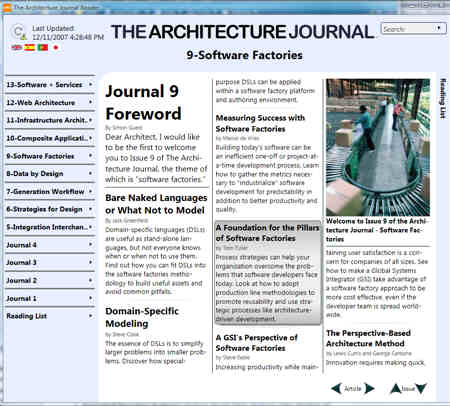
    Yesterday I was checking out the MSDN Architecture Center and noticed a reader application for the Architecture Journal.

    This interface makes the Journal easy to read, and demonstrates a few nice UI concepts.

    This tool is auto-updating, so it should automatically pull down the latest versions of the Journal.  You can add interesting articles to a “reading list” for later reference.   For each particular article, you have the option of saving it to the desktop, emailing it, or copying the summary to the Windows clipboard.

    Another nice feature is the ability to add notes to each article.  Once a note is added to a particular passage or section, that area is highlighted with a different color.  I was hoping that my notes would show up in the search results, but alas, I’d have to remember where I had added notes vs. finding them later via broad search.

    I find this more interesting as a UI design then for actually reading the Journal.  There probably aren’t enough issues to justify reading list and search functionality (I’d like to see this tool for MSDN Magazine!), but, it does offer a few interesting ideas about an internet-updated thick client.

    Technorati Tags: ,

  • InfoPath 2007 Scenarios With BizTalk Server 2006 R2

    I’m a fan of InfoPath, but one barrier to entry has been the need to install the client software on user machines.  We have one deployed solution that uses it (as part of ESB Guidance), but I wanted to explore the new Forms Services capability and see how I can use that to simplify BizTalk workflow use cases.  In this post, I will examine a few common use cases, and demonstrate how I built them.  The theme of the solution is the workflow around system support incident management.

    InfoPath Setup

    To build this solution, first I needed schemas with which to generate the necessary InfoPath forms.  So, within a new BizTalk project I created an “Incident” schema that looked like this:

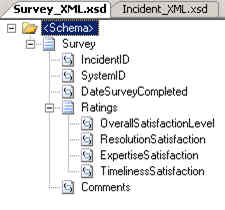
    Next, I have a “Survey” schema which the system owner will fill out after the incident has been successfully resolved.

    After deploying the BizTalk solution, I went ahead and built a Web Service using the BizTalk Web Services Publishing Wizard so that incidents can be sent from InfoPath directly back to the running BizTalk workflow process.

    Now, I can go ahead and build the necessary InfoPath forms.  When designing the form, I’ve chosen to support both the InfoPath rich client AND, InfoPath Forms Services.

    The form itself is fairly basic.  It simply uses the XSD schema as a data source and allows for capture of incident data.

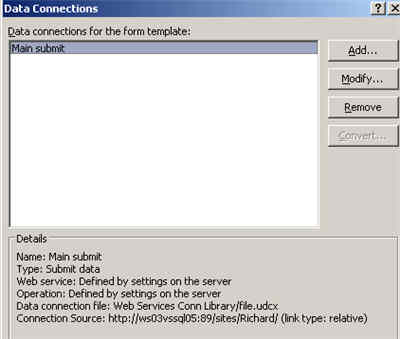
    The first tricky part was getting the “Submit” action to work.  On my first iteration building this, the rich client could submit to the web service just fine, but the Forms Services version kept giving me “an error occurred accessing the data source.”  So, I had to learn all about UDC files and SharePoint data connections (thanks to the InfoPath Team Blog and Mark Bower‘s posts).  So, my InfoPath form’s “submit action” now points to a SharePoint-managed data connection.

    I then deployed this Incident form to my SharePoint server.  When deploying forms in InfoPath 2007, you’ll see that Forms Services is mentioned.

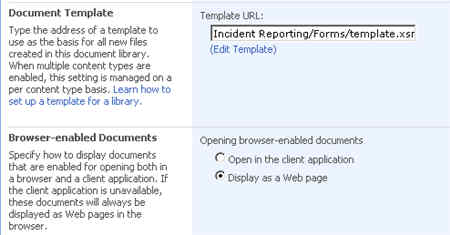
    Once deployed, I can go to the SharePoint document library’s Advanced Settings and set the form to open in the browser by default.

    Next I built and deployed the “Survey” form which will be saved directly to the SharePoint library, so no extra submit action is needed.

    BizTalk Setup

    On the BizTalk side, I built a simple workflow to demonstrate the following use cases:

    • Emailing a link to a InfoPath form existing in SharePoint
    • Receiving submitted feedback from InfoPath back into BizTalk
    • Emailing a link to a “new” document for someone to fill out and save in SharePoint

    Also, to deal with the ridiculous InfoPath/SharePoint namespace bug, I decided to build a Jeff Lynch-style map so that now my promoted columns show up in the SharePoint document library.

    To send the first email (asking the user to fill out the Incident Report), I need the correct URL to embed in the email message.  Since I clearly need a Incident to refer to in this hyperlink, I first send the Incident to the SharePoint library.  Because I dynamically set the file name, I have that value in my orchestration, and can use it for my email link.  The link looks like:

    http://myserver:89/sites/Richard/Incident%20Reporting/”+wssMessageName+&#8221;?OpenIn=Browser

    The next hyperlink I need is for the “Survey” so that I can ask someone to create an entirely new form (that doesn’t already exist in the SharePoint document library).  What does that look like?

    http://myserver:89/sites/Richard/Satisfaction%20Survey/Forms/template.xsn?
    SaveLocation=http://myserver:89/sites/Richard/Satisfaction%20Survey&
    Source=http://myserver:89/sites/Richard/Satisfaction%20Survey&
    OpenIn=Browser

    Running the Scenario

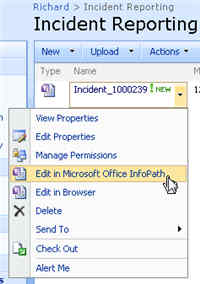
    Ok, so let’s kick this off and see how it looks.  When I drop a file (to signify a system sending an incident report), I expect to see a message sent to SharePoint, AND, an email with a link to the same document.  In my SharePoint library I see …

    Notice that a form can be viewed either in the rich client or browser.  In my email box I have a link to the web version of my Incident form.  Clicking that link brings me to the form served up by InfoPath Forms Services.

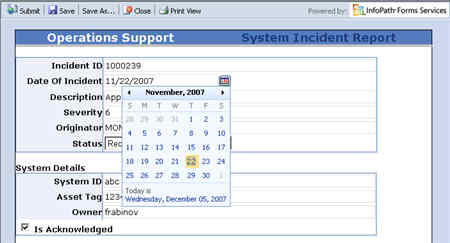
    Notice that I have both “save” and “submit” buttons available on the web form.  The “submit” button will trigger the default submit action, which in my case, calls my BizTalk-generated web service.

    Once the form submits, I then get a receipt (via my orchestration), and, a request to fill out a satisfaction survey.  The email link creates a new empty form, that when saved, will appear in my SharePoint document library.  Notice that I turned off “submit” in this form, since there is no submit action.

    Summary

    So, unlike with InfoPath 2003, InfoPath 2007 makes it very easy to design a form once, and have it surfaced up via the rich client, web browser, or mobile browser with no additional effort.  From a BizTalk perspective, instead of emailing forms around and trying to keep track of them, we can now send links to web forms and be confident that any user, regardless of platform or software install, can participate in our workflow.   This should make it much more compelling to use InfoPath + SharePoint in workflow solutions instead of doing custom development.

    Technorati Tags: , ,