I just finished up my first week in the new job, and so far, so good. One aspect of my job as Architect is to help identify reusable frameworks and encourage their usage. I spent a brief time considering “tracing” and how best to add *conditional* tracing to my BizTalk application. This is Part I of a two part post. [UPDATE: Part II]
I’d like a way to turn application tracing on and off, without requiring a code update or deployment. For this post, let’s consider the usage of a configuration file to store the trace switch. I started by modifying my btsntsvc.exe.config file. My configuration file now looks like this:
<?xml version=”1.0″ ?>
<configuration>
<runtime>
…
</runtime>
<appSettings>
<add key=”TraceFlag” value=”Off” />
</appSettings>
<system.runtime.remoting>
…
</system.runtime.remoting>
</configuration>
Now my BizTalk components can read this value at runtime. I want the tracing to be embedded within orchestrations, but in a fairly inconspicuous way. So, I used the Group shape to hold any tracing code. My sample workflow looks like this …
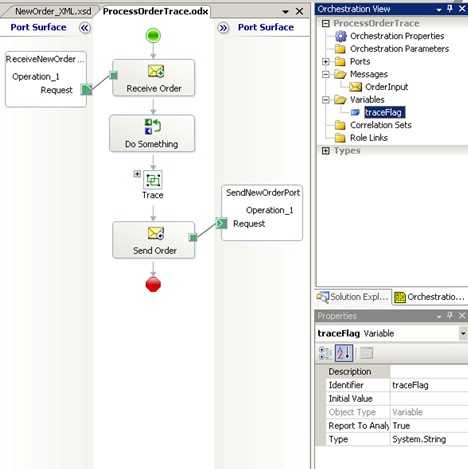
If you peek inside the Group shape, you see this …
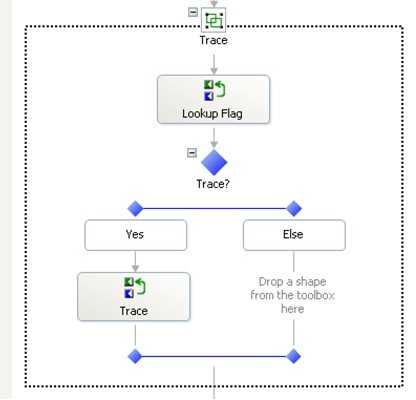
Note that a given orchestration might have a few of these trace points strategically placed at key points in the workflow. The code inside the “Lookup Flag” Expression shape is:
traceFlag = System.Configuration.ConfigurationSettings.AppSettings[“TraceFlag”];
I now have the value that the decision shape can use to determine whether to output trace data or not.
I may want to trace more than just my orchestration, so I wrote a simple pipeline component that also uses this same configuration flag. This “any” pipeline component can be used on either a Send or Receive pipeline. The pipeline component’s “Execute” method looks like this:
public IBaseMessage Execute(IPipelineContext pc, IBaseMessage inmsg)
{
//get trace setting from config file
string traceFlag = System.Configuration.ConfigurationSettings.AppSettings[“TraceFlag”];
if (traceFlag == “On”)
{
Stream s = inmsg.BodyPart.GetOriginalDataStream();
byte[] buffer = new byte[s.Length];
s.Read(buffer, 0, Convert.ToInt32(s.Length));
//store value of message (whatever format) in a string
string output = System.Text.UTF8Encoding.UTF8.GetString(buffer);
//output string to trace
System.Diagnostics.Debug.WriteLine(“Pipeline Trace: Body is ” + output);
}
return inmsg;
}
I then threw this into a Send pipeline that looks like this …
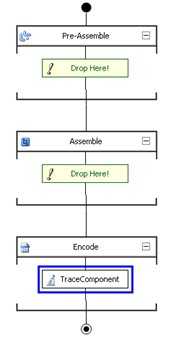
Now, when I run my process normally, I get the standard message that my orchestration ALWAYS writes, and if I flip the trace flag in the configuration file, I get full tracing as well …
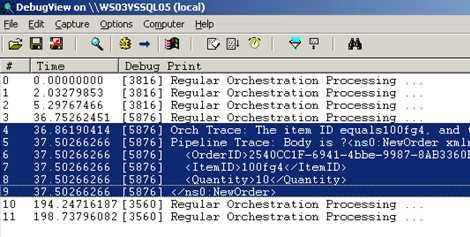
Now, a huge caveat is that you have to restart your host instance whenever you update the configuration file in order to clear your configuration cache and force a reload of the new setting(s). This may not be ideal for your production environment, so, that’s why I’m writing a Part II to this post. [UPDATE: Part II]
Technorati Tags: BizTalk


Leave a comment